
Rizzo
Rizzo
About
- Username
- Rizzo
- Joined
- Visits
- 5,164
- Last Active
Comments
-
Could you please attach the logs? Be sure they are taken right after encountering the issue.
To find them:
- Press the Windows Key + R to open the "Run" command.
- In the text box paste the following: %USERPROFILE%\AppData\Local\DeadByDaylight\Saved\Logs
- Click "OK" - this will open your Dead by Daylight Logs folder.
- If it does not open the Dead by Daylight Logs folder, it may mean that when installing Dead by Daylight you chose to save your files somewhere else and will need to check there.
- The file called "DeadByDaylight.log" is your log file
Thank you.
-
Could you please attach the logs? Be sure they are taken right after encountering the issue.
To find them:
- Press the Windows Key + R to open the "Run" command.
- In the text box paste the following: %USERPROFILE%\AppData\Local\DeadByDaylight\Saved\Logs
- Click "OK" - this will open your Dead by Daylight Logs folder.
- If it does not open the Dead by Daylight Logs folder, it may mean that when installing Dead by Daylight you chose to save your files somewhere else and will need to check there.
- The file called "DeadByDaylight.log" is your log file
Thank you.
-
When you want to report a bug, please check the bug report section to see if it has been reported already and upvote it, otherwise you can open a new report following the given template.
If you are on PC, please be sure to attach the logs, collected right after you encountered the issue. You can find them here:- Press the Windows Key + R to open the "Run" command.
- In the text box paste the following: %USERPROFILE%\AppData\Local\DeadByDaylight\Saved\Logs
- Click "OK" - this will open your Dead by Daylight Logs folder.
- If it does not open the Dead by Daylight Logs folder, it may mean that when installing Dead by Daylight you chose to save your files somewhere else and will need to check there.
- The file called "DeadByDaylight.log" is your log file
Thank you!
-
In general when you want to report a bug, please check the bug report section to see if it has been reported already and upvote it, otherwise you can open a new report following the given template.
If you are on PC, please be sure to attach the logs, collected right after you encountered the issue. You can find them here:- Press the Windows Key + R to open the "Run" command.
- In the text box paste the following: %USERPROFILE%\AppData\Local\DeadByDaylight\Saved\Logs
- Click "OK" - this will open your Dead by Daylight Logs folder.
- If it does not open the Dead by Daylight Logs folder, it may mean that when installing Dead by Daylight you chose to save your files somewhere else and will need to check there.
- The file called "DeadByDaylight.log" is your log file
Thank you!
This specific issue has already been reported and it's currently under review.
-
Could you please attach the logs?
To find them:
- Press the Windows Key + R to open the "Run" command.
- In the text box paste the following: %USERPROFILE%\AppData\Local\DeadByDaylight\Saved\Logs
- Click "OK" - this will open your Dead by Daylight Logs folder.
- If it does not open the Dead by Daylight Logs folder, it may mean that when installing Dead by Daylight you chose to save your files somewhere else and will need to check there.
- The file called "DeadByDaylight.log" is your log file
Thank you.
-
Could you please attach the logs?
To find them:
- Press the Windows Key + R to open the "Run" command.
- In the text box paste the following: %USERPROFILE%\AppData\Local\DeadByDaylight\Saved\Logs
- Click "OK" - this will open your Dead by Daylight Logs folder.
- If it does not open the Dead by Daylight Logs folder, it may mean that when installing Dead by Daylight you chose to save your files somewhere else and will need to check there.
- The file called "DeadByDaylight.log" is your log file
Thank you.
-
Hello, when you want to report a bug, please check the bug report section to see if it has been reported already and upvote it, otherwise you can open a new report following the given template.
If you are on PC, please be sure to attach the logs, you can find them here:- Press the Windows Key + R to open the "Run" command.
- In the text box paste the following: %USERPROFILE%\AppData\Local\DeadByDaylight\Saved\Logs
- Click "OK" - this will open your Dead by Daylight Logs folder.
- If it does not open the Dead by Daylight Logs folder, it may mean that when installing Dead by Daylight you chose to save your files somewhere else and will need to check there.
- The file called "DeadByDaylight.log" is your log file
Thank you!
-
Could you please attach the logs?
To find them:
- Press the Windows Key + R to open the "Run" command.
- In the text box paste the following: %USERPROFILE%\AppData\Local\DeadByDaylight\Saved\Logs
- Click "OK" - this will open your Dead by Daylight Logs folder.
- If it does not open the Dead by Daylight Logs folder, it may mean that when installing Dead by Daylight you chose to save your files somewhere else and will need to check there.
- The file called "DeadByDaylight.log" is your log file
Thank you.
-
@FreyFrey said:
https://forums.bhvr.com/dead-by-daylight/discussion/comment/3973166#Comment_3973166
I hope I got the right one. I added it :)
Thank you.
Perfect, thanks!
-
@FreyFrey said:
Hey :)
I can't find a file with a .log :/
Here is a Screenshot:
https://us.v-cdn.net/6030815/uploads/W0CYBUDOJD36/dbd-folder.png
The first file should be it.
-
Could you please attach the logs?
To find them:
- Press the Windows Key + R to open the "Run" command.
- In the text box paste the following: %USERPROFILE%\AppData\Local\DeadByDaylight\Saved\Logs
- Click "OK" - this will open your Dead by Daylight Logs folder.
- If it does not open the Dead by Daylight Logs folder, it may mean that when installing Dead by Daylight you chose to save your files somewhere else and will need to check there.
- The file called "DeadByDaylight.log" is your log file
Thank you.
-
Could you please attach the logs?
To find them:
- Press the Windows Key + R to open the "Run" command.
- In the text box paste the following: %USERPROFILE%\AppData\Local\DeadByDaylight\Saved\Logs
- Click "OK" - this will open your Dead by Daylight Logs folder.
- If it does not open the Dead by Daylight Logs folder, it may mean that when installing Dead by Daylight you chose to save your files somewhere else and will need to check there.
- The file called "DeadByDaylight.log" is your log file
Thank you.
-
If you are on PC, could you please attach the logs?
To find them:
- Press the Windows Key + R to open the "Run" command.
- In the text box paste the following: %USERPROFILE%\AppData\Local\DeadByDaylight\Saved\Logs
- Click "OK" - this will open your Dead by Daylight Logs folder.
- If it does not open the Dead by Daylight Logs folder, it may mean that when installing Dead by Daylight you chose to save your files somewhere else and will need to check there.
- The file called "DeadByDaylight.log" is your log file
Thank you.
-
Hello, when you want to report a bug, please check the bug report section to see if it has been reported already and upvote it, otherwise you can open a new report following the given template.
If you are on PC, please be sure to attach the logs, you can find them here:- Press the Windows Key + R to open the "Run" command.
- In the text box paste the following: %USERPROFILE%\AppData\Local\DeadByDaylight\Saved\Logs
- Click "OK" - this will open your Dead by Daylight Logs folder.
- If it does not open the Dead by Daylight Logs folder, it may mean that when installing Dead by Daylight you chose to save your files somewhere else and will need to check there.
- The file called "DeadByDaylight.log" is your log file
If you are reporting multiple issues, please be sure to open a report for each of them.
Thank you! -
Hello, when you want to report a bug, please check the bug report section to see if it has been reported already and upvote it, otherwise you can open a new report following the given template.
If you are on PC, please be sure to attach the logs, you can find them here:- Press the Windows Key + R to open the "Run" command.
- In the text box paste the following: %USERPROFILE%\AppData\Local\DeadByDaylight\Saved\Logs
- Click "OK" - this will open your Dead by Daylight Logs folder.
- If it does not open the Dead by Daylight Logs folder, it may mean that when installing Dead by Daylight you chose to save your files somewhere else and will need to check there.
- The file called "DeadByDaylight.log" is your log file
-
Congrats!🎉
-
Could you please attach the logs?
To find them:
- Press the Windows Key + R to open the "Run" command.
- In the text box paste the following: %USERPROFILE%\AppData\Local\DeadByDaylight\Saved\Logs
- Click "OK" - this will open your Dead by Daylight Logs folder.
- If it does not open the Dead by Daylight Logs folder, it may mean that when installing Dead by Daylight you chose to save your files somewhere else and will need to check there.
- The file called "DeadByDaylight.log" is your log file
Thank you.
-
Could you please attach the logs?
To find them:
- Press the Windows Key + R to open the "Run" command.
- In the text box paste the following: %USERPROFILE%\AppData\Local\DeadByDaylight\Saved\Logs
- Click "OK" - this will open your Dead by Daylight Logs folder.
- If it does not open the Dead by Daylight Logs folder, it may mean that when installing Dead by Daylight you chose to save your files somewhere else and will need to check there.
- The file called "DeadByDaylight.log" is your log file
Thank you.
-
Do you have any of the filters selected when checking your cosmetics?
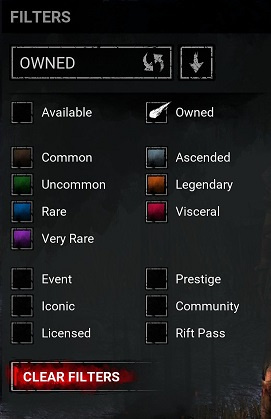
-
To find the logs:
- Press the Windows Key + R to open the "Run" command.
- In the text box paste the following: %USERPROFILE%\AppData\Local\DeadByDaylight\Saved\Logs
- Click "OK" - this will open your Dead by Daylight Logs folder.
- If it does not open the Dead by Daylight Logs folder, it may mean that when installing Dead by Daylight you chose to save your files somewhere else and will need to check there.
- The file called "DeadByDaylight.log" is your log file
Thank you.
-
Could you please attach the logs?
To find them:
- Press the Windows Key + R to open the "Run" command.
- In the text box paste the following: %USERPROFILE%\AppData\Local\DeadByDaylight\Saved\Logs
- Click "OK" - this will open your Dead by Daylight Logs folder.
- If it does not open the Dead by Daylight Logs folder, it may mean that when installing Dead by Daylight you chose to save your files somewhere else and will need to check there.
- The file called "DeadByDaylight.log" is your log file
Thank you.
-
We do not discuss bans publicly.
If you want more information, please contact Support: https://support.deadbydaylight.com/hc/en-us/categories/6713776396180-Dead-by-Daylight -
The report system does not require the ID anymore, simply report them in game, which flags the match and open a ticket on the Support website with all the information and evidence you have collected.
Edit: the lack of video evidence is a problem, in the future be sure to record your match. -
Hello, when you want to report a bug, please check the bug report section to see if it has been reported already and upvote it, otherwise you can open a new report following the given template.
If you are on PC, please be sure to attach the logs, you can find them here:- Press the Windows Key + R to open the "Run" command.
- In the text box paste the following: %USERPROFILE%\AppData\Local\DeadByDaylight\Saved\Logs
- Click "OK" - this will open your Dead by Daylight Logs folder.
- If it does not open the Dead by Daylight Logs folder, it may mean that when installing Dead by Daylight you chose to save your files somewhere else and will need to check there.
- The file called "DeadByDaylight.log" is your log file
-
Do you have any of the filters selected when checking your cosmetics?
-
Could you please attach the logs?
To find them:
- Press the Windows Key + R to open the "Run" command.
- In the text box paste the following: %USERPROFILE%\AppData\Local\DeadByDaylight\Saved\Logs
- Click "OK" - this will open your Dead by Daylight Logs folder.
- If it does not open the Dead by Daylight Logs folder, it may mean that when installing Dead by Daylight you chose to save your files somewhere else and will need to check there.
- The file called "DeadByDaylight.log" is your log file
Thank you.
-
Could you please attach the logs?
To find them:
- Press the Windows Key + R to open the "Run" command.
- In the text box paste the following: %USERPROFILE%\AppData\Local\DeadByDaylight\Saved\Logs
- Click "OK" - this will open your Dead by Daylight Logs folder.
- If it does not open the Dead by Daylight Logs folder, it may mean that when installing Dead by Daylight you chose to save your files somewhere else and will need to check there.
- The file called "DeadByDaylight.log" is your log file
Thank you.
-
Could you please attach the logs?
To find them:
- Press the Windows Key + R to open the "Run" command.
- In the text box paste the following: %USERPROFILE%\AppData\Local\DeadByDaylight\Saved\Logs
- Click "OK" - this will open your Dead by Daylight Logs folder.
- If it does not open the Dead by Daylight Logs folder, it may mean that when installing Dead by Daylight you chose to save your files somewhere else and will need to check there.
- The file called "DeadByDaylight.log" is your log file
Thank you.
-
Could you please attach the logs?
To find them:
- Press the Windows Key + R to open the "Run" command.
- In the text box paste the following: %USERPROFILE%\AppData\Local\DeadByDaylight\Saved\Logs
- Click "OK" - this will open your Dead by Daylight Logs folder.
- If it does not open the Dead by Daylight Logs folder, it may mean that when installing Dead by Daylight you chose to save your files somewhere else and will need to check there.
- The file called "DeadByDaylight.log" is your log file
Thank you.
-
Could you please attach the logs?
To find them:
- Press the Windows Key + R to open the "Run" command.
- In the text box paste the following: %USERPROFILE%\AppData\Local\DeadByDaylight\Saved\Logs
- Click "OK" - this will open your Dead by Daylight Logs folder.
- If it does not open the Dead by Daylight Logs folder, it may mean that when installing Dead by Daylight you chose to save your files somewhere else and will need to check there.
- The file called "DeadByDaylight.log" is your log file
Thank you.
-
Do you have any of the filters selected when checking your cosmetics?
-
Could you please attach the logs and a clip if possible?
To find the logs:
- Press the Windows Key + R to open the "Run" command.
- In the text box paste the following: %USERPROFILE%\AppData\Local\DeadByDaylight\Saved\Logs
- Click "OK" - this will open your Dead by Daylight Logs folder.
- If it does not open the Dead by Daylight Logs folder, it may mean that when installing Dead by Daylight you chose to save your files somewhere else and will need to check there.
- The file called "DeadByDaylight.log" is your log file
Thank you.
-
Could you please attach the logs?
To find them:
- Press the Windows Key + R to open the "Run" command.
- In the text box paste the following: %USERPROFILE%\AppData\Local\DeadByDaylight\Saved\Logs
- Click "OK" - this will open your Dead by Daylight Logs folder.
- If it does not open the Dead by Daylight Logs folder, it may mean that when installing Dead by Daylight you chose to save your files somewhere else and will need to check there.
- The file called "DeadByDaylight.log" is your log file
Thank you.
-
Could you please attach the logs?
To find them:
- Press the Windows Key + R to open the "Run" command.
- In the text box paste the following: %USERPROFILE%\AppData\Local\DeadByDaylight\Saved\Logs
- Click "OK" - this will open your Dead by Daylight Logs folder.
- If it does not open the Dead by Daylight Logs folder, it may mean that when installing Dead by Daylight you chose to save your files somewhere else and will need to check there.
- The file called "DeadByDaylight.log" is your log file
Thank you.
-
Let's keep the discussion civil and constructive, thank you.
-
Could you please attach the logs?
To find them:
- Press the Windows Key + R to open the "Run" command.
- In the text box paste the following: %USERPROFILE%\AppData\Local\DeadByDaylight\Saved\Logs
- Click "OK" - this will open your Dead by Daylight Logs folder.
- If it does not open the Dead by Daylight Logs folder, it may mean that when installing Dead by Daylight you chose to save your files somewhere else and will need to check there.
- The file called "DeadByDaylight.log" is your log file
Thank you.
-
Hello, when you want to report a bug, please check the bug report section to see if it has been reported already and upvote it, otherwise you can open a new report following the given template.
If you are on PC, please be sure to attach the logs, you can find them here:- Press the Windows Key + R to open the "Run" command.
- In the text box paste the following: %USERPROFILE%\AppData\Local\DeadByDaylight\Saved\Logs
- Click "OK" - this will open your Dead by Daylight Logs folder.
- If it does not open the Dead by Daylight Logs folder, it may mean that when installing Dead by Daylight you chose to save your files somewhere else and will need to check there.
- The file called "DeadByDaylight.log" is your log file
-
Could you please attach the logs and a clip if possible?
To find the logs:
- Press the Windows Key + R to open the "Run" command.
- In the text box paste the following: %USERPROFILE%\AppData\Local\DeadByDaylight\Saved\Logs
- Click "OK" - this will open your Dead by Daylight Logs folder.
- If it does not open the Dead by Daylight Logs folder, it may mean that when installing Dead by Daylight you chose to save your files somewhere else and will need to check there.
- The file called "DeadByDaylight.log" is your log file
Thank you.
-
Could you please attach the logs?
To find them:
- Press the Windows Key + R to open the "Run" command.
- In the text box paste the following: %USERPROFILE%\AppData\Local\DeadByDaylight\Saved\Logs
- Click "OK" - this will open your Dead by Daylight Logs folder.
- If it does not open the Dead by Daylight Logs folder, it may mean that when installing Dead by Daylight you chose to save your files somewhere else and will need to check there.
- The file called "DeadByDaylight.log" is your log file
Thank you.
-
If you are on PC, could you please attach the logs?
To find them:
- Press the Windows Key + R to open the "Run" command.
- In the text box paste the following: %USERPROFILE%\AppData\Local\DeadByDaylight\Saved\Logs
- Click "OK" - this will open your Dead by Daylight Logs folder.
- If it does not open the Dead by Daylight Logs folder, it may mean that when installing Dead by Daylight you chose to save your files somewhere else and will need to check there.
- The file called "DeadByDaylight.log" is your log file
Thank you.
-
Hello, when you want to report a bug, please check the bug report section to see if it has been reported already and upvote it, otherwise you can open a new report following the given template.
If you are on PC, please be sure to attach the logs, you can find them here:- Press the Windows Key + R to open the "Run" command.
- In the text box paste the following: %USERPROFILE%\AppData\Local\DeadByDaylight\Saved\Logs
- Click "OK" - this will open your Dead by Daylight Logs folder.
- If it does not open the Dead by Daylight Logs folder, it may mean that when installing Dead by Daylight you chose to save your files somewhere else and will need to check there.
- The file called "DeadByDaylight.log" is your log file
-
If you are on PC, could you please attach the logs?
To find them:
- Press the Windows Key + R to open the "Run" command.
- In the text box paste the following: %USERPROFILE%\AppData\Local\DeadByDaylight\Saved\Logs
- Click "OK" - this will open your Dead by Daylight Logs folder.
- If it does not open the Dead by Daylight Logs folder, it may mean that when installing Dead by Daylight you chose to save your files somewhere else and will need to check there.
- The file called "DeadByDaylight.log" is your log file
Thank you.
-
Could you please attach the logs?
To find them:
- Press the Windows Key + R to open the "Run" command.
- In the text box paste the following: %USERPROFILE%\AppData\Local\DeadByDaylight\Saved\Logs
- Click "OK" - this will open your Dead by Daylight Logs folder.
- If it does not open the Dead by Daylight Logs folder, it may mean that when installing Dead by Daylight you chose to save your files somewhere else and will need to check there.
- The file called "DeadByDaylight.log" is your log file
Thank you.
-
Could you please attach the logs?
To find them:
- Press the Windows Key + R to open the "Run" command.
- In the text box paste the following: %USERPROFILE%\AppData\Local\DeadByDaylight\Saved\Logs
- Click "OK" - this will open your Dead by Daylight Logs folder.
- If it does not open the Dead by Daylight Logs folder, it may mean that when installing Dead by Daylight you chose to save your files somewhere else and will need to check there.
- The file called "DeadByDaylight.log" is your log file
Thank you.
-
@Kaelum said:
Hey Rizzo,
I updated the report to show that I'm on PS5, so there's no logs that I can attach.
Best
Thank you!
-
If you are on PC, could you please attach the logs?
To find them:
- Press the Windows Key + R to open the "Run" command.
- In the text box paste the following: %USERPROFILE%\AppData\Local\DeadByDaylight\Saved\Logs
- Click "OK" - this will open your Dead by Daylight Logs folder.
- If it does not open the Dead by Daylight Logs folder, it may mean that when installing Dead by Daylight you chose to save your files somewhere else and will need to check there.
- The file called "DeadByDaylight.log" is your log file
Thank you.
-
@TiredDBDenjoyer said:
https://forums.bhvr.com/dead-by-daylight/discussion/comment/3952314#Comment_3952314
I have uploaded a video of a full Springtrap match where I get plenty of axe hits, a couple axe grabs, and 2 office grabs, and ended the match with no Chaser emblem at all. I will also attach my log file as requested. This was the last match of the last session I played before writing this reply and linking my log, so hopefully this is enough to narrow down the culprit of what's causing this. https://youtu.be/TzuYuDX-e3A
https://us.v-cdn.net/6030815/uploads/I6J2G2PXI9JY/deadbydaylight.log
Thank you!
-
If you are on PC, could you please attach the logs ?
To find them:
- Press the Windows Key + R to open the "Run" command.
- In the text box paste the following: %USERPROFILE%\AppData\Local\DeadByDaylight\Saved\Logs
- Click "OK" - this will open your Dead by Daylight Logs folder.
- If it does not open the Dead by Daylight Logs folder, it may mean that when installing Dead by Daylight you chose to save your files somewhere else and will need to check there.
- The file called "DeadByDaylight.log" is your log file
Thank you.
-
@Defnotmeghead said:
Can you lock this thread? 9.0.1 basically solved 99% of the issues that the new AFK system added in the 2v1 and I trust the devs that the anti-slug measures added in upcoming updates will solve the pretty much all other issues that slugging in the 2v1 currently causes.
Its otherwise only going to be clutter on the discussion page.Locked it as requested.
Next time please do not tag the developers and simply flag your thread to be closed or tag us moderators.
Thank you.