
Rizzo
Rizzo
About
- Username
- Rizzo
- Joined
- Visits
- 5,164
- Last Active
Comments
-
@Bloodwebs said:
https://forums.bhvr.com/dead-by-daylight/discussion/comment/3952359#Comment_3952359
Hi Rizzo, so how can she get in the game if she received the error message? We are ready to play
It's not something I can fix for you, I am afraid, I can only collect the report and send it to the team.
-
@Bloodwebs said:
https://forums.bhvr.com/dead-by-daylight/discussion/comment/3952353#Comment_3952353
Hey Rizzo thanks for the fast response. I actually made the post for a friend experiencing the issue. Here is her attached log.
If you need my friend to make an account and post the log here I will get her to sign up to the forums.https://us.v-cdn.net/6030815/uploads/YJAGBZR2BD1F/deadbydaylight.log
The file is fine, no worries.
Thank you! -
Could you please attach the logs ?
To find them:
- Press the Windows Key + R to open the "Run" command.
- In the text box paste the following: %USERPROFILE%\AppData\Local\DeadByDaylight\Saved\Logs
- Click "OK" - this will open your Dead by Daylight Logs folder.
- If it does not open the Dead by Daylight Logs folder, it may mean that when installing Dead by Daylight you chose to save your files somewhere else and will need to check there.
- The file called "DeadByDaylight.log" is your log file
Thank you.
-
Hello, in general when you want to report a bug, please check the bug report section to see if it has been reported already and upvote it, otherwise you can open a new report following the given template.
This specific issue has already been reported and it's currently under review.
-
Do you have any of the filters selected when checking your cosmetics?
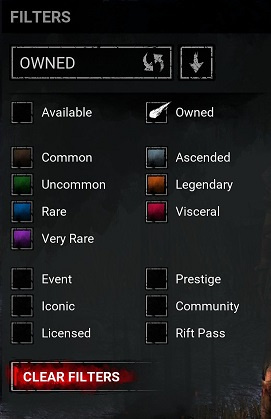
-
Could you please attach the logs and a clip if possible?
To find the logs:
- Press the Windows Key + R to open the "Run" command.
- In the text box paste the following: %USERPROFILE%\AppData\Local\DeadByDaylight\Saved\Logs
- Click "OK" - this will open your Dead by Daylight Logs folder.
- If it does not open the Dead by Daylight Logs folder, it may mean that when installing Dead by Daylight you chose to save your files somewhere else and will need to check there.
- The file called "DeadByDaylight.log" is your log file
Thank you.
-
Could you please attach the logs?
To find the logs:
- Press the Windows Key + R to open the "Run" command.
- In the text box paste the following: %USERPROFILE%\AppData\Local\DeadByDaylight\Saved\Logs
- Click "OK" - this will open your Dead by Daylight Logs folder.
- If it does not open the Dead by Daylight Logs folder, it may mean that when installing Dead by Daylight you chose to save your files somewhere else and will need to check there.
- The file called "DeadByDaylight.log" is your log file
Thank you.
-
Could you please attach the logs?
To find the logs:
- Press the Windows Key + R to open the "Run" command.
- In the text box paste the following: %USERPROFILE%\AppData\Local\DeadByDaylight\Saved\Logs
- Click "OK" - this will open your Dead by Daylight Logs folder.
- If it does not open the Dead by Daylight Logs folder, it may mean that when installing Dead by Daylight you chose to save your files somewhere else and will need to check there.
- The file called "DeadByDaylight.log" is your log file
Thank you.
-
Could you please attach the logs?
To find the logs:
- Press the Windows Key + R to open the "Run" command.
- In the text box paste the following: %USERPROFILE%\AppData\Local\DeadByDaylight\Saved\Logs
- Click "OK" - this will open your Dead by Daylight Logs folder.
- If it does not open the Dead by Daylight Logs folder, it may mean that when installing Dead by Daylight you chose to save your files somewhere else and will need to check there.
- The file called "DeadByDaylight.log" is your log file
Thank you.
-
Could you please attach the logs?
To find the logs:
- Press the Windows Key + R to open the "Run" command.
- In the text box paste the following: %USERPROFILE%\AppData\Local\DeadByDaylight\Saved\Logs
- Click "OK" - this will open your Dead by Daylight Logs folder.
- If it does not open the Dead by Daylight Logs folder, it may mean that when installing Dead by Daylight you chose to save your files somewhere else and will need to check there.
- The file called "DeadByDaylight.log" is your log file
Thank you.
-
Could you please attach the logs and a clip if possible?
To find the logs:
- Press the Windows Key + R to open the "Run" command.
- In the text box paste the following: %USERPROFILE%\AppData\Local\DeadByDaylight\Saved\Logs
- Click "OK" - this will open your Dead by Daylight Logs folder.
- If it does not open the Dead by Daylight Logs folder, it may mean that when installing Dead by Daylight you chose to save your files somewhere else and will need to check there.
- The file called "DeadByDaylight.log" is your log file
Thank you.
-
Could you please attach the logs and a clip if possible?
To find the logs:
- Press the Windows Key + R to open the "Run" command.
- In the text box paste the following: %USERPROFILE%\AppData\Local\DeadByDaylight\Saved\Logs
- Click "OK" - this will open your Dead by Daylight Logs folder.
- If it does not open the Dead by Daylight Logs folder, it may mean that when installing Dead by Daylight you chose to save your files somewhere else and will need to check there.
- The file called "DeadByDaylight.log" is your log file
Thank you.
-
@Linkdouken said:
The bug reporting system is ridiculous on here now because of the template. I made a report and followed the template as much as I could but being on console I could not provide player logs and the clip I had taken was not possible to upload so I put a link to it in the comments after.
My report was still declined for supposedly not following the template- what gives??
I cannot help but feel like this is just an easy way to turn a blind eye to issues until a large amount of reports are made.
I'll check it for you.
-
@SoGo said:
https://forums.bhvr.com/dead-by-daylight/discussion/comment/3950076#Comment_3950076
Thanks, i put it there.
Perfect, thank you!
-
Could you please attach the logs?
To find them:
- Press the Windows Key + R to open the "Run" command.
- In the text box paste the following: %USERPROFILE%\AppData\Local\DeadByDaylight\Saved\Logs
- Click "OK" - this will open your Dead by Daylight Logs folder.
- If it does not open the Dead by Daylight Logs folder, it may mean that when installing Dead by Daylight you chose to save your files somewhere else and will need to check there.
- The file called "DeadByDaylight.log" is your log file
Thank you.
-
Could you please attach the logs?
To find them:
- Press the Windows Key + R to open the "Run" command.
- In the text box paste the following: %USERPROFILE%\AppData\Local\DeadByDaylight\Saved\Logs
- Click "OK" - this will open your Dead by Daylight Logs folder.
- If it does not open the Dead by Daylight Logs folder, it may mean that when installing Dead by Daylight you chose to save your files somewhere else and will need to check there.
- The file called "DeadByDaylight.log" is your log file
Thank you.
-
Hello, when you want to report a bug, please check the bug report section to see if it has been reported already and upvote it, otherwise you can open a new report following the given template.
If you are on PC, please be sure to attach the logs, you can find them here:- Press the Windows Key + R to open the "Run" command.
- In the text box paste the following: %USERPROFILE%\AppData\Local\DeadByDaylight\Saved\Logs
- Click "OK" - this will open your Dead by Daylight Logs folder.
- If it does not open the Dead by Daylight Logs folder, it may mean that when installing Dead by Daylight you chose to save your files somewhere else and will need to check there.
- The file called "DeadByDaylight.log" is your log file
Thank you.
-
Could you please attach the logs?
To find them:
- Press the Windows Key + R to open the "Run" command.
- In the text box paste the following: %USERPROFILE%\AppData\Local\DeadByDaylight\Saved\Logs
- Click "OK" - this will open your Dead by Daylight Logs folder.
- If it does not open the Dead by Daylight Logs folder, it may mean that when installing Dead by Daylight you chose to save your files somewhere else and will need to check there.
- The file called "DeadByDaylight.log" is your log file
Thank you.
-
Could you please attach the logs and maybe a clip of the issue?
To find the logs:
- Press the Windows Key + R to open the "Run" command.
- In the text box paste the following: %USERPROFILE%\AppData\Local\DeadByDaylight\Saved\Logs
- Click "OK" - this will open your Dead by Daylight Logs folder.
- If it does not open the Dead by Daylight Logs folder, it may mean that when installing Dead by Daylight you chose to save your files somewhere else and will need to check there.
- The file called "DeadByDaylight.log" is your log file
Thank you.
-
Could you please attach the logs?
To find them:
- Press the Windows Key + R to open the "Run" command.
- In the text box paste the following: %USERPROFILE%\AppData\Local\DeadByDaylight\Saved\Logs
- Click "OK" - this will open your Dead by Daylight Logs folder.
- If it does not open the Dead by Daylight Logs folder, it may mean that when installing Dead by Daylight you chose to save your files somewhere else and will need to check there.
- The file called "DeadByDaylight.log" is your log file
Thank you.
-
Could you please attach the logs?
To find them:
- Press the Windows Key + R to open the "Run" command.
- In the text box paste the following: %USERPROFILE%\AppData\Local\DeadByDaylight\Saved\Logs
- Click "OK" - this will open your Dead by Daylight Logs folder.
- If it does not open the Dead by Daylight Logs folder, it may mean that when installing Dead by Daylight you chose to save your files somewhere else and will need to check there.
- The file called "DeadByDaylight.log" is your log file
Thank you.
-
Could you please attach the logs?
To find them:
- Press the Windows Key + R to open the "Run" command.
- In the text box paste the following: %USERPROFILE%\AppData\Local\DeadByDaylight\Saved\Logs
- Click "OK" - this will open your Dead by Daylight Logs folder.
- If it does not open the Dead by Daylight Logs folder, it may mean that when installing Dead by Daylight you chose to save your files somewhere else and will need to check there.
- The file called "DeadByDaylight.log" is your log file
Thank you.
-
Could you please attach the logs?
To find them:
- Press the Windows Key + R to open the "Run" command.
- In the text box paste the following: %USERPROFILE%\AppData\Local\DeadByDaylight\Saved\Logs
- Click "OK" - this will open your Dead by Daylight Logs folder.
- If it does not open the Dead by Daylight Logs folder, it may mean that when installing Dead by Daylight you chose to save your files somewhere else and will need to check there.
- The file called "DeadByDaylight.log" is your log file
Thank you.
-
Could you please attach the logs?
To find them:
- Press the Windows Key + R to open the "Run" command.
- In the text box paste the following: %USERPROFILE%\AppData\Local\DeadByDaylight\Saved\Logs
- Click "OK" - this will open your Dead by Daylight Logs folder.
- If it does not open the Dead by Daylight Logs folder, it may mean that when installing Dead by Daylight you chose to save your files somewhere else and will need to check there.
- The file called "DeadByDaylight.log" is your log file
Thank you.
-
Could you please attach the logs?
To find them:
- Press the Windows Key + R to open the "Run" command.
- In the text box paste the following: %USERPROFILE%\AppData\Local\DeadByDaylight\Saved\Logs
- Click "OK" - this will open your Dead by Daylight Logs folder.
- If it does not open the Dead by Daylight Logs folder, it may mean that when installing Dead by Daylight you chose to save your files somewhere else and will need to check there.
- The file called "DeadByDaylight.log" is your log file
Thank you.
-
Could you please attach the logs?
To find them:
- Press the Windows Key + R to open the "Run" command.
- In the text box paste the following: %USERPROFILE%\AppData\Local\DeadByDaylight\Saved\Logs
- Click "OK" - this will open your Dead by Daylight Logs folder.
- If it does not open the Dead by Daylight Logs folder, it may mean that when installing Dead by Daylight you chose to save your files somewhere else and will need to check there.
- The file called "DeadByDaylight.log" is your log file
Thank you.
-
Since a bug report about this issue has been created, I'm closing this here.
-
Could you please attach the logs?
To find them:
- Press the Windows Key + R to open the "Run" command.
- In the text box paste the following: %USERPROFILE%\AppData\Local\DeadByDaylight\Saved\Logs
- Click "OK" - this will open your Dead by Daylight Logs folder.
- If it does not open the Dead by Daylight Logs folder, it may mean that when installing Dead by Daylight you chose to save your files somewhere else and will need to check there.
- The file called "DeadByDaylight.log" is your log file
Thank you.
-
Hello, when you want to report a bug, please check the bug report section to see if it has been reported already and upvote it, otherwise you can open a new report following the given template.
If you are on PC, please be sure to attach the logs, you can find them here:- Press the Windows Key + R to open the "Run" command.
- In the text box paste the following: %USERPROFILE%\AppData\Local\DeadByDaylight\Saved\Logs
- Click "OK" - this will open your Dead by Daylight Logs folder.
- If it does not open the Dead by Daylight Logs folder, it may mean that when installing Dead by Daylight you chose to save your files somewhere else and will need to check there.
- The file called "DeadByDaylight.log" is your log file
This specific issue has already been reported, you can upvote it and comment here:
@Emeal said:
SUMMARY OF THE ISSUE:
This Quest from week 6 wont complete, its been stuck at 60 and I cant pin it for some reason.
https://us.v-cdn.net/6030815/uploads/UCBFF262YWIO/image.png
PLATFORM: PC
STEP BY STEP INSTRUCTIONS ON HOW THE ISSUE OCCURED:
I dont have the any idea.VIDEO: N/A
PLAYER LOGS:
https://us.v-cdn.net/6030815/uploads/EL3WVHFUPXDR/deadbydaylight.log
https://us.v-cdn.net/6030815/uploads/XUY22216P435/deadbydaylight-backup-2025-06-17-22-06-48.log
Will I be cheated out of my 75 Rift Shards?!?!?!?!
-
Could you please attach the logs?
To find them:
- Press the Windows Key + R to open the "Run" command.
- In the text box paste the following: %USERPROFILE%\AppData\Local\DeadByDaylight\Saved\Logs
- Click "OK" - this will open your Dead by Daylight Logs folder.
- If it does not open the Dead by Daylight Logs folder, it may mean that when installing Dead by Daylight you chose to save your files somewhere else and will need to check there.
- The file called "DeadByDaylight.log" is your log file
Thank you.
-
To find the logs:
- Press the Windows Key + R to open the "Run" command.
- In the text box paste the following: %USERPROFILE%\AppData\Local\DeadByDaylight\Saved\Logs
- Click "OK" - this will open your Dead by Daylight Logs folder.
- If it does not open the Dead by Daylight Logs folder, it may mean that when installing Dead by Daylight you chose to save your files somewhere else and will need to check there.
- The file called "DeadByDaylight.log" is your log file
Thank you.
-
We should be back to normal now.
-
It's not only on your end.
I reported the issue, I think it's something to do with the Forums' theme, in any case hopefully it will be fixed soon. -
If you are on PC, could you please attach the logs ?
To find them:
- Press the Windows Key + R to open the "Run" command.
- In the text box paste the following: %USERPROFILE%\AppData\Local\DeadByDaylight\Saved\Logs
- Click "OK" - this will open your Dead by Daylight Logs folder.
- If it does not open the Dead by Daylight Logs folder, it may mean that when installing Dead by Daylight you chose to save your files somewhere else and will need to check there.
- The file called "DeadByDaylight.log" is your log file
Thank you.
-
Could you please attach the logs?
To find them:
- Press the Windows Key + R to open the "Run" command.
- In the text box paste the following: %USERPROFILE%\AppData\Local\DeadByDaylight\Saved\Logs
- Click "OK" - this will open your Dead by Daylight Logs folder.
- If it does not open the Dead by Daylight Logs folder, it may mean that when installing Dead by Daylight you chose to save your files somewhere else and will need to check there.
- The file called "DeadByDaylight.log" is your log file
Thank you.
-
If you are on PC, could you please attach the logs and maybe a clip of the issue?
To find them:
- Press the Windows Key + R to open the "Run" command.
- In the text box paste the following: %USERPROFILE%\AppData\Local\DeadByDaylight\Saved\Logs
- Click "OK" - this will open your Dead by Daylight Logs folder.
- If it does not open the Dead by Daylight Logs folder, it may mean that when installing Dead by Daylight you chose to save your files somewhere else and will need to check there.
- The file called "DeadByDaylight.log" is your log file
Thank you.
-
Could you please attach the logs?
To find them:
- Press the Windows Key + R to open the "Run" command.
- In the text box paste the following: %USERPROFILE%\AppData\Local\DeadByDaylight\Saved\Logs
- Click "OK" - this will open your Dead by Daylight Logs folder.
- If it does not open the Dead by Daylight Logs folder, it may mean that when installing Dead by Daylight you chose to save your files somewhere else and will need to check there.
- The file called "DeadByDaylight.log" is your log file
Thank you.
-
Could you please attach the logs?
To find them:
- Press the Windows Key + R to open the "Run" command.
- In the text box paste the following: %USERPROFILE%\AppData\Local\DeadByDaylight\Saved\Logs
- Click "OK" - this will open your Dead by Daylight Logs folder.
- If it does not open the Dead by Daylight Logs folder, it may mean that when installing Dead by Daylight you chose to save your files somewhere else and will need to check there.
- The file called "DeadByDaylight.log" is your log file
Thank you.
-
@sethy123 said:
https://us.v-cdn.net/6030815/uploads/JZG2SD8EET1J/deadbydaylight.log
is this the right one?
Yes, thank you!
-
Could you please attach the logs?
To find them:
- Press the Windows Key + R to open the "Run" command.
- In the text box paste the following: %USERPROFILE%\AppData\Local\DeadByDaylight\Saved\Logs
- Click "OK" - this will open your Dead by Daylight Logs folder.
- If it does not open the Dead by Daylight Logs folder, it may mean that when installing Dead by Daylight you chose to save your files somewhere else and will need to check there.
- The file called "DeadByDaylight.log" is your log file
Thank you.
-
If you are on PC, could you please attach the logs?
To find them:
- Press the Windows Key + R to open the "Run" command.
- In the text box paste the following: %USERPROFILE%\AppData\Local\DeadByDaylight\Saved\Logs
- Click "OK" - this will open your Dead by Daylight Logs folder.
- If it does not open the Dead by Daylight Logs folder, it may mean that when installing Dead by Daylight you chose to save your files somewhere else and will need to check there.
- The file called "DeadByDaylight.log" is your log file
Thank you.
-
Could you please attach the logs?
To find them:
- Press the Windows Key + R to open the "Run" command.
- In the text box paste the following: %USERPROFILE%\AppData\Local\DeadByDaylight\Saved\Logs
- Click "OK" - this will open your Dead by Daylight Logs folder.
- If it does not open the Dead by Daylight Logs folder, it may mean that when installing Dead by Daylight you chose to save your files somewhere else and will need to check there.
- The file called "DeadByDaylight.log" is your log file
Thank you.
-
Could you please attach the logs?
To find them:
- Press the Windows Key + R to open the "Run" command.
- In the text box paste the following: %USERPROFILE%\AppData\Local\DeadByDaylight\Saved\Logs
- Click "OK" - this will open your Dead by Daylight Logs folder.
- If it does not open the Dead by Daylight Logs folder, it may mean that when installing Dead by Daylight you chose to save your files somewhere else and will need to check there.
- The file called "DeadByDaylight.log" is your log file
Thank you.
-
Could you please attach the logs?
To find them:
- Press the Windows Key + R to open the "Run" command.
- In the text box paste the following: %USERPROFILE%\AppData\Local\DeadByDaylight\Saved\Logs
- Click "OK" - this will open your Dead by Daylight Logs folder.
- If it does not open the Dead by Daylight Logs folder, it may mean that when installing Dead by Daylight you chose to save your files somewhere else and will need to check there.
- The file called "DeadByDaylight.log" is your log file
Thank you.
-
Could you please attach the logs?
To find them:
- Press the Windows Key + R to open the "Run" command.
- In the text box paste the following: %USERPROFILE%\AppData\Local\DeadByDaylight\Saved\Logs
- Click "OK" - this will open your Dead by Daylight Logs folder.
- If it does not open the Dead by Daylight Logs folder, it may mean that when installing Dead by Daylight you chose to save your files somewhere else and will need to check there.
- The file called "DeadByDaylight.log" is your log file
Thank you.
-
It really depends on the amount of reports the Support has to go through, just be sure not to open new tickets, because that will simply send you back into the queue.
-
Could you please attach the logs?
To find them:
- Press the Windows Key + R to open the "Run" command.
- In the text box paste the following: %USERPROFILE%\AppData\Local\DeadByDaylight\Saved\Logs
- Click "OK" - this will open your Dead by Daylight Logs folder.
- If it does not open the Dead by Daylight Logs folder, it may mean that when installing Dead by Daylight you chose to save your files somewhere else and will need to check there.
- The file called "DeadByDaylight.log" is your log file
Thank you.
-
Oh, no! That's unfortunate, I hope you can recover quickly!
-
Do you have any of the filters selected when checking your cosmetics?
-
As Mooks explained, the forums have a spam filter and sometimes when an account is not verified (i.e. they haven't posted enough to be verified yet), posting multiple comments in a row and editing posts is picked up by the filter.
Those posts then need manual approval, which we try to do as quickly as possible, however feel free to contact me or any other moderator if your posts take a long time to show up.