
Slay___
Slay___
About
- Username
- Slay___
- Joined
- Visits
- 1,204
- Last Active
Comments
-
Are you playing through Steam or Epic?
Have you tried fixing your game files? Another thing could be your anti-virus blocking EAC, you could try turning it off or adding a exception to allow EAC and Steam or Epic depending on what platform you use and the game executable itself.
-
Lowering the graphical settings do help a lot.
For example when I started playing this game a way back years ago I started on Ultra graphics. And even used Ultra while streaming to Twitch.
However when the graphics kept evolving I noticed that the stream started to have small lag issues and slight framedrops from 60 to 42 or so. That's when I switched from Ultra to High and I can barely tell the difference in visual differences but the weight of the game on my system went way down. Then I tested even lower graphics settings and didn't see much difference in system usage. I was playing with uncapped fps at this time, way before the setting to change fps was introduced into the game settings. Today I have set it to 120 from game settings because the high fps also causes a lot of system usage stress in this game only, not in other games.
The biggest difference in system usage is only between High and Ultra, so I would recommend dropping it from Ultra to High and see for yourself.
-
You can start with attempting to fix the game files, if that fails refresh Steam files.
- https://help.steampowered.com/en/faqs/view/6AD7-820D-8BE5-E51F
- https://help.steampowered.com/en/faqs/view/0C48-FCBD-DA71-93EB
For Steam issues first start by fully exiting Steam. Then go to Steam install folder and delete all files except for Steam.exe, steamapps folder (this is where your games are installed, keep it), userdata folder (this is where your Steam content such as screenshots, save files, some config files are located, keep it), ssfn<numbers> (this is for your Steam guard file, keep it).
Then simply run Steam.exe and Steam will automatically download all required files back and function normally.
Note that if you have installed games outside of default Steam folder location you have to manually re-add them to Steam by attempting to install them from Steam and selecting the folder path where they are already installed to and Steam will recognize the custom install folder as a Steam folder location automatically so you wont have to download your installed games again. Or I think you can just add the custom location from Steam settings as well, don't remember this step so well myself since it has been years since I have done this.
-
Tested this in a custom game, same result.
I am unable to enter the basement.
-
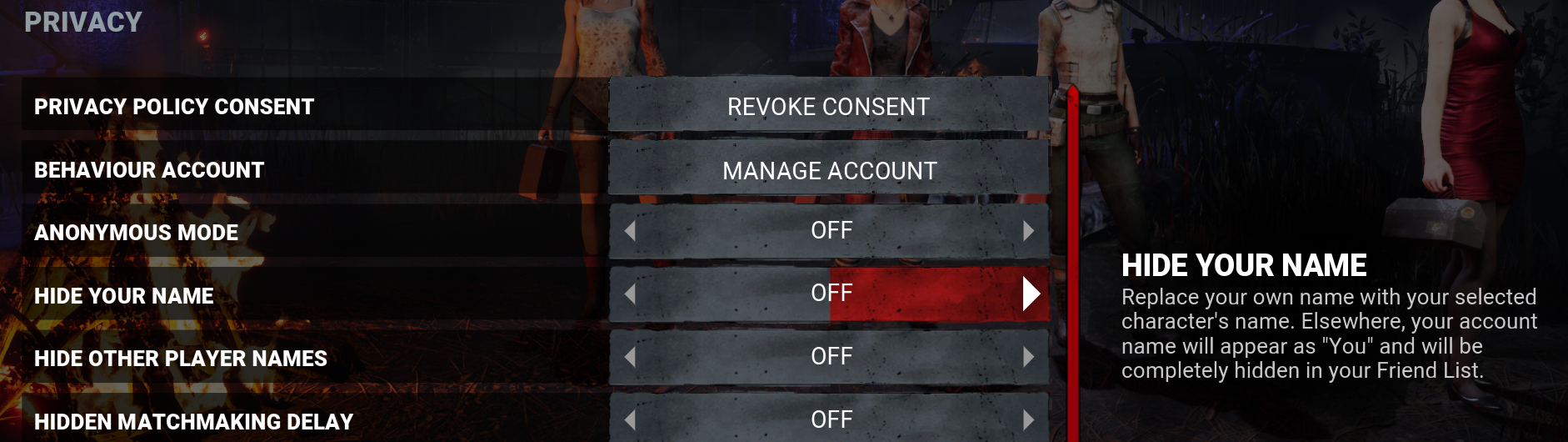
Privacy mode as mentioned by others, I just came here to add a screenshot showing the option in menu and description shown in-game.
-
This was asked a few days ago as well and just by scrolling down the Ask the community category I found this,
@Mandy said:
Adjusting our game files in this manner is not something that's supported officially and can trigger a ban, one which we will not assist in getting removed.
We also will not have these discussions on our official platforms.
-
Perk or addon.
Obsession is an integral Game Mechanic in Dead by Daylight . It was implemented with Patch 1.2.1 alongside the Perks of The Shape and Laurie Strode, the first ones to use this new mechanic before it became part of every Trial. The Obsession Mechanic was a major part of the Perks brought into Dead by Daylight in CHAPTER II: The HALLOWEEN® Chapter, bringing with it a then unique interplay of the Killer with their designated Obsession, akin to how in the Halloween franchise, Michael is obsessed wit -
@botrax said:
https://forum.deadbydaylight.com/en/discussion/281291/surge-in-cheating
They do nothing to cheater or when they do something they ban the guy for a week and they leave him alone after
They do ban cheaters permanently. That claim of a week makes no sense, where did you get that amount?
EDIT: Missed the theory above this post which mentions the number. Easy Anti-Cheat gives hardware ban on 3rd ban as far as I know and since that is being used as anti-cheat solution on this game they also manage the bans and are unable to give 7 day ban. And according to the Steam FAQs if you family share and get a ban both the original game owner and the loaner gets the ban, which in this case would be game ban since Easy Anti-Cheat bans has that integration on the Steam platform.
-
Yes, anti-cheat is a thing but like most anti-cheats it doesn't ban instantly when someone cheats but at a later date. This is a thing because it can fool cheaters to think that the cheat isn't detected and also makes it more difficult to develop cheats because they don't know if you get a ban or not for using it unlike system where if the cheat works then you cannot get banned. Then there is the cat and mice game between cheat developers and anti-cheats systems.
See here for information about reporting cheaters, https://forum.deadbydaylight.com/en/categories/game-rules
-
HOW TO REPORT A PLAYER
You may only report things that happen directly to you or in a game that you were in.
Reporting for other people is not allowed and these reports will be discarded.
(ie. Reporting someone on behalf of a friend, streamer, or other)
FILL THE IN-GAME REPORT
An In-game report MUST be made. This is not optional, and is a must to help us identify the person in your game as well as find any other evidence we need.
CUSTOMER SUPPORT TICKET?
Video evidence is required or heavily suggested for some offenses, please refer to the lists below.
Whilst you can report offenses directly to our support, please only do so for serious offenses like cheating, hacking, DOX/death threats.
https://forum.deadbydaylight.com/en/discussion/19450/game-rules-and-report-system
@Ryuti said:
Hello, people of the fog!
When reporting a player, many offences require video evidence to help us investigate your report. Below is a list of bannable offences which may require video evidence:
- Working with the opposite team to gain an advantage or grief teammates
- Targeting specific users repeatedly in order to ruin their game experience
- Holding the game hostage
- Botting
- Lag switching
- Exploit bugs, errors in design, or undocumented features to gain access to what otherwise would not be available or to obtain a competitive advantage
HOW TO RECORD YOUR MATCH:
XBOX:
- Press the XBOX button to open the guide.
- Press the VIEW button, and then select "Record from now" . Depending on your clip's resolution, you can record anywhere from 10 minutes with internal storage and up to 1 hour with external storage.
- To end the clip, open the guide and press the X button . You'll get a notification when it's been saved.
PS4:
- Press the "Share" Button on your controller to begin recording gameplay.
- When you've recorded your match, save your clip, and trim as needed.
- After that you can upload the video directly to your linked YouTube account.
- Length, quality and etc. can be changed depending on your console settings for Video sharing
PC:
- For players using an NVIDIA graphics card, you can enable Shadowplay which will automatically record any gameplay while running in the background.
- To use Shadowplay ensure you have the GeForce Experience program installed.
- Open the in-game overlay settings found in the top right corner. From there, you can turn on "Instant Replay" and adjust settings such as clip length, quality, and audio levels.
- Alternatively, you can use OBS to manually record the incidents.
INFORMATION THAT WILL AID US IN REVIEWING CASES:
Opening your escape menu and viewing the match details tab.
This will allow us to see all of the Survivor characters in the match and usernames of who is playing them.
Visiting the tally menu once a match has ended.
This will allow us to examine player loadouts including perks, items and offerings.
UPLOADING YOUR EVIDENCE
Due to the small file size limit on ZenDesk, we suggest uploading your evidence to YouTube and "Unlisting" it. This will prevent anyone without the link from seeing it, and will allow you to upload without needing to compress the quality to meet the size limit.
For XBOX players,
- Open the Youtube App, and sign in.
- Navigate to the Upload tab. You may need to turn on "Enable Sharing on Social Networks" for your clips to be visible.
- Select your recorded match
- Enter a title and then select upload.
For PC players
- If you wish to cut down your clip, you can do so in the editing software of your choice. Otherwise you can upload the raw footage straight to youtube by navigating to your shadowplay recording folder.
Please keep in mind that even with video evidence, an in-game report is still required.
Screenshots are not considered valid evidence.
If the video sent does not follow our criteria or the quality of the video is low, it is possible that nothing will be done against the player reported.
-
@Heartbound said:
I have a dream that one day Steam will tell people when they're going to do whatever they do and give us a heads up.
It was a thing way back in the day. But when it was moved to weekly thing the announcements stopped being useful.
Steam Downtime Announcements General Steam Discussionhttps://help.steampowered.com/en/faqs/view/7016-8AFD-19F7-F397 - they also have this FAQ on their support portal.
Since you can disable Steam overlay either globally or per game basis there wouldn't be a system to give warning to everyone who are playing a full screen game.
Just try to remember that it is always on the same day and same time.
-
@justbecause said:
And I already found a bug it's old bug where ppl load in match with default clothes while having bought outfits in lobby... Good job bhvr once again
Are you sure that is the case? Because it seems load cosmetics from your point of view and switch to their own cosmetics during the trial for some, including me.
https://forum.deadbydaylight.com/en/discussion/280076/everyone-in-the-lobby-is-wearing-my-cosmetics
-
@JawsIsTheNextKiller said:
https://forum.deadbydaylight.com/en/discussion/comment/2496410#Comment_2496410
So in your screenshot above, Kate is wearing the outfit that you currently have equipped on Kate and Tapp is wearing what you have equipped on him.
Yep, all of the survivors have same clothing selected as I have on my own survivors.
-
@Mandy said:
https://forum.deadbydaylight.com/en/discussion/comment/2496408#Comment_2496408
and in the game they don't appear wearing those clothes?
In-game they are using whatever cosmetics they have chosen themselves, it's just in lobby where it uses the clothes selected by the person whos point the view is from.
Items and charms are also originals, while clothes are clones.
-
Screenshot as requested.
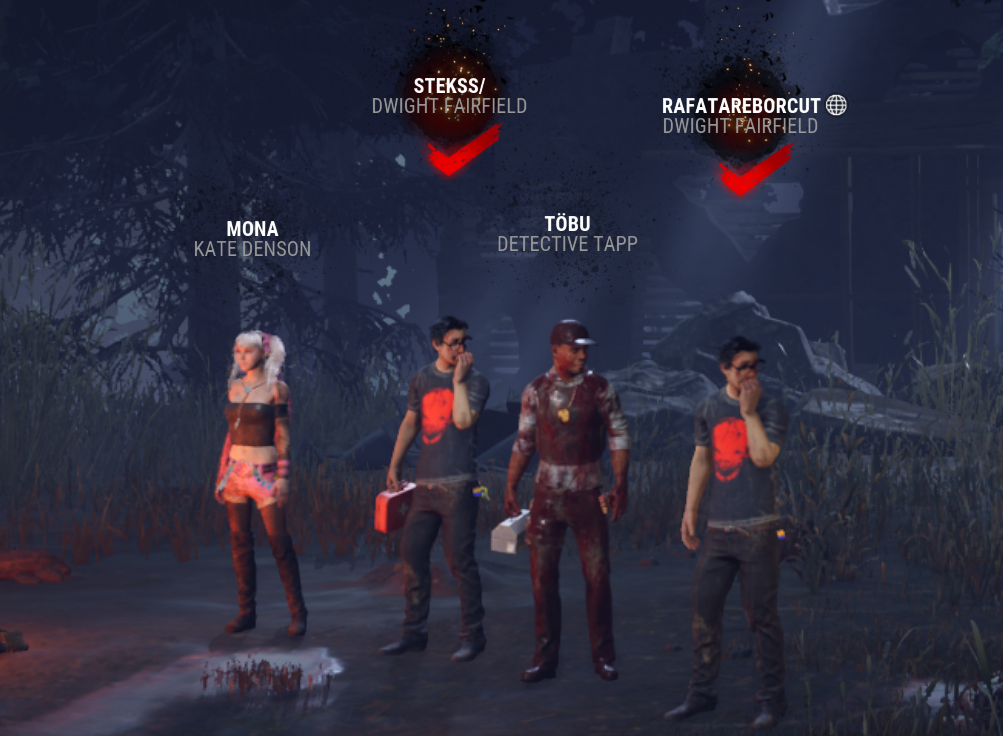
PC, Steam.
-
@oxygen said:
Considering BHVR says you don't need any proof beyond just reporting in-game for chat-based rule violations, I'd imagine they have some sort of way to figure out who says what. Presumably and hopefully on a non-spoofable ID basis, no matter if that's the in-game ID string or one of the persistent steamIDs like steamID32 / steamID64.
So you should be fine. A perfect example of why the rule against naming and shaming exists though, as it's so easy to straight up fabricate evidence that might not convince BHVR, but it can certainly convince random people more than it should.
There would be match ID and game engine assigned unique ID for players ("Cloud/Player ID" in game settings).
I am curious what you mean by "couldn't get their steam links because they changed it before I could load it." part? Does Steam load current URL or old URL which might become invalid if gets changed once or more.
To grab permanent URL type ?xml=1 to end of the URL and grab the SteamID64 from the XML page. Then to access their profile use format of https://steamcommunity.com/profiles/steamID64
This permanent URL cannot be changed like the custom URL for steamcommunity.com/id/ can be changed.
-
Usually when you are getting this error it means that your Windows install is broken. Have you tried reinstalling your Windows?
-
The description text says merciless victory, not 4k.
What I usually do is to leave a survivor or few into dying state 1-3 times just to make sure that I get enough emblem score for merciless and this method also allows you to get it even if one gets the hatch. If you try to do a quick speedrun it wont work, allow the survivors to get rescued and healed from dying state as often as possible but try to aim for 3 kills.
-
You can only receive crowns on the original killers and survivors.
Licensed killers and survivors cannot obtain them due to licensing issues, same with custom cosmetics and skins. The licensor has to agree to the customizing of their licensed content first.
-
@MissKitty95 said:
https://forum.deadbydaylight.com/en/discussion/comment/2365803#Comment_2365803
Oh I have virgin media fibre optic he’s not in the same as me
Yep that explains one part of the puzzle, different ISP and very likely different router and/or modem as well.
Only unknowns after those would be server you get connected to by the game and if you have any other users in the same household using the same connection for other things while you are playing the game.
-
Internet Service Provider.
-
@MissKitty95 said:
https://forum.deadbydaylight.com/en/discussion/comment/2365790#Comment_2365790
I did lol I said we are both on ps5 and both use Ethernet cables, (wired connection)
Sorry I missed that part.
Forgot to ask, do you have same ISP or not? That can have some variable to the ping as well.
-
@MissKitty95 said:
https://forum.deadbydaylight.com/en/discussion/comment/2365759#Comment_2365759
Ok I’m bad with explaining things so when we are playing together and I looked at the screen where you see the players and there ping it will say my name and my ping number but then my friend says your ping on my screen says something different
so for example I’m pig he’s hag 😂 sorry trying to make it more understandable
pigs ping on my ps5 is 30 , hags ping on my ps5 is 60+
on hags screen pigs ping is 50+ and hags ping on hags ps5 is 40 hope that helps 😂
Then it's up to the connection type and load on the household/connection. Different routers can also affect things a bit. You still haven't specified if you use wired or wireless connection.
Or you just get connected to different servers, because this game has servers in several locations and doesn't always connect to the closest one every single time.
EDIT: Ping is not static either, you don't always get the same number, it fluctuates a bit.
-
Ping is mainly dependant on distance and after that the connection type, connection load and device comes in play.
For example if you are using fiber optics with wired connection and no other clients on the same household/connection gives you the lowest possible ping, assuming location is close enough to the server.
Then if you would use wireless connection on adsl/vdsl with other clients consuming heavy video content such as high resolution Netflix with the same distance to the server the ping could jump up to 500 ms at the worst case.
How do you measure the ping exactly when you say it shows two different numbers? It shows the ping between you and the server, not other players.
-
@zarr said:
https://forum.deadbydaylight.com/en/discussion/comment/2360173#Comment_2360173
Fair. You did not clarify as much in the original post so I thought to mention it just because it might help you.
I think this issue is better posted in the bug reports or technical issues section, however, and along with anything you can provide as evidence and ways to reproduce the issue. Might have more success with getting it looked at there (or might not, not sure how much of an eye BHVR has on the forums altogether, and how much of the things they do look at they actually then look into or otherwise take to heart).
That's the thing, I don't have any details on this. I am asking for other player experience here.
I am not trying to submit a bug report due to missing key information. Only had to fix my files around 3-5 times since I started playing in November of 2016 but I am pretty active on helping other players on the forums and this is the most common issue that I have faced with questions asking for help or support with something.
I am fairly certain this has been reported as a bug multiple times over the years, I even have suggested the affected players to do so.
Again to repeat, this is a feedback more than anything else at this point.😊
-
@zarr said:
I have never experienced any such issues personally. I do verify the integrity of the game files after every major update (and after switching from PTB back to live), but it always just says that all files validated successfully.
I'm not saying the file integrity is not questionable in DbD, I've seen my share of weird things like PTB mechanics (and even characters) transitioning into people's live builds, but still, just as a suggestion that might end up making this an even less frequent issue for you: have you checked whether the storage device you have DbD installed on is healthy?
I know all of the solutions, this is not an ask for help with an issue but a feedback about issues that players, including me, are having.
I have personally tested multiple PCs and hard drives. No issues there.
-
The errors seem to point towards your graphics card and because there aren't a certain action causing the issue but rather happening at random it could be your hardware or graphics driver and not a bug.
Unfortunately the matchmaking bans for leaving are issued no matter what, even if you get kicked out without any action on your part. And wont be removed as far as I know.
I would suggest that you create a thread here with the error messages and a brief explainer for further support with this issue, https://forum.deadbydaylight.com/en/categories/technical-issues
PS. I am just a regular forum user and cannot rule out with 100% certainty that this isn't a bug.
-
What error does the crash reporter pop-up say? It could be specific to your hardware and/or software.
-
@Lurakaz said:
https://forum.deadbydaylight.com/en/discussion/comment/2218012#Comment_2218012
I had almost none of the items but when I bought a cosmetic or got one it for some reason updated all the characters cosmetics. This might've been because I got the meg mask skin. I now have all of the items but I had none of them since yesterday. This might be a bug in the data.
Long time ago around the time when in-game store was introduced there was a bug similar to this. When purchasing items your older items would disappear or the item that you purchased wasn't visible, until you launched the game again and everything would be there and fixed.
I thought this was fixed already, you should submit a bug report to get it fixed or at least looked at.
I personally don't like skins for any games and have only purchased two for iridescent shards, I think - haven't counted. And very rarely change skins so I don't even look at what I have. So I cannot say how long this has been a thing or if it still is.
-
If you are on Steam there was or still is a bug with Steam overlay making the mouse movement in-game very sluggish and slow.
Installing Steam beta (from settings in Steam) fixes that, unless the live build is already updated with it by now. I had to install beta yesterday to be able to play properly.
Welcome to the Steam Client Beta group. Opting in to the Steam Client Beta lets you see the latest features before they're released. You can find out how to opt in to a beta here: https://developer.valvesoftware.com/wiki/Betas You can see the latest Client Beta updates on this group's announcement page. Join the group to get updates delivered to your Friend Activity feed. http://steamcommunity.com/groups/SteamClientBeta#announcements Your testing and feedback is an enormous help! -
You can use resource monitor if you are using Windows 10.
https://forum.deadbydaylight.com/en/discussion/comment/856286#Comment_856286
-
NOTE:
We do not control anything that happens outside of Dead by Daylight.
This includes private Steam messages/groups/names, PS4/XBOX messages, Discord messages, Twitch/social media interactions, etc. Anything that occurs on these platforms must be reported to the respective authorities.
https://forum.deadbydaylight.com/en/discussion/19450/game-rules-and-report-system
-
On consoles the game downloads data after you launch it, especially on first launch.
The game modes remain locked until the download is fully complete.
-
The feature would also make it interesting to learn from others, for example I play more hide and seek compared to the nascar style that most seem to do, just running around in circles (best described by Humble Bundle years ago in a bundle page if anyone read that text, I forgot the exact text).
Most of the time I manage to end the chases as a survivor in 10-25 seconds and always wondered where the killer went or what they did in order to try to find me, and how quickly they gave up and moved to elsewhere.
This replay would also benefit both, the survivor and killer to better manage their strategies to match X play style after watching a replay of it.
Not to mention the endless possibilities for content creators, even more so if that replay would feature free camera, following camera from X angle and so on.
To combat the negatives such as disk space the replay could only be downloadable to players for short period of time (a week?), slightly longer for moderation team in case of cheat reports and on top of that get extra retention length if multiple players report player(s) from that game. And in extreme cases you can even save them locally on players machines and either allow game itself to upload files or have players manually upload them upon creating a support request.
And as a side note, I know that the game engine supports replays with various features such as free camera from other games that I play but the file size may get quite big quickly if the games are on the lengthy side. For example one replay file that I have from Rocket League is 2.14 MB and is only 9 minutes and 46 seconds long, no idea if any optimization or changes happened since then, the file itself is from 2016.
-
Are you sure it was Twitch icon? Cross-play players have a globe icon next to their display name.
As far as I know you cannot directly link your Twitch URL to be clickable in-game so people just set it as their display name instead.
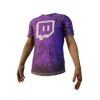
And if you reach some unknown to public number of followers or other factor you may ask for a cosmetic item of a Twitch shirt for Dwight and Meg.
-
With the nurse rework the addons were changed, and one of the common ones makes grunts of pain louder after a successful hit. Did you check for that? It threw me off a bit because so many reworks changed a lot of addons in very short period of time.
Add-on descriptions may vary from in-game descriptions for reasons explained here.Add-ons support Mouse-over functionality (desktop version only): hovering over the modifier words with your cursor will reveal the values behind them.On mobile browsers, the values are displayed in small text after the modifier words. Desktop users experiencing issues with the mouse-over may temporarily switch to mobile view at the bottom of an Article page. Metal Spoon is a Common Spencer's Last Breath Add-on . 1A dull, partially rusted and stained metallic spoon. Confiscated from Room 202's patient, the "Bad Man".
Moderately increases Grunts of Pain Volume after hitting the Survivor with a successful post-Blink Attack.
This effects lasts for 60 seconds.
-
This is a Steam downloading issue, possibly caused by corrupt download cache within your Steam files. The error message is from the anti-cheat software which wont allow you to play with wrong file version to prevent cheating.
Nothing can be done with game updates or fixes since both above aren't caused by the game itself.
To stop this from happening clear Steam download cache using the Steam tool, https://support.steampowered.com/kb_article.php?ref=3134-TIAL-4638&l=
But if you want to be 100% sure delete the cache file manually since Steam sometimes fails to delete the file but that is very rare.
For those cases fully exit Steam and manually delete the cache yourself.
The cache file can be located here: C:\Program Files (x86)\Steam\steamapps\appmanifest_381210.acf -- Or if installed elsewhere then it's the same drive as your game but the folder path stays same, it would be located in the steamapps folder.
Then to further verify that this wont happen again whitelist Steam download and game folder on your anti-virus because the file can corrupt while Steam edits it while downloading/updating and anti-virus live scanning feature looks into the file, which could stop Steam from editing the file.
And final step to make it even smaller chance of getting the error again fully reinstall the game and manually delete any files which might have been left behind.
-
@Xbob42 said:
https://forum.deadbydaylight.com/en/discussion/comment/1762018#Comment_1762018
Uhh. I dunno what you think a separate library entry is, but it has absolutely no relation to licensing or anything like that. What they're doing with the beta branch is exactly the same thing except is requires you to replace the files in the main game. What you're arguing would be like them having to get licensing revoked and reissued every time they applied a patch. Pure nonsense.
A separate library entry is not the same as a new game listed in the store, it's attached to the main game, and is accessed by having access to the main game. It's the same as having a separate entry for soundtrack or map making tools or anything like that. Piracy wouldn't have any effect because it's all piggybacking off the main game to begin with. I have dozens of games in my library that do this. The beta branch feature is fine for single-player games, but generally it's the absolute wrong choice for multiplayer games for exactly the reasons I stated above.
Platform related speculation on the licensing part. If you want to restrict access when outside of testing period you would have to revoke access. And to revoke access you need to control it using a license to access said content.
Guessing the restricted access was more valid point when save files were still saved locally but they could change it now that save files aren't locally saved anymore.
@Stealth said:
https://forum.deadbydaylight.com/en/discussion/comment/1762018#Comment_1762018
How is it a correct use of beta? When you have a full release you don't go back to beta.
R6 siege uses a separate branch before each season update so you can have both test branch and main game installed at the same time. It works nicely.
Beta testing of features, not full game.
Can't find a support article for the feature alone so here is an example for Counter-Strike: Global Offensive detailing the feature and how it works for testing new updates in smaller player base. https://support.steampowered.com/kb_article.php?ref=9847-WHXC-7326&l=
-
I am guessing its mostly because of the platform choice.
They are correctly using the beta feature provided there.
And having separate library item brings licencing issues for the platform in use. Would be a hassle to issue, revoke and reissue it. Not really sure how to keep it there permanently and out of the 2k games that I own in Steam I have only seen one game which have both live and test builds permanently attached in library.
Haven't personally tested PTB build in a long time but anti-cheat and pirating could be some minor issues for having file access outside of testing period.
-
The game can still end so it wouldn't be holding the game a hostage.
The survivor can just go to an exit gate instead and the killer have option to close the hatch, hit the survivor and forfeit hatch or chase the survivor if they decide to go to the exit gate assuming the survivor is visible to the killer.
The only way of holding a game as a hostage is to prevent the game from ending, no matter what the victim(s) might try to end it.
-
Your save file gets copied over to PTB a few days before PTB is available.
Anything you do in the PTB will get deleted once PTB ends and your live build profile wont be affected by PTB at any time.
-
That is a perk called Borrowed Time.
It activates if the person doing the unhooking has it and is inside the killers terror radius. So to prevent that from happening you should either be far away from the hook or wait 15 seconds before hitting the survivor which got unhooked.
What I do is to go after the rescuer instead because usually they go down faster.
If no one was unhooked then it's an addon for the med-kit called Styptic Agent. That gives the same effect for 8 seconds after use and can be either used on yourself or someone else while healing using the med-kit.
-
Twitch shirt? Sure, why not. The Fog Whisperers already have their exclusive charm. It also makes it easier to use your own name rather than a billboard type "streamingservice.username".
Rest of the shirts? Don't know how the tournaments worked or will work for those, probably shouldn't allow everyone to have them if they are exclusive to some past or future tournaments.
-
@Yords said:
The infamous "getting a skillcheck when you stop doing an action". Just allow a player to hit the skillcheck when they stop doing an action. I also love how it only happens when you are injured as the last survivor lmao. Has this happened to anyone else?
This happens about 80% of the time when I let go off generator while repairing it. There is already a function for it for the Overcharge perk, you are allowed to tap the generator and move away while doing skillcheck on the move.
While it is not intended to generate a skillcheck while you stop repairing and move elsewhere I believe it's doing that because of the latency. The server still thinks that you are repairing while you aren't.
-
I have the same issue.
And when you close the overlay it still briefly plays previous audio from the moment it got muted and takes a few seconds to sync up to present audio status. For example if I open overlay when I get hooked for the first time, chat or browser the web, then get saved it still plays killer heartbeat as if the killer would be close to the hook. So I never know if the killer really is that close or not until a few seconds have passed.
I also sometimes chat while repairing generators and not hearing skillchecks is making it pretty difficult as of right now.
Not to mention how weird it must be for possible spectators of live stream when the game just mutes at random and they don't see the overlay itself for privacy reasons.
-
The different versions of DirectX support different functions and the exact version is required to run certain functions required by this game. This isn't a thing where higher number equals better of the same thing but a thing where new version contains fully reworked functions and isn't backwards compatible which is why most gaming graphics card support a long list of version instead of just the most latest one at the time when the card was manufactured.
Run these installers;
- C:\Program Files (x86)\Steam\steamapps\common\Steamworks Shared\_CommonRedist\DirectX\Jun2010\DXSETUP.exe
- C:\Program Files (x86)\Steam\steamapps\common\Steamworks Shared\_CommonRedist\vcredist\2010\vcredist_x64.exe
- C:\Program Files (x86)\Steam\steamapps\common\Steamworks Shared\_CommonRedist\vcredist\2013\vcredist_x64.exe
- C:\Program Files (x86)\Steam\steamapps\common\Steamworks Shared\_CommonRedist\vcredist\2015\vcredist_x64.exe
- C:\Program Files (x86)\Steam\steamapps\common\Steamworks Shared\_CommonRedist\vcredist\2010\vcredist_x86.exe
- C:\Program Files (x86)\Steam\steamapps\common\Steamworks Shared\_CommonRedist\vcredist\2013\vcredist_x86.exe
- C:\Program Files (x86)\Steam\steamapps\common\Steamworks Shared\_CommonRedist\vcredist\2015\vcredist_x86.exe
Then update your Windows.
If your drivers are OK then somewhere along the graphics card change some depencies listed above could have gotten corrupt or broken. It's also a good idea to update Windows just to make sure since DirectX is included and updated with Windows operating system.
If you are still experiencing problems you should try to fully uninstall all graphics drivers using this tool, https://www.wagnardsoft.com/display-driver-uninstaller-ddu- , then reboot your system and install latest drivers for your correct graphics card. Also make sure your Windows is using your graphics card instead of integrated graphics from your CPU.
-
I just recently got a 1440p monitor and did a fresh Windows install too. On first game launch the game had already defaulted to 1440p for me.
It just doesn't scale the game to 1440p like other games do so it looks streched on a first glance.
You can verify that by opening the configuration file with notepad or similar.
C:\Users\USERNAME\AppData\Local\DeadByDaylight\Saved\Config\WindowsNoEditor\GameUserSettings.ini
If for some reason it doesn't change to 1440p try deleting the configuration file, then the game should generate a new file using default settings based on your system and resolution.
-
The wording on that one causes confusion.
For progress towards that achievement you have to have survivor step into your trap and after that you have to pick them up from the said trap.
The grab is mandatory, if you attack a trapped survivor or they escape the trap it wont count.
Did you pick up a trapped survivor more than once?
-
You can send additional player reports such as video here: https://support.deadbydaylight.com/hc/en-us/requests/new?ticket_form_id=360000942011
Note that in-game report is a must to verify that you are reporting the correct player and the match did happen.
More information can be found here: https://forum.deadbydaylight.com/en/categories/game-rules