
Slay___
Slay___
About
- Username
- Slay___
- Joined
- Visits
- 1,204
- Last Active
Comments
-
You can create backup for both either manually or using Steam and then switch between them that way.
https://support.steampowered.com/kb_article.php?ref=8794-YPHV-2033&l=
-
I think they are fine as long as it shows the player names with acceptable quality so they are readable. I have noticed that Twitch archived broadcasts tend to be lower quality than the actual broadcast often but if you download the video file itself (only can download your own videos) it's higher quality then.
But it would be best if you can click the player name to bring up their profile and show that with in-game report being filed in the video itself. Or at least that's what I do for my video evidence personally, it gives more proof that the video wasn't altered.
-
There currently is a bug that if you switched character in the lobby it shows that in tally screen instead of the correct one, also no perks.
-
You can see the dependencies listed here, https://steamdb.info/app/381210/depots/ , and for those you should consult the instructions listed here, https://forum.deadbydaylight.com/en/discussion/153/master-fixes-and-general-guidelines
To find those the Shared Install Depot folder path is by default C:\Program Files (x86)\Steam\steamapps\common\Steamworks Shared\_CommonRedist or where you installed Steam if it's outside the default location.
And to fix the game files using Steam tools you should start with clearing download cache first to make sure Steam downloads most up to date and correct files, then verify game file integrity as suggested by @Pulsar above.
For those see these two, https://support.steampowered.com/kb_article.php?ref=3134-TIAL-4638&l= & https://support.steampowered.com/kb_article.php?ref=2037-QEUH-3335&l=
I don't remember the error codes, what is the exact error text description for error 14?
-
@Coder said:
https://forum.deadbydaylight.com/en/discussion/comment/1423982#Comment_1423982
That's really sad, achievements are something you put a lot of time and effort into, and some guy just clicks a button and gets them all. He could have even be smart and unlock them in different days so it could actually look legit.
I shouldn't really care, since if you look at the date it's clear they're not legit, but it still bugs me for all the effort it took me to get the 155/155.
Anyways, thanks for your answer.
Yep, it's frustrating for achievement hunters.
Some cheaters submit their profiles and achievements to achievement hunting websites so it can be time consuming checking up to 50 profiles to verify your own ranking on such sites.
-
Unfortunately neither Steam or DbD devs do anything about achievement cheaters..
Earlier cheated achievements got you banned from DbD but not anymore, here is an example of my support ticket with DbD support team from an year ago,
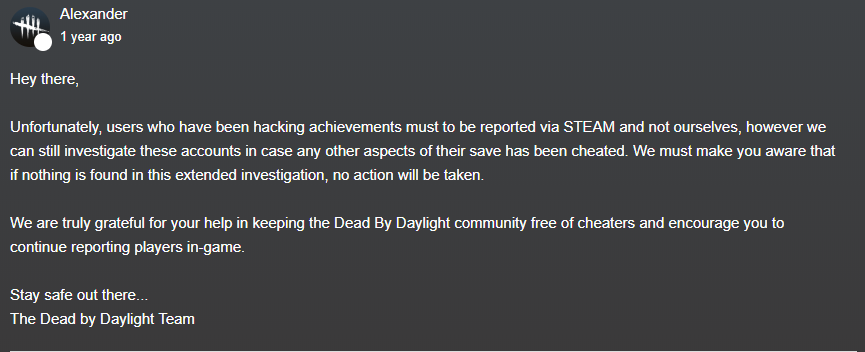
Unable to find source for Steam side of things and I have never seen anyone get banned for cheating achievements.
-
You are no longer the host so your ping doesn't affect survivors at all.
This is lag switch cheat that you are describing. They cut the connection to the server and the server makes them run straight without turning when it happens, once it's done they reappear where they really are on their end and the server syncs up to that location instead.
-
@SpiceyRice said:
So i'm not sure if this works but press windows key and r and type &appdata&, then go back one folder and click on Local, Dead by Daylight, Saved, Config, WindowsNoEditor and then open GameUserSettings. In there you can find AimAssist=[true/false] change it to False. Then save the file, go to the properties of the file and and check if Read-only is on and apply it.
I hope this helped!
No idea if I have edited this years ago but mine is set to false it doesn't disable it.
I still keep hitting objects over survivors in some cases and there is very visible autoaim at times.
-
@Skysair said:
https://forum.deadbydaylight.com/en/discussion/comment/1377760#Comment_1377760
You can do it in post-game screen. Click the cog in the left bottom corner, go to match details - wala, survivor details. Can't do anything about the killer though.
Thank you for the tip. I never fully explored that cog, missed the top tab links.
-
You can access it using the pause menu (ESC key) but that only works while you are alive as a survivor or still in-game as the killer. And this wont show you the killer, only survivors.
I had to do that once due to free play cheater. Since that has ended now it should help the situation with cheating.
-
Status update to those following this issue, it seems have been fixed now.
Twice in a row I made progress in it with zero bugs in between those two attempts.

EDIT: Unlocked it at 10/10 as well, so it's definitely working now.
-
@HPhoenix said:
I am pretty sure I healed the obsession multiple time and can confirm that this is a bug.
Please up vote this to get it top of the list and looked at.
Same issue for me, bugged.
-
@luka2211 said:
ye the vid isn't reproducable,never heard of what u experienced. Just clip it and post it here
Thanks for telling me that the embed video player didn't work, edited the post with link to a working version (non-embed).
-
@Bigyo369 said:
is it working now?
Yes, it was fixed in the 3.6.1 hotfix.
-
For the comments on Steam platform you have to go to their profile pages and report it to Steam.
You can also adjust your privacy settings to restrict or disable commenting. More here: https://support.steampowered.com/kb_article.php?ref=7597-KZNM-3716&l=
-
Same issue for me, completed the saloon generator as my first generator on that map using a worn-out toolbox with scraps and instructions add-ons. Another survivor joined me after around 5 seconds of me starting fixing it.
Steam platform.
EDIT: Tried again without toolbox, same issue. On this game I started with saloon, then after that finished off sheriff building and hanging station. Then escaped alive via exit gate.
-
As far as I know it hasn't been changed yet. However you do get hit if you are on the same side with the killer when you get hit and the killers have learned how to do that instead of keep smacking the hooked survivor.
-
You don't need 4 kills for that. However you should aim at getting at least 3 kills.
If you struggle to get the emblems required for merciless killer in your normal playstyle then it might benefit you to leave 1-2 of downed survivors to the ground to get more chases and emblem score in the process. Don't guard them, let others heal them. This also slows down the game which increase your chances of getting merciless a bit easier.
Always when I have failed on my normal playstyle I have done that and gotten merciless in the very next game.
-
If you are playing The Doctor then stop using these cosmetics until next patch;
Frame rate issues occur when combining The Doctor's Foul Bile and Auto-Lobotomy cosmetics.
Source: https://forum.deadbydaylight.com/en/discussion/122133/
What platform are you playing on?
If it's PC try updating your Windows and graphics driver.
If it's console does it overheat? This game can cause that on multiple consoles. Try moving your console to more ventilated and/or open area, and feel if it's hot to touch.
-
Bumping this old thread to add follow-up question..
What if the survivor stays there for a minute or two in order to waste killers time and allow survivors to repair all generators?
It's not taking the game as a hostage since they can die on the hook and the killer can just leave to defend the generators.
But the killer cannot hit anyone but the hooked survivor in that situation. There is no way of hitting the survivor crouched there.
In my previous game I encountered a survivor who either checked if they can get hit or to tease the killer just by staying there for extra seconds before unhooking. And even after unhooking got away safely thanks to dead hard, so it's not a guaranteed that the killer gets to hit them and gives 100% safety to the survivor who unhooks.
Here is a video of the situation with player names hidden;
https://www.youtube.com/watch?v=EP5CTWAJ7W4To repeat, this is a question of a scenario which no one has done before as far as I know, not even in this video. This is not to name & shame anyone, I didn't have an issue with what happened and had a fun game.
-
As far as I know PS4 uses peer to peer system where the connection is dependent the Internet connection of the killer who acts as a host/game server for the most part, where minimal impact is on survivor connections. And most of those issue what you listed are caused by poor connection.
PC and Switch are using dedicated servers (Amazon cloud servers on multiple regions) where the connection is more stable and in best case scenario lower ping.
-
Emblem system is used for ranking and to rank up you need pips which means point in progress.
https://deadbydaylight.gamepedia.com/Emblems#Ranking https://deadbydaylight.gamepedia.com/Rank#OverviewTo quickly learn pips and emblems you should hover over your online ranking number shown in top right corner. And also the emblems after each game, it's the second tab shown in this screenshot;
And the text "Rank progress" shows how many pips you gained (or lost if you rank down, -1 pip).
-
@ReikoMori said:
https://forum.deadbydaylight.com/en/discussion/comment/862402#Comment_862402
I would actually advise against jumping to reporting just for a killer being afk. They aren't really going to gain anything from being afk as spending time in the game alone doesn't do anything for the killer if they just stand still. Just run through the game and get what points you can. It's gonna score low due to little to no interaction so it is sort of a wash. Not really worth the report. Now if they had a movement based script that you could prove without any doubt, report that. Though most cheat engine tech shouldn't work anymore now that dedicated servers are running.
Remember those bots that just kept swinging air (auto clicker) and just farmed bloopoints because survivors would run there, get hit, heal and repeat. Those people got permanent bans for it.
Now that it's very rare, if not obsolete. But who knows, it might do a comeback.
As for cheats, dedicated server does not block cheating at all. You still send and receive data from the game server which can manipulated.
Anyway, I didn't find AFKing to be against the rules here: https://forum.deadbydaylight.com/en/categories/game-rules
But the in-game report screen still lists AFKing under unsportsmanlike option. I guess a moderator/dev is needed to clarify on that.
AFKing still kills the fun of the game while sometimes the wait times to find a game are long and can happen more than once in a row if someone is trying to derank in hopes of easier of games for example.
-
Could be a cheat software, for example in shooter games the cheats allow you to set certain angle where it automatically shoots an enemy at certain distance allowing you to set it to 360 degrees.
Or someone deranking trying to shoo survivors away for faster games, you can hear survivors breathing and footsteps so you know if someone is directly behind you.
Either way you should report such players since automated bloodpoint farming (AFK killers) are against the rules.
-
There is a desync issue listed in PTB known issues so this might already be known but I had this happen in version 3.2.2 few hours ago, https://clips.twitch.tv/TemperedAbrasiveHamRalpherZ
-
You need to be awake. It only works if you can hear a heartbeat.
Indicates to unfortunate Survivors that they are Oblivious to the Killer's whereabouts. The following effects apply:
The Survivor does not hear The Killer's Terror Radius.
The Survivor is not affected by any effects that are conditional to being inside of a Terror Radius.
https://deadbydaylight.gamepedia.com/Oblivious#List_of_Status_Effects
-
You must report them in-game first. You can find that on the tally screen by hovering over their name and clicking on the thumbs up/down icon. After that you may submit any additional proof such as video here: https://support.deadbydaylight.com/hc/en-us/requests/new?ticket_form_id=191426
-
@FireHazard said:
You unfortunately can't, I don't know how microsofts version works... but unless there is a recent players thing... than you can't add him. And even if there is a recent players feature on that version, you can add people from other platforms on your steam friends list... since that other version doesn't use steam.
There is no add feature to add people from other platforms yet, since DBDs cross-platform is still new... I can't say if they'll add one in the future but if enough people ask than they might!
Or they already will, who knows.
That recent players is platform specific and different platforms will do that differently, even if they offer such feature. Meaning you never see recent players using another platform in Steam recent players list, which at the moment isn't even working due to dedicated servers doesn't support it, at the moment anyway - it works in other games using same game engine and dedicated servers (for example Rocket League).
Instead you need to use game engine specific friend list which was released a few updates ago, and currently it's being updated to function with other platform such as Windows store. It will be very similar to what Rocket League uses I think since it's using the same game engine.
Example video of how it could look like from Rocket League: https://youtu.be/gewA1A7wo7w
And the FAQ has this;
A: Initially, you will not be able to add friends from another platform.
@not_Queen said:
We are expending our PC family!
Dead by Daylight is now available on the Windows Store.
https://www.microsoft.com/en-us/p/dead-by-daylight/9nms4sfnbgbh?activetab=pivot:overviewtab
Enable crossplay option
Sometime in the next few weeks, PC players will notice a new option labeled “Enable Crossplay”.
When this option is enabled, PC players will be able to match and play against both Steam and Microsoft Store players. While we understand that expectations are high, we want to reiterate that crossplay is only available between PC versions of the game for the time being.
F.A.Q.
Q: Can I transfer my progress from Steam / XBOX to the Windows Store version?
A: No, it is not possible to transfer your progress right now.
Q: Will I be able to add friends from another platform (IE. Adding a Steam player on Windows Store)?
A: Initially, you will not be able to add friends from another platform. Enabling the “Enable Crossplay” only allows the matchmaker to pair you with all PC players.
Q: Will crossplay be extended to the console versions of the game in the future?
A: We would like to offer the same treatment for all platforms. We do not have an ETA at this time, but we will keep you posted as new information becomes available.
Q: Will Dead by Daylight Mobile be receiving crossplay as well?
A: Crossplay is not planned for Dead by Daylight Mobile at this time.
Meaning it might become a feature soon.
-
You must report them in-game, after that you may optionally send additional proof to support here: https://support.deadbydaylight.com/hc/en-us/requests/new?ticket_form_id=191426
For more information see these, https://forum.deadbydaylight.com/en/categories/game-rules
-
If you just copy them as a backup then you should use Steam backup feature instead since it packs them into a smaller file size it's faster than selecting to move the install folder.
Also just to verify, you mean that you clone your old drive into the new one ssd, right? Because you can't just copy and paste Windows and expect it to work, and for cloning you need a software to do that for you also.
-
Yes you can.
My game is on D drive while Steam is on C (boot) drive.
EDIT: better choice would be backup game files instead, then simply restore once you have reinstalled Steam. https://support.steampowered.com/kb_article.php?ref=8794-YPHV-2033&l=
But what I have always done myself when switching hard drives is to copy steamapps and userdata folders along side with ssfn<random-numbers-here> file to another drive, install Steam on new drive and before launching Steam copying those folders and file back and launching Steam. The ssfn file holds your Steam Guard data so if you keep that file with you Steam wont treat your new drive as new device with 7 day trading and Steam market restriction. Which means you can just copy and paste the files as you want without Easy Anti-Cheat saying a thing since you don't alter any files in the process and their location stay in the correct folder path and so on.
-
This should answer some of your question, https://forum.deadbydaylight.com/en/discussion/comment/813031/#Comment_813031
Switching accounts wont affect your previous account. So if you were to login through Windows Store copy of the game you would use your Microsoft account as login I am assuming. So it's separate from Steam and you would have to start fresh.
-
@FireHazard said:
It's best not to use scripts in game as you can get banned through EAC (Easy Anti Cheat) and that's out of BHVRs hands once you're banned through EAC...
EAC is a valve issued ban and BHVR has no jurisdiction over that type of game ban once you're banned through valves system... EACs are non-negotiable and you'll be in a sense... boned... if you get banned through their system.
The same goes for modifying game files to use new portraits for your Survivors and Killers, Great Skill Check scripts, etc.
Please, please, please! Don't use a struggle script unless you want to risk this.
EAC is owned by Epic Games, not Valve.
However within Steam platform EAC bans show up as game bans, https://support.steampowered.com/kb_article.php?ref=6899-IOSK-9514&l= -- whilst VAC bans show up as VAC bans. And this game does not use VAC.
And you may appeal your EAC bans if you are feeling lucky, https://easy.ac/en-us/support/game/contact/appeal/
-
There used to be a Google form for reporting players long before an in-game option was created and at one point it broke when it was reverted back to that form.
However right now you must report in-game and if you have further evidence such as video or screenshot of the incident you may optionally submit that at https://support.deadbydaylight.com as a support ticket.
Everything you need to know about reporting is linked by @antgnstea however.
-
@Nurse10 said:
Ha good .. "decisive blow", passive regeneration of health, the key to the hatch, two doors to exit completely opposite, many generators but few goals ..

But that's ok ... let me guess, you're 100% survivor ..?

Traps are easy to avoid in squatting position .. and when we have perks that depend on totem and our traps are easy to counter ......

In short, everything is fine ^^
I play both roles equally and don't "main" either side.
-
I don't think having unbreakable traps is very fair, personally anyway.
For example Trapper's bear traps can be disarmed but if you want to do the same for Hag's traps you must bring a flashlight and it's not included for everyone for every game making it hard to disarm Hag traps.
So it balances the game and allows sneaky play. If you wish to guard generators or totems try placing the traps further away from obvious spots while still blocking off pathways to the objects you wish to guard.
-
The Hag's Phantasm Traps will not trigger if Survivors crouch over/past them and/or if they are performing an action.
https://deadbydaylight.gamepedia.com/Hag#TipsNot sure what you mean, does this answer your question?
-
Check that your NAT is open, https://www.techadvisor.co.uk/how-to/network-wifi/change-nat-type-xbox-one-3657187/
Also check your modem/router for NAT type set there, if the device has such option. If not you can also try using DMZ option if your device has such option.
-
According to this you are allowed to use it, https://www.easy.ac/en-us/support/dbd/guides/whitelist/
-
The Steam store page also includes details of each exclusives for DLCs on their specific store pages.
The Stranger Things Chapter also features two exclusive cosmetic items: Steve’s Scuffed Rolled Sleeves and Nancy’s Torn Sweatshirt. -
@bomb1720 said:
https://forum.deadbydaylight.com/en/discussion/comment/673355#Comment_673355
sorry what i meant was will it be added to dbd or is it going to be a seperate game to purchase?
PTB is a beta test of future content, not a new game.
Most tested content end up in the game in the future, bugs get fixed and balance tweaked & tested etc.
And in this case the new chapter means new DLC which is paid content for the game.
-
@Theluckyboi said:
Deathgarden has dedicated servers, DBD doesnt.
Exactly for this reason.
They have been working towards launching dedicated servers for some time now so that will come before they alter a huge bunch of code into making it possible to have two killers on peer to peer to system where the killer is the host. Having two hosts is just impossible or hard to create so it would have to take a random host out of the two. But even then it would run into problems because it's peer to peer, more data to be handled with two killers (more players) so the lag would be twice what it is now, in theory anyway.
-
@DrDeepwound said:
https://forum.deadbydaylight.com/en/discussion/comment/584351#Comment_584351
I understand, and thats what makes it even worse, yes your lobbies will have people from all over the world regularly and it shouldnt even happen with a "steam game" as steam uses your billing region on your account, but DBD I think doesnt use that anymore? Anyhow, the match making is plagued with out of region players for most people.
This has gone way off topic by now..
Steam only uses billing address to handle tax, vat, regional pricing etc..
No game uses that as base location for players, game servers or matchmaking. However some games use (and Dead by Daylight used to use) the Steam download region set in Steam settings.
Other than that it has no real use in any game as far as I can tell.
Valve games ping regions to find a server close to your location with lowish ping, same goes to games using their free api (yes, free servers for everyone, even non-Steam games). Source: https://youtu.be/wrvr02SiHY4?t=1785
Other games have region selector, Rocket League, PUBG for example.
-
@DrDeepwound said:
https://forum.deadbydaylight.com/en/discussion/comment/584313#Comment_584313
Yes, out of region VPN users are a big problem in this game, Ive posted about it for over 2 years as I have worked in the webhost industry for many years and see it in my region too, everyone tries to connect to US West to play our lobbies.
On Cali on Fiber and I get tons of Asians (China is heavy VPN users) foreign countries like that use VPNS to get around government rules like bans on how long you can play a game etc,... so we get to deal with them in our lobbies using west coast VPns. They region hop in all games for advantage, just like in PUBG, its done ion DBD regularly, I wish theyd ban VPNs, wed probably see a big change in matchmaking, but as Ive know for awhile, theres more Asian players than good ol boys in texas playing DBBD
Not trying to deny the issue, just pointing out that it isn't really required.
Would be hard to ban VPN, even Netflix and other streaming services are struggling with that issue. They don't brand the IP addresses but rather use default hostname and reverse DNS etc..
-
@DrDeepwound said:
people try to say everything is a lag switch and blame the killer for cheating, when in fact, its often the dsync and latency from the survivor p2p connection and not the killer at all.
Im on fiber in Cali and sometimes get teleporting survivors, its not me, its the dumb survivor probably using VPN and jumping regions
I agree but.. You don't even need a VPN to mess up the matchmaking, just play off peak hours. I live in Finland and get people all over the world in my lobby or end up in theirs. Brazil, Argentina, Korea, Japan, China etc..
Just like any game the accusations are thrown at the enemy all the time and often without a reason too, just like crying out "hacks" or "cheats" in most multiplayer games.
Even had a red ping click ready in my lobby and saying I lag switched afterwards once, https://slay.pro/2019/03/01/lag-switching-accusation-with-a-red-ping-in-dbd/
-
@ABannedCat said:
https://forum.deadbydaylight.com/en/discussion/comment/584226#Comment_584226
You should edit your post before the mods see it. I know from personal experience that discussing lagswitching is bannable.
I didn't name the program or go into detail about it and I explained to Yohan the signs of a lag switch and how to identify them better.
How is that banable offense? Or why should it be edited? Or which part do you mean, it's quite long post.
-
Lag switch has two different methods, one is easy to spot while other is not.
If the lag started suddenly while earlier it wasn't laggy at all that could be a sign of a lag switch. But there is still a small chance it being caused by something else such as other users in the same household starting up streaming video at high resolution causing small to huge buffer download of the video file or small hiccup in the connection (temporary packet loss).
Based on the video it could be just a lag spike (50%) or lag switch (50%), hard to tell without video of the full game including lobby ping time.
The other type of lag switch is where you stop moving completely until the killer allows you to move again which is done by manually limiting the packet speed sent to survivors using a software designed to limit that (designed for managing downloads, not to cheat in DbD).
EDIT: Missed your post about it being like that all game.
In that case it isn't switch per say.. But instead very unstable connection if the ping in the lobby was fine. Most likely a laggy wireless router/modem causing packet loss and delay with possible interference from neighbors being in the same WLAN channel (routers/modems have channels for certain hz to send and receive, you can choose a different one to combat interference and some automatically switch that), or overheated/over stressed modem/router etc..
My friend has a router which often either overheats or just lags by design (too cheap) and shows skipping motion on all online games, DbD and CS:GO for example. And powering it off for 10 seconds weekly fixes that lag/skipping motion in online games.
-
Checked the Google Play page again today and now it says my device is compatible.
I guess they added more phones to the device list which can run the game or updated the game in way which lowered the requirements.
But I would still, if possible, suggest that there was a complete or at least partial list of devices which can run the game. Or just chipset + GPU minimum requirement list like on PC games for example.
Game runs great as was to be expected by the specs of my phone.
Only issue is that I have 10 second timer to turn off the screen and the game doesn't have feature to stop that from happening unlike many other applications. So adding that would be nice.
-
The "problem" is that both of those were "flagship products" and Samsung Galaxy S7 was released on February 2016, while Nokia was released on September 2017 making it newer than Samsung 7. Which is listed as the minimum requirement for the game.
Nokia 8 also has better chipset, CPU and possibly GPU than Samsung Galaxy S7. Couldn't find way to compare GPUs.
In the mobile chipset ranking, Qualcomm Snapdragon 835 performs better than Samsung Exynos 8890. Find out why! ✅So if I were to upgrade to Nokia 9 for example, knowing the requirements would help. However I understand that phones have very different hardware, even version change may drop support for some functions or add too much new stuff it can be hard to pinpoint the exact requirements. But.. Many applications can produce lists of supported phones for example.
However as of now the next time I might upgrade my phone to a newer model would be somewhere in the summer of 2021, unless something drastic happens.
