
forthelulz
forthelulz
About
- Username
- forthelulz
- Joined
- Visits
- 838
- Last Active
Comments
-
Instead of 1920x1080 (16:9) try 1680x1050 (8:5) for a small improvement, if that's not enough try 1620x1080 (3:2) and if that's not enough try 1440x1080 (4:3) it still sucks but it does help.
-
@pseudechis said:
I don't know what it is but, I think maybe its the gen indicator bouncing around in the center of my view at the top of the map, or having to look left at the info constantly rather than just glancing down, but the new UI gives me motion sickness.
I'm not one for melodrama I hate it, but after 10 games as killer I went and vomited. I genuinely had motion sickness.
Its cluttered and awkward and maybe I'll get used to it but I can't play anymore this evening.
Its to hard to tell the bleed out info because rather than being on the solid ground at the bottom of the screen where I could eyeball it in my peripheral even during chase, its now at the side where things are rushing by a lot more and it really is disorienting to glace over at it.
I felt gimped trying to keep track of it and focus on the game and now that my head hurts I'm done. Have got one kill in 10 games its just hard on the eyes.
I'm sorry but if this doesn't change or become more customizable that might be me calling it a day till it gets reverted or changed.
Haven't tried survivor yet the queues are to long but if its like killer then bleh. Maybe its the cluttered screen in 1st person view, but I just can't play. I could probably play it with the third person survivor view but killer is a no go which is a shame as a rather dedicated killer player I just am really bummed out.
Sorry couldn't really appreciate any of the other updates to nauseated.
Instead of 1920x1080 (16:9) try 1680x1050 (8:5) for a small improvement, if that's not enough then try 1620x1080 (3:2) and if that's not enough try 1440x1080 (4:3)
-
If everyone stops playing for a week or two they'll change it no matter what it takes, this game keeps BHVR alive if it dies, which it will if they don't stop screwing around then 100s of people will be out of work soon and the company will fold in a couple years.
If the daily numbers drop a huge chunk and they stay low they'll have no choice.
Shame on them for even trying to do this, I can't think of any other game or business that would attempt changing so many things at once especially when they all literally suck and nobody asked for because they'd be essentially killing their cash cow and they can't possibly be that stupid.
-
HUD is so silly & ugly and the animations and movement is absolutely terrible not to mention look weird.
If only the devs actually played this game.
I'm done.
-
Ping doesn't mean nearly as much as everyone in this thread seems to think it does same with speedtests, I'll never understand why anyone thinks they're important. Those that are assuming that you have "good" internet what does that even mean? What did you do to verify it's good and not on your end?
Having a wired connection with little to no bufferbloat or jitter, as well as good routing to the servers is many many times more important than your ping or the results of a speedtest
Don't get me wrong this game has issues but put some effort into trying to make things better.
Do some testing to find out routing and bufferbloat and post results, there are ways you can improve things on your end to help make things better. I was surprised when I looked into mine and with a little work I managed to make it much better.
Edit: I had massive bufferbloat as well as my routing to the servers was mind bogglingly silly averaging +30 hops. Yet 40-45ms ping 24/7 to the servers. Now I have no bufferbloat and average 10 hops, all fixed on my end without help from my ISP.
-
@dugman said:
P.S. here’s a game of someone playing in 1080x1080. There are definitely points where the survivor can see over walls they normally can’t.
Thanks for making that, always nice to have a clear video detailing issues. :) I also agree completely that it should be considered cheating.
-
@dugman said:
https://forum.deadbydaylight.com/en/discussion/comment/1736266#Comment_1736266
Nobody is complaining about normal aspect ratios, the complaint has always been about people intentionally using 1:1 ratios to be able to see over objects. And it’s not just Tru saying it’s cheating, Behaviour also commented that they consider it cheating as well. It’s just unfortunately something that is probably technically difficult for them to stop.
Ahh ok I understand better now.
Thought the part about BHVR saying it was cheating I'd like to see a link because so far I've only see Not_Queen muttering once about that it was cheating, no offical statement at all. Also if they thought it was cheating why aren't they banning for it, they can easily tell who's doing it and who's not.
It's not hard at all to stop it from being used, this is barely over high school level computer programming type stuff.
-
Also the fact that they've almost finished re-writing the entire game and have now allowed fullscreenmode=0 means that very soon we will have actual graphical settings available, as well as they'll fix things like 1:1 aspect ratios.
For normal aspect ratios such as (8:5 / 5:4 / 4:3 / 3:2) those will still work the same because they show the exact same thing that you would see if you had a monitor with that aspect ratio.
-
True is not very smart, and was fooled into thinking what he was looking at was accurate when it wasn't, and therefore made that video.
If you use a normal well known aspect ratio (8:5 / 5:4 / 4:3 / 3:2) the "advantage" is so slight it doesn't matter. If using 1:1 then yeah there is an advantage but the entire game looks terrible and the disadvantages far outweigh the advantage but I still agree that 1:1 shouldn't work.
But normal aspect-ratios such as the 4 I mentioned are fine.
It takes literally seconds to try any of the aspect ratios I mentioned as well as 1:1 to see for yourself. Too bad True couldn't be bothered to do the same himself.
-
Anyone that has noticed they had stuttering and bad FPS which appears to be fixed by lowering mouse polling rate from 1000Hz to 500Hz or 125Hz should make sure that they do not have useplatformclock listed under BCDEDIT.
In reality nobody anywhere, ever should be using it because it cripples most aspects of Windows, however on a couple of "tests" it appears to make the system more responsive and for that reason well known YouTubers that offer tweaking advice suggest using it, but this advice (as well as practically everything else they suggest tbh) should be ignored.
Hope this helps someone! :)
-
@GMan79 said:
https://forum.deadbydaylight.com/en/discussion/comment/1720823#Comment_1720823
I'm pretty interested what you found out and your solution about it.
Please describe :)
Ok now the other thing is that they've allowed the use of:
fullscreenmode=0
However an important fact that is overlooked now is that when using =0 these two lines which are and were previously ignored when using borderless fullscreen (which is =1) are now actually used and are important. Those lines are:
ResolutionSizeX=
ResolutionSizeY=
So make sure that if you're using fullscreenmode=0 that those two lines are set to the resolution of your monitor that you want the game to use. For example if your monitor is a 1920x1080 AND you use fullscreenmode=0 AND those lines are set to:
ResolutionSizeX=1280
ResolutionSizeY=720
Then the game is going to stretch 1280x720 across your 1920x1080 screen and it'll look terrible.
If you're using fullscreenmode=1 then you don't need to worry about those values because it will use your current desktop resolution because it's using borderless fullscreen.
So to recap. If you're using fullscreenmode=1 then things are as they normally were. If you're using fullscreenmode=0 then you must make sure that the values for ResolutionSizeX= and ResolutionSizeY= are set correctly for your monitor & what you want the game to use.
As always: Never should you set read-only on an ini file, and steam launch parameters don't do anything because when you launch the game via steam you're not actually launching the game. You're launching Easy Anti-Cheat so any launch parameters set will go towards EAC and are not forwarded when EAC starts DBD up, making them useless.
-
@GMan79 said:
https://forum.deadbydaylight.com/en/discussion/comment/1720823#Comment_1720823
I'm pretty interested what you found out and your solution about it.
Please describe :)
Ok the first thing cripples any machine but it's the kind of thing someone has to do on purpose so it's likely not something you did but still worth a quick check.
Open command prompt as admin and run:
bcdedit
Make sure that you do not have "useplatformclock" listed.
On my system and the other 6 systems I've tested if this is enabled DBD can barely hold 60FPS and if you move your mouse back and forth it'll drop down into the 50's or even 40s.
So you don't want to see this:
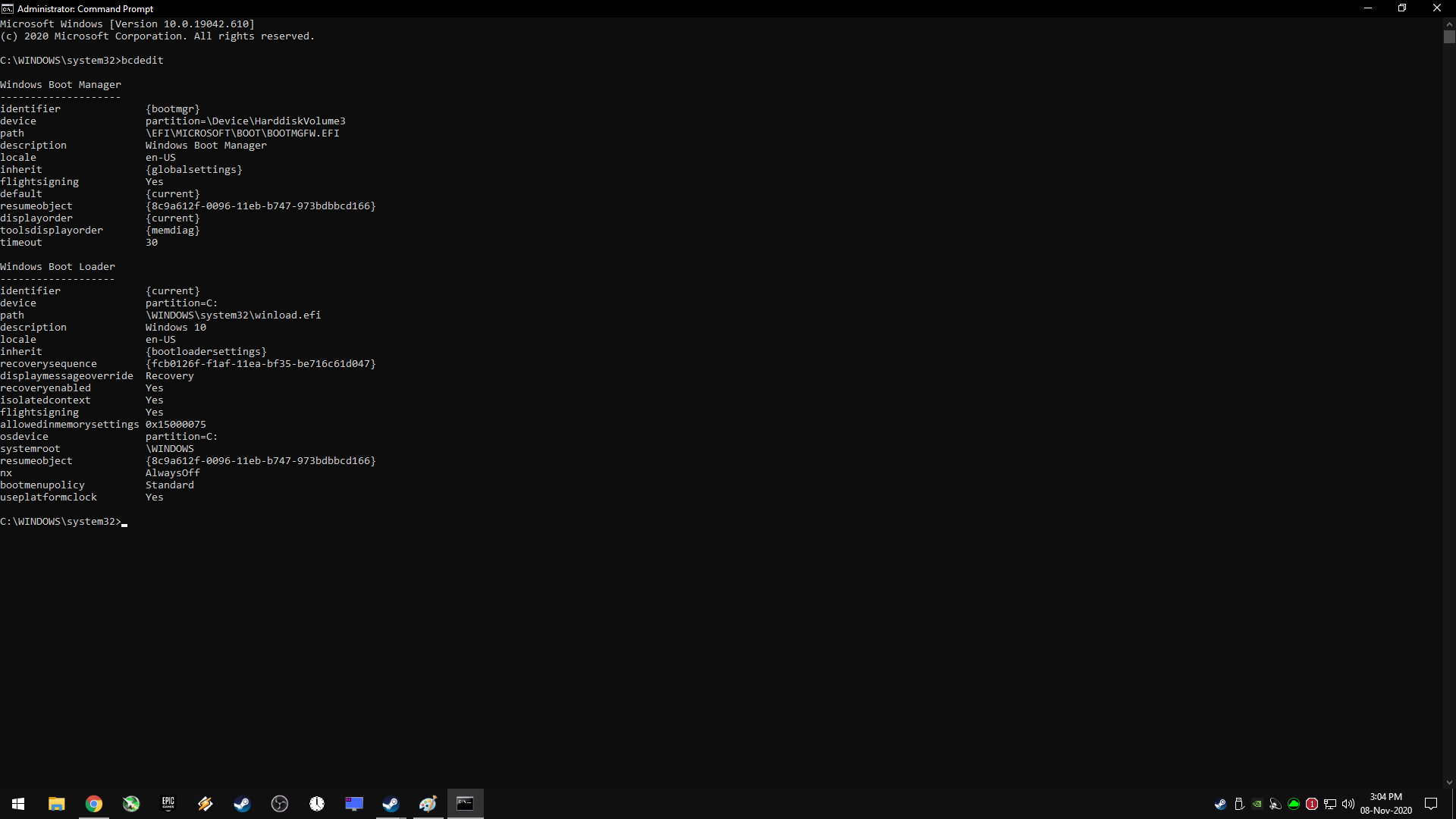
Ideally you should see nothing about platformclock or platformtick like this:
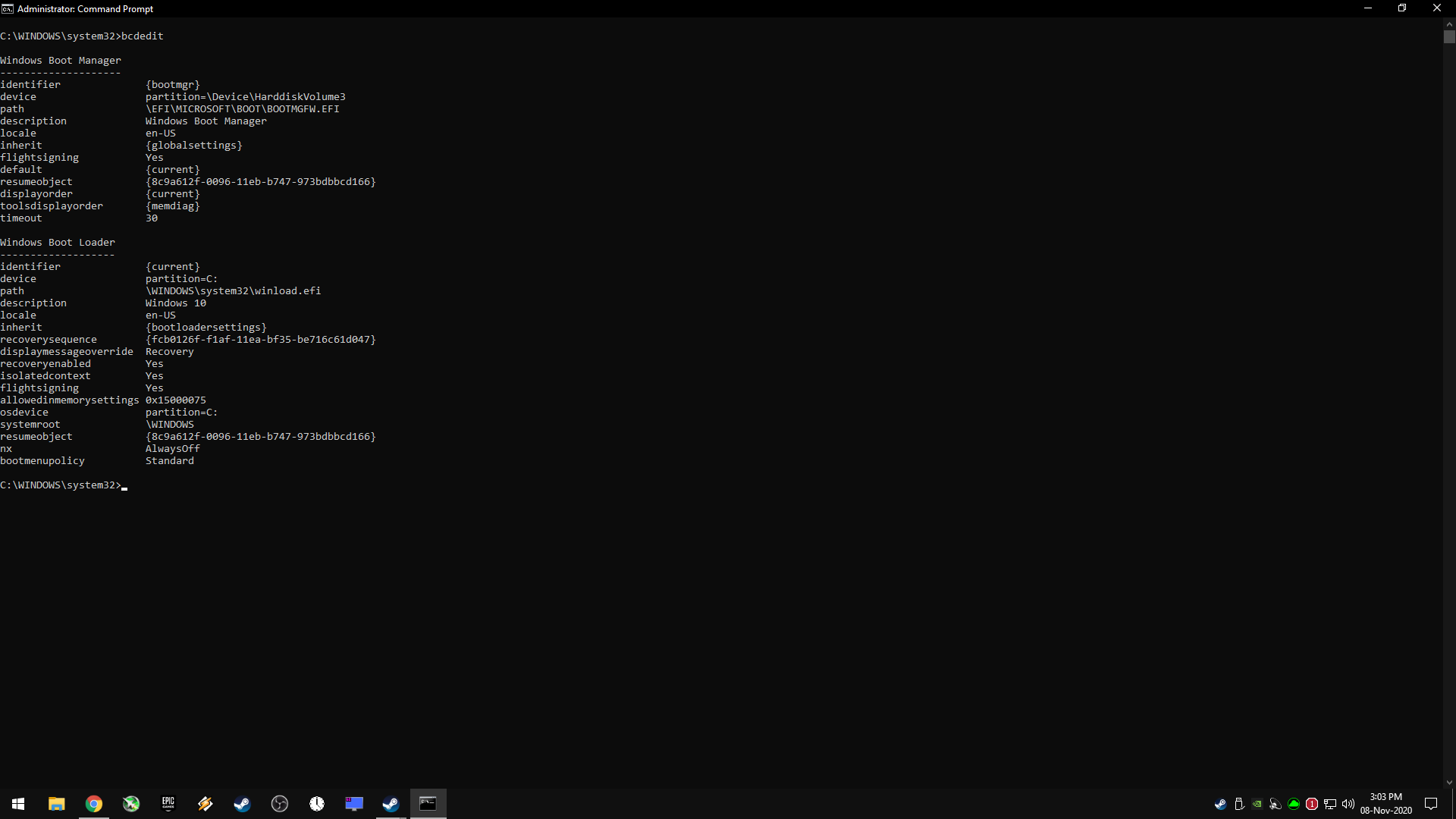
-
@Terratoast said:
There shouldn't be a FoV slider, but what Dbd should have is a locked 16:9 aspect ratio and allow the user to change between 16:9 resolutions in the options.
I've got a ultra-wide monitor and I have to manually change my resolution back down to 1920:1080 outside of the game so I don't gimp myself on the vertical FoV since Dbd only seems to care about horizontal FoV and stretches the vertical FoV to accommodate. For more square resolutions this is an advantage. For ultra-wides this is a disadvantage.
That's exactly why trying to force locked aspect-ratios sucks and is/was a bad idea.
In this game on a 16:9 monitor, 16:9 looks and feels terrible.
I remember first starting this game in 2016 and saying "#########" about the resolution and the lack of video settings and then vsync being on by default so after less than I minute I shut it down so I could figure out how to turn fix all that crap, and make it look normal because 16:9 is just so silly looking and clunky. 8:5 is better but still a little "meh". 3:2 I like the most and I think 4:3 should be the max.
-
You could buy and use a 3:2 or 4:3 monitor you'll see the same thing.
But since they seem to be almost done rewritting the whole damn game and have allowed win 10 + d/x 11's version of exclusive fullscreen I would imagine there will be proper settings menu soonish too once they get the servers side hit detection working and sort out all the issues that come from switching from borderless to fullscreen...
A good example is right now if you use fullscreenmode=0 the game will actually use the values:
ResolutionSizeX=
ResolutionSizeY=
Whereas before 4.2.0 only borderless fullscreen could be used, so those values were completely ignored and only the current desktop resolution mattered, but now if you manually switch yourself to =0 those values matter and if they're weird it'll make weird things happen lol
-
@KhaineGB Can you message me privately somehow or email me or something? I have figured out a couple of specific issues and how to exactly replicate them 100% of the time and wanted to fill you in so you could hopefully directly pass the info on to someone that can do something about it. I've been trying to catch Mclean on twitch this last week but I'm in the middle of moving to a new house and getting the old one ready to go on the market so it's been tough.
-
@Wesu said:
https://forum.deadbydaylight.com/en/discussion/comment/1642233#Comment_1642233
I have this exact problem right now. I normally run in 2560x1440, and now when I boot up it's in a lower resolution, and the mouse is off center. If I toggle off fullscreen, it fixes it, but the window is so tiny that I can't play in windowed mode. Any attempt to re-apply full screen messes up my resolution again. I can't even make it out of the main menu half the time because the cursor is like 3-4 inches off where it should be.
Still having issues as well?
-
@GMan79 said:
That doesn't work. It's not that it's unsharp (more the usual) it's simply not the right resolution.
I can't even move down the mouse to the bottom line of the monitor, it's like 3cm over it and game says "window", also game is in fullscreen, ends there. Same on the right side.
I figured out a few things. Haven't been on here for like a month but if you're still having issues let me know I'm pretty sure I not only figured out the resolution issues but also the weird issue with strong systems getting horrid FPS regardless of graphic settings such as RTX 20 series barely being able to get 60 FPS never mind maintain it although that specific issue is pretty rare.
-
- If it WAS considered cheating by EAC or BHVR then they would ban those doing it because it's high school simple for either of them to find out who is doing it and ban them for it since they have zero tolerance for cheating. Nobody has been banned for using common aspect-ratios that I've ever heard of or seen, quite a few streamers seem to use it in various countries and have for a long time. This clearly means neither thinks this is cheating, and that is how simple it is to figure out their position on it.
- The "advantage" of using popular common aspect-ratios such as 8:5 / 5:4 / 4:3 / 3:2 versus 16:9 is extremely minor at best and has drawbacks not to mention they could very easily fix it so that the extremely minor advantage becomes no advantage at all.
- Simply "stretching" a 16:9 image to 8:5 / 5:4 / 4:3 / 3:2 doesn't give anymore of an advantage than it would to a person that is using a monitor with a native 8:5 / 5:4 / 4:3 / 3:2 aspect-ratio because it's the same image or people that has a native 16:9 but prefers to use 8:5 / 5:4 / 4:3 / 3:2 at all times for everything (like my grandparents and mom)? Are they cheating also?
-
@aarongai said:
Bump, still not fixed, and didn't see PTB notes on a fix either.
I was testing this today and it happens with all the kits.. if the kit and addon charges are exactly enough for a 2nd, 3rd or 4th heal (such as yellow kit + bandages or yellow kit + self adherent wrap or yellow kit + gel dressings + self adhesent wrap or yellow kit + gel dressings + bandages or brown kit + gel dressings or green kit + gel dressings etc) then on the last heal you'll run out around 98% every single time.
Note: This is not caused by killer perk affecting consumption, missing a skill check, or using a tiny bit by mistake on someone else etc. If you have a yellow kit + self adherent wrap and hit all normal skill checks you will not have enough to heal yourself the 2nd time you'll end up 98% healed every time.
-
@GMan79 said:
Something has happend to the resolutions. After the patch, somehow I had a totally screwed resolution on my 2560x1440p Monitor. To clean things up, I deleted all ini files and let the game create them fresh after a restart. that fixed the stretched image, but now when I ALT + Enter, Game gets windowed, of course, but when ALT + Enter again, Game keeps a lower resolution, but stretched to my native monitor size, which results in unsharpness of course. can't find a way to fix this... Any help ?
If you're talking about these lines in GameUserSettings.ini then unless you were or are playing in fullscreenmode=2 for some weird reason those lines are are ignored anyway so they weren't doing anything.
- ResolutionSizeX=
- ResolutionSizeY=
- LastUserConfirmedResolutionSizeX=
- LastUserConfirmedResolutionSizeY=
- WindowPosX=
- WindowPosY=
- DesiredScreenWidth=
- DesiredScreenHeight=
- LastUserConfirmedDesiredScreenWidth=
- LastUserConfirmedDesiredScreenHeight=
-
@zireael_ said:
Are Red lights intended to be nearly invisible now? Or is this a bug?
They are brighter and better looking than they've ever been.
-
You could turn off AA but that looks terrible so I suggest that you try using NVCPL and under 3D settings for this game turn on Image Sharpening. I found that 0.70 looks good to me.
I'm sure AMD has something equal to that in their control panel as well.
-
EAC is actually pretty good at what it does and requiring SHA-2 code signing support will improve things so it's a good thing.
However, somewhat ironically, EAC is literally 100% ineffective when it comes to detecting and/or stopping the problem specific only to this game because of the way the code was written from the begining. I'm fairly certain that they are working to fix that and other issues surrounding it but since it pretty much means rewriting the game it's being done quietly and will take quite awhile.
Also I forgot to mention that the SHA-2 code signing support update is available to Win7 users.
-
@seki23 said:
since i dont have any reason to update, is there a problem with it? i just close the thing and i entered to the game will i have any problem just because i dont want to enable windows "install problems" updates enabled?
That's literally a reason to update, an update which is already 18 months old by the way..
It is a warning that means that your Windows doesn't have SHA-2 code signing support and you need to have it next month because it is now required by EAC which means starting next month you won't be able to play games that use Easy Anti-Cheat.
-
@Freki said:
https://forum.deadbydaylight.com/en/discussion/comment/1571158#Comment_1571158
and why only killers? why not survivors too?? see this is the problem i'm talking about this is a very survivor sided push right now, I'm only talking about making it an even push change.
Yeah I should have changed "killers" to "people" or something. I should have read it over before I posted I'll fix that.
-
@Crazewtboy said:
https://forum.deadbydaylight.com/en/discussion/comment/1571083#Comment_1571083
I'm not playing on PC. Trust me, it isn't my console. Or everything else wouldn't run perfectly
Sounds like CPU / GPU maxing out and/or close to overheating causing hard throttling. Best of luck.
-
@Freki said:
first of all what i see in the announcement of the detection, it looks like it shifts the hit detection from the killer preference and then changes it to survivor preference. it talks of killers with bad connections, killers with solid connections etc. How about talk about survivors with bad connections as well as solid connections just as much? I usually have a 30-40 ms ping to the server, i've seen survivors get away from hits that shouldn't happen, i've seen hits happen that shouldn't have happened. meh it's hit or miss but making it look only at the killer side may be a bit hard and biased the other direction. I hope it evens out properly.
Those using Wi-Fi are going to start to understand how & why it's such a terrible idea it is to use WiFi even with very low ping. It will be even more obvious (worse) if they also increased their FPS cap to higher than default cap, and if they are running uncapped making the FPS and frametimes fluctuating wildly that would be... terrible + worse + worse
-
@Nicholas said:
Did they update the tick rate to 60?
They are still 30Hz.
-
@Crazewtboy said:
For the past 4-5 days I've been playing this game, I've gotten the most horrendous lag I've ever experienced in my years of gaming. The worst part is, it is only on the survivor side. As killer I can see other survivors in my game lagging. When I play survivor, the killer's ping is fine and the game runs smooth in the half. But as soon as we hit the 2 gen remaining mark, the lag becomes very apparent. The game literally turns into a wallpaper and when it finally fixes itself, chances are the killer has already downed you. Before anyone says anything, no it isn't my internet. I run every other game perfectly (most of which are more internet demanding than DBD). I've lost so many games to this it's not even funny. I can't continue playing the game like this. Rant over.
Use something to monitor the usage levels and temps of your CPU / GPU / HDD / SDD while this is happening, and see what they are @ before during and after this happens.
-
@UseTheValve said:
@Peanits Are the servers 60tick as well? Or that will be another update?
They are still 30Hz.
-
@immortalls96 said:
60 tick rate servers were supposed to go with these changes, were they added as well?
They are still 30Hz
-
Windows 10 has a few color blind options that work with Nvida and AMD.
ReShade, which is by far superior, also works with Nvidia and AMD.
FreeStyle is for Nvidia only and also has the added downside of having to install & use GeForce experience in order to use it.
-
@UseTheValve said:
Seriously can we get a official statement on it? Are we ever going to have it, they let us tweak the gameusersettings but after 4 years we don't have them in-game, still can't choose which AA we want etc.
Also anyone got G-Sync to work on DbD I can't seem to get it to work at all and tried almost everything.
You can use NVCPL to force AA modes via NVCPL and disable it completely via Engine.ini if that's what you want to do. I agree there should be actual graphic settings available, I'm just saying it's possible to do some stuff in the meantime at least.
G-Sync was a little wonky before but now that windows finally got around to fixing the various issues with DWM in WDDM 2.7 such as multi-monitor setups and even single monitor setups with games running in borderless windowed mode (like DBD) creating stutters, huge frametime spikes, skipped frames etc things work much better.
Note: You need Windows 10 2004 to get DWM fixes found in WDDM 2.7 which also requires NVIDIA drivers 450.12 and above. Not sure if AMD has made WDDM 2.7-compatible drivers available yet.
-
Win 10 has colorblind options or you could use ReShare or Freestyle or even a combo of those together.
-
@Angelicus23 said:
https://forum.deadbydaylight.com/en/discussion/comment/1249097#Comment_1249097
I only copy pasted two things. Dowsey's video and the AMD panel. The rest is all made with my settings.
Both people gave me permission.
It's not about permission it's about everyone using the exact same mistakes in the exact same order when listing the changes to make to the ini files, which I find hard to believe is just a coincidence.
-
@Angelicus23 said:
https://forum.deadbydaylight.com/en/discussion/comment/1244227#Comment_1244227
As I said, that is needed in case you accidentally change thevin-game settings. Setting it as read only, will make the game unable to edit the file
In the rare event that you do that one specific thing sure it technically "helps" but it would be better to just re-edit the file if that one specific thing happens because it is silly and a bad idea to set read-only on an ini file.
Also, you really shouldn't just copy/paste stuff from other people which is what literally everyone always does because you're all copy/pasting the same mistakes.
Example: To disable smoothframes you only need two lines, the extra two lines you copy/pasted are completely pointless, just like having the vsync line is pointless to put in Engine.ini.
The two lines are:
[/Script/Engine.Engine]
bSmoothFrameRate=False
-
Good god all those screenshots look so ugly.. #########?
Reshade is 10x better than Freestyle.
No need to set read-only on ini files.. I'll never understand why every single guide or how-to says to do this, it's idiotic and that's being kind.
-
They already commented about this in the big thread.
It was changed because people were using the same method to make the red stain twice as bright as intended, remove fog & grass and various other things. To stop those thing from happening they had to block everything which included disabling AA.
They're supposed to be working on an ingame way to turn AA off but that will take awhile I'm sure.
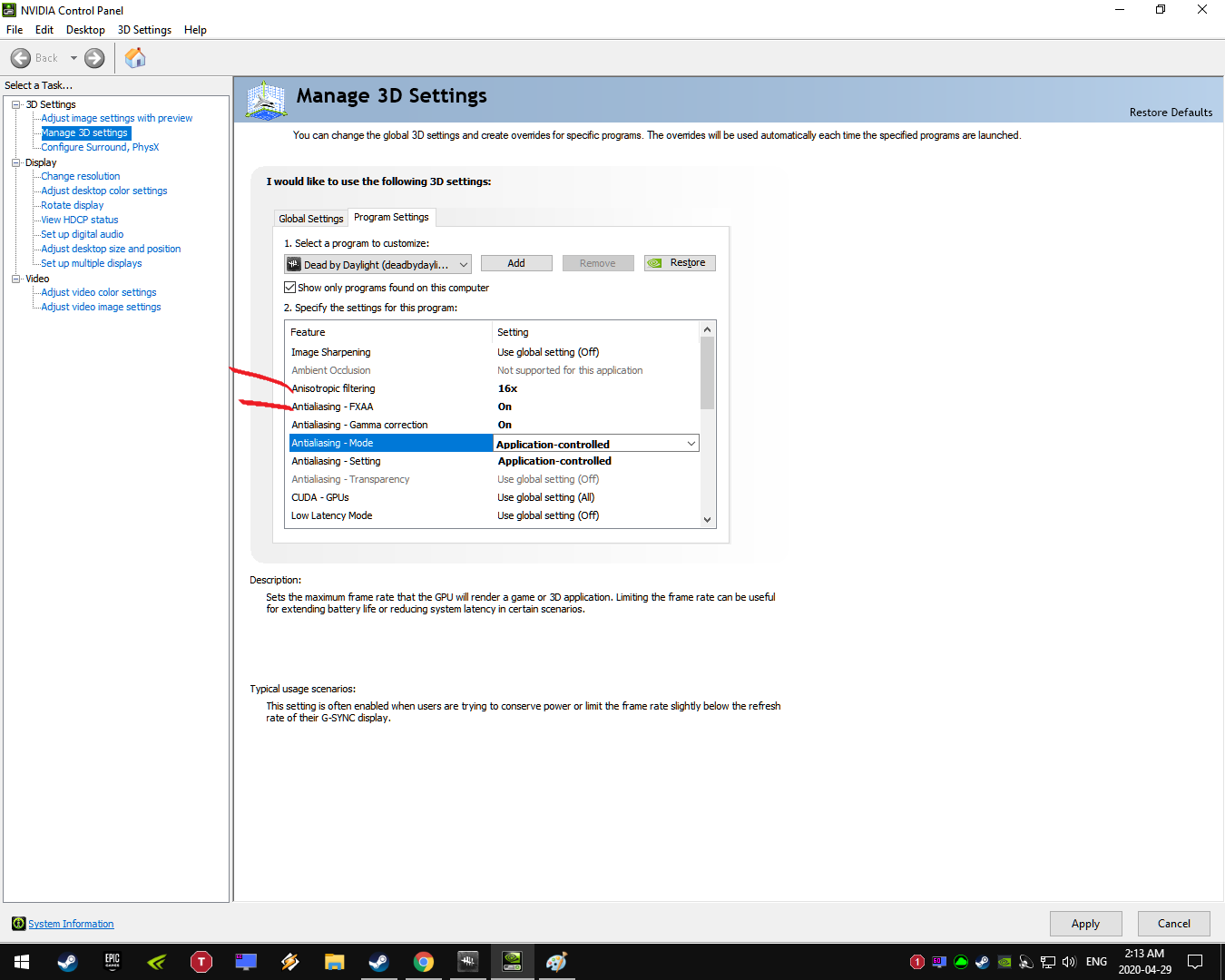
In meantime you can turn on AF x16 and FXAA to help combat the blurry with very little extra performance loss (same exact GPU usage for me on low setting)
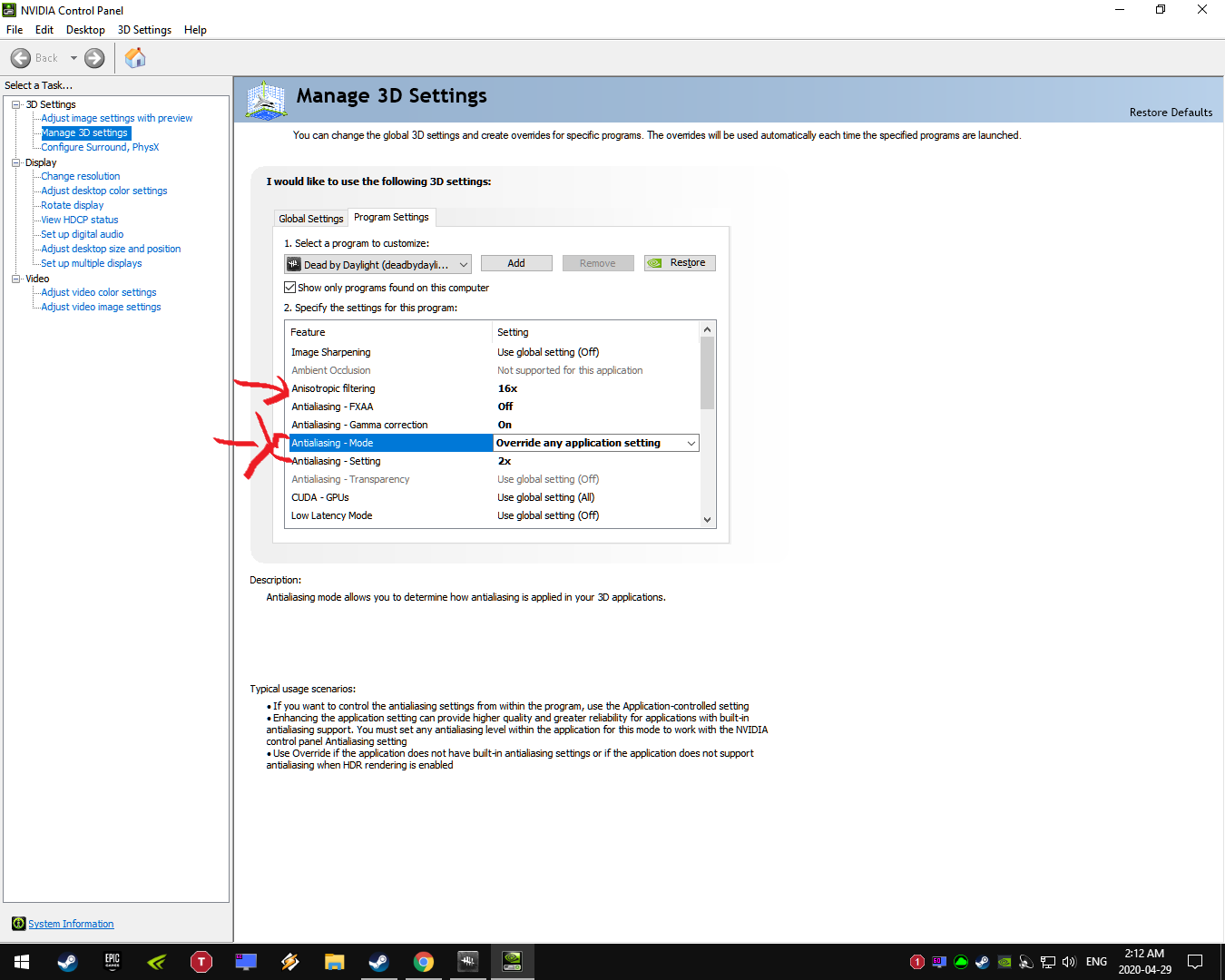
or turn on AF x16 and enable MSAA at a slight performance cost (+4% GPU usage for me on low setting) which helps quite a bit
-
To use a different resolution and/or aspect-ratio requires absolutely no altering of .ini files, or any files for that matter. Anyone or thing claiming otherwise has no idea what they're talking about at all.
-
lol @ thinking using a lower resolution and/or aspect-ratio is an exploit, does that mean anyone with a monitor that has any other aspect-ratio or native resolution of 1920x1080 is also "exploiting"?
Even in actual competitive games for real money, including first person shooters, they're freely allowed to use any resolution and/or aspect ratio they want.
-
@Raulillo said:
https://forum.deadbydaylight.com/en/discussion/comment/1223072#Comment_1223072
It's a fact that the wiki has wrong or outdated information, I don't know if it is updated by developers from time to time. There are things that are wrong like gate keeper emblem information and there are other wiki articles that could be wrong and we don't know.
If a value change from 1% to 2% people won't notice without hints in the patch notes. Even with a phrase in the patch notes there are balance changes that will not be that important to most of the player base and people won't notice. So a "slightly" being 1% or 1.075% it's a thing that I prefer to look outside the game because I don't want to translate from <numbers> to <how it's supposed to be played>, in a competitive game I can understand that information is displayed but in this game I think is not relevant for the most part of the players.
I know, there are some players out there that have a timed path for every tile with every perk in the game and even a 0.00001% value change can destroy their perfect though build. They are not even a big enough group to be found every day in your matches.
From what I've seen they seem to be very much on top of keeping it accurate, even when the PTB drops they update it with the possible changes within a few hours including the minor updates to the PTB while in progress, and the things that are outdated seem to be clearly indicated with the reason. Any mistakes they're quick to look into. I also don't think that it is purposefully hidden so much as back when they first were making the game it was done to make it so they could alter the values quicker and easier. @FichteHiro can probably shed some light on the subject.
-
@Raulillo said:
https://forum.deadbydaylight.com/en/discussion/comment/1222815#Comment_1222815
From devs perspective I think it's a good idea to don't show the exact numbers. People would abuse certain items more, and stop using other ones.
When numbers come in, an optimal result can be calculated. Devs know this, so they hide the numbers and add a description with the idea that you should be using the item/addon for.
Part of the horror aura of the game comes from the lack of information too. A newcomer in the fog is going to have a hard time until he figures out how all things work.
The DBD Wiki shows the exact numbers for everything including the amounts for slightly, moderately etc
-
@BeanBan said:
So I was trying to edit my Nvidia filter settings because they were turned off. Then when I tried to change the settings, it told me Nvidia filter settings only work on supported games. Has the DBD team disabled Nvidia or is it just a problem I’m having?
Had this happen a few times over the last year or so. I hated GFE anyway so I switched to ReShade so I could get rid of it. ReShade has always worked without fail, is also white-listed and I think it's superior.
-
@woundcowboy said:
https://forum.deadbydaylight.com/en/discussion/comment/1191281#Comment_1191281
??
Literally every killer agrees that the god loops have to go. Do you play this game?
Since 2016 which is why I can't stand the way this game and it's babying is going.
I'm done time for a new game with less babies.
-
I give up.
Babies win! <eyeroll>
-
I sure hope this font is only an April fools day thing holy moly
-
I've gotten two purple, a couple or maybe 3 yellow and one green in the past 6-7 webs over the last couple of hours, I think I might have gotten one purple early this morning also but I'm not 100% sure
-
Seems to be happening to everyone. That explains the drop in numbers also.
-
What settings are you using?
Seeing the added launch parameters, both of which are useless since -novsync doesnt do anything and -fullscreen is idential to checking the fullscreen box from the in-game setting menu, makes me think that you followed some YouTube video or guide which are always full of useless if not bad advice so I'm wondering what other things you've changed?
-
@FichteHiro said:
https://forum.deadbydaylight.com/en/discussion/comment/1160382#Comment_1160382
A Generator takes 80 Charges to complete. Since one individual Survivor repairs a Generator in 80 seconds, the repair speed of a Generator with only one Survivor repairing it is 1 c/s (charge per second).
Keep in mind that there is a penalty applied to the Repair Speed for each individual Survivor that starts repairing the Generator (0.1 c/s per additional Survivor).
The default repair speed for two Survivors without Prove Thyself is 0.9 c/s for each Survivor. Prove Thyself applies a 10% speed bonus to each Survivor: 0.1 x 0.9 = 0.09 -> 0.09 + 0,9 = 0.99 c/s
This means that the repair speed for each Survivor with Prove Thyself (when 2 Survivors are repairing a Generator) is 0.99 c/s for each Survivor. Since a Gen takes 80 Charges to be completed -> 80 : 0.99 = 80.8080808080 -> 80.80808080 : 2 Survivors = 40.40 seconds
It would take up 40.40 seconds to repair a Gen with an additional Survivor with Prove Thyself equipped compared to the normal 44.44 seconds.
Let's do the same for 3 Survivors:
Default repair speed (3 Survivors) : 0.8 c/s -> 0.2 x 0.8 = 0.16 -> 0.16 + 0.8 = 0.96 c/s for each Survivor.
80 : 0.96 = 83.333333333 : 3 Survivors = 27.77 seconds
And for 4 Survivors:
Default repair speed (4 Survivors) : 0.7 c/s -> 0.3 x 0.7 = 0.21 -> 0.21 + 0.7 = 0.91 c/s for each Survivor.
80 : 0.91 = 87.912 : 4 Survivors = 21.97 seconds
Also, you forgot that only other Survivors count for Prove Thyself, yourself not, so if you're repairing a Gen with one other Survivor, only a 10% speed bonus will be applied.
EDIT: The DBD Wiki's Article for Prove Thyself was changed to reflect what I just told you: https://deadbydaylight.gamepedia.com/Prove_Thyself
Let me preface this by saying that I'm basically stuck at work only able to use my phone, I'm bored and pretty tired due to my usual rig breaking down on me at the last minute so I had to take a beaten up old one on the road instead for this trip and can't sleep for more than 90 minutes at a time because the bed in it sucks!
I didn't forget, the main reason I brought up the numbers being incorrect is because the perk seems to state or is at least worded in a way that makes it seem that it grants 10% repair speed bonus to the perk user and 10% repair speed bonus is also given to each other survivor.
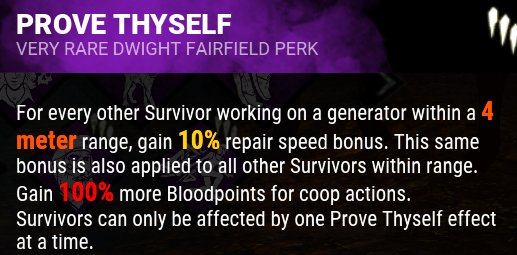
However, even if I only give the other survivors and not the perk user the 10% bonus for a maximum total of 30% as you state, I'm still unable to get the same numbers you do. You say that the bonus is only given to the other survivor, so with only the perk user and 1 other survivor that 10% is the maximum bonus but in your explanation here and on the webpage when you break it down it appears that you did give each of them 10% for a total of 20%.. but it just might be that I'm just not able to correctly do the math and/or am confused..
For example when you say:
Default repair speed (4 Survivors) : 0.7 c/s -> 0.3 x 0.7 = 0.21 -> 0.21 + 0.7 = 0.91 c/s for each Survivor.
Are you saying:
With 4 survivors the default is 0.7c/s per survivor, and out of the 4 survivors that only 3 will get the 10% bonus added onto the default while the perk users will only get the default? So since 10% of 0.7 equals 0.07 this is added to the default 0.7 for a total of 0.77c/s to be given to each of the 3 other survivors and the perk user gets 0.7c/s total? Wouldn't that be 0.77 + 0.77 + 0.77 + 0.7 = 3.01c/s?
Just for the hell of it say the maximum bonus with 4 survivors was 40% instead of 30% can you show me how that would look compared to your previous example of:
Default repair speed (4 Survivors) : 0.7 c/s -> 0.3 x 0.7 = 0.21 -> 0.21 + 0.7 = 0.91 c/s for each Survivor.