
madamretto
madamretto
About
- Username
- madamretto
- Joined
- Visits
- 136
- Last Active
Comments
-
@Rivyn said:
So do I. Just about anything is better than the boring display we have currently.
I agree. The black screen sucks 😣
-
@Wamps said:
https://forum.deadbydaylight.com/en/discussion/comment/1449455#Comment_1449455
Paul did a GREAT Job of portraying Ace and bringing him to Life! And actually.... YES I Play DWIGHT FAIRFIELD....
I like your portray of Dwight! 😍"Claudette" caught my eye too 😉I'm looking forward to it!
P.S. Am I allowed to say that the actor for David looks sexier than David himself? 😏That hair tho, man 👀
-
But the forum design should have stayed the same tho. I loved gold, white and black colors combined. I even used those colors with my cosmetics and charms for a survivor. Looked cool. 😥
-
Yeah, same. It was waaaay better, I don't like these red numbers, they are hurting my eyes a bit.
-
Some good servers actually, with more or less stable ping...
-
I mean, I love Depp and this movie in particular (have watched it ten times already), I read the book too, so I'm up for it!👍️
-
@DwightOP said:
https://forum.deadbydaylight.com/en/discussion/comment/1426704#Comment_1426704
Another one with no manners at a funeral. Learn to be respectful around people who lost their beloved one... These Kids nowadays never have respect...
This ☝️
Requiescat in pace, Billy :(
You didn't deserve it.
🍀
-
@Nibla02 said:
https://forum.deadbydaylight.com/en/discussion/comment/1426077#Comment_1426077
I legit dont understand why they added those sound clips. I hate them and they dont fit the game at all
It becomes annoying really fast
🍀
-
@OBX said:
Billy chase music consists of listening to him grunt/howl (whatever you wanna call the horrible effect) every time he charges his saw
I wanted to say the same thing lol It is irritating😑
🍀
-
I bet there still will be that bug with the numbers on the roof on Yamaoka's map when it will go live lol
Btw, who thought that it was a great idea to blind people with that shinning sun on Yamaoka's map? It is so annoying.
🍀
-
I get it when they just wanna die on the first hook to leave the game, but I hate it when I'm running to the person who is struggling (and they are doing it for quite some time) and when I'm about to save them, they just let go and die in front of me! Happened to me twice yesterday. And of course because of that the killer started chasing me then.
-
Usually I use them for a daily or challenge, nothing more.
-
Thank you very much, was waiting for you to post this. I hope you will continue with this stuff🤗
-
Yeah, I have played dbd just now and I thought that I imagined things lol Because previously I was playing an old game where graphics were not very good. And it seemed to me that maybe it was just my imagination or whatever but it actually looked sharper and less blurry since I last remembered. Despite the filter. Hmmm...
-
As a survivor I hate when you have to take an item from the match and escape. Or escape in general when those survivors are not leveled up.
As for the killer, I hate Nurse's, Billy's and Ghostface's dailies. They are hard for me to master.
-
@GMan79 said:
I bet there a plenty of people that doesn't even know the benefits of such options, nevertheless keep upvoting this Topic.
All Players will benefit of a proper Graphics Setting Menu.
Yeah, the same goes for Q & A thread with this issue, I don't know what people are thinking.
-
@RockoRango said:
When a mod closes a MASSIVE THREAD ABOUT A PROBLEM because of a reason that was not justified at all. Pog
But fr, this mid patch didn't fix any of the major problems and rather fixed the minor issues that didn't make the game unplayable. Thanks.
Couldn't agree more KEKW
-
Yay, another thread on this forced stupid AA, I'm in :D
-
@DwightOP said:
Oh look, the mods found a reason to lock the high popular 3.7.0 anti aliasing post on this forum so it doesn't keep getting bumped up.
I will continue bumping this one here instead.
I knew I bookmarked this thread for a reason! And as you said somewhere, it's funny to think that people in their right mind will down vote the topic about graphics option being brought up to the attentions of the devs. Like are you seriously against convenient options that are present in any other game? lol
-
Phew, false alarm, my bad, fix it after few tries.
-
Phew, false alarm, my bad, fix it after few tries.
-
@Angelicus23 said:
Hello guys, I found out a solution for the AA issue until devs listen us and revert it. I will let you two ways to do this
1-GeForce Experience Game Filter:
(This is just available for nvidia users)
If you updated drivers before you know which app is this, use for that, optimize games, record and stream games.
(you shouldn't see DbD duplicated, I do have it like that because I always leave a security copy every time I update DbD or aply a PTB)
https://us.v-cdn.net/6030815/uploads/816/CWS1QHKD3DGU.png
Download link: https://www.nvidia.com/es-es/geforce/geforce-experience/
So what we have to do is going to the settings part which is just at the left of our user name in the corner up-right. Then we enable an option called "in-game overlay".
Then we can now open DBD and activate it pressing alt+z so we can see the overlay. We must now go to an option called "game filter" (if i doesn't appear, go back to the GeForce settings and enable "experimental functions").
Then we choose any number for our graphic settings, add filter, add "details" and the result should look similar to this. The way we're "disabling" Anti Aliasling is by enabling extra sharpness:
https://us.v-cdn.net/6030815/uploads/104/VUFINIOVSFL6.png
NOTE: please don't use that HDR so high, that's my personal setting to help with my brightness eye issue.
This one is a personal recommendation which helped me a lot to difference some objects and characters for their color, helps a lot with red stain and scratchmarks:
https://us.v-cdn.net/6030815/uploads/588/21B76EALPMTI.png
For this last one you must be precise with the numbers.
This is how my game looks like for me with "details" and "color" (for you with less HDR it looks a bit darker and doesn't hurt your eyes):
https://us.v-cdn.net/6030815/uploads/275/RC07YJRIBEKI.png
https://us.v-cdn.net/6030815/uploads/567/4XV5QF783UPJ.png
("color" is disabled in this second one)
And this is how it would look by default:
https://us.v-cdn.net/6030815/uploads/272/1J7W3YRCKGUJ.png
https://us.v-cdn.net/6030815/uploads/900/CT2DIANY6TG0.png
UPDATE: DOWSEY'S METHOD (only for nvidia users):
This consists on using the control panel, and is a faster way to add sharpness, so I won't explain it here and ask you to watch the video to support him.
-QUESTION: is this banable?
-ANSWER. No, Behaviour gave nvidia permission to add filter support.
2-AMD Drivers:
Credits to @Fiv55
https://us.v-cdn.net/6030815/uploads/056/22M5SXJNOY5A.png
(watch the comparisions with the screenshots of their comment)
3- Using SweetFX:
I personally don't know a lot from this but I will help you with all I know.
First here is the best tutorial video for it. It's in German but it's self explanatory by just watching it: https://www.youtube.com/watch?v=CWceb0ZmjJg
The download link isn't included, you must google it, or use this one from this link which is the one used in the video. The instructions in english to install it are included in the web page: https://sfx.thelazy.net/games/preset/5924/
After you installed it and opened DBD once, you will notice in a corner that SweetFX is activated and you have to press "(idk the default one)" key to activate it. Then close DbD, go back to the folder where you installed it and change the settings manually in the note files. This is hard and confusing, that's why the nvidia filter is better.
-QUESTION: is this banable?
-ANSWER: it does exactly the same thing as the nvidia filter, I also tried this for some months because I saw a dev answering a thread saying it's secure, however, I used this in 2018, and I'm not sure if eac changed anything, but I'm really really sure that it's still no banable, so I can't either say yes or no, sorry.
CONSOLE USERS:
for my PS4 I have a TV which has visual settings, almost all the monitors have this. When I choose HDMI3 my TV automatically puts my personal visual settings, now, I can't show this first because mobile pictures to screens look awful and second because all TVs have different settings, so I can't really help you here, you need to explore yourself.
EXTRAS
DISABLING VSYNC AND UNCAP FPS
So as you can see from my screenshots, my fps aren't capped to 60 which is the default setting from the game, and Vsync can be disabled for better skillchecks. I will show now how to fix these too here:
Go to the windows' search bar and type for a program called "Run" or just press windows key+R. After opening, type %appdata% and click on accept.
https://us.v-cdn.net/6030815/uploads/393/0CLWE6PNV5QP.png
now here, you have to revert one folder clicking here (where the rectangle says):
https://us.v-cdn.net/6030815/uploads/359/EUUB6A8ZGBRO.png
Then, by order, open the following folders: Local>Dead by Daylight>Saved>Config>WindowsNoEditor
Here we will find the two files we need:
-Engine.ini
-GameUserSettings.ini
Let's go first with Vsync. Open GameUserSettings.ini then search a line which says "bUseVSync=True". You just need to change "True" to "False" (with capital letter).
(PERSONAL RECOMENDATION) now that you're in this file, to make the game look with better resolution and better textures in low graphics, I recommend you to change the lines of the top of the file like this:
https://us.v-cdn.net/6030815/uploads/535/8O6QN1S50YOI.png
Remember that if you change the settings later ingame, you will have to repeat all this, so to get these settings safe, save changes and close the file, then right click to it, go to propperties and make it "read only". If you want to change anything later, disable this.
https://us.v-cdn.net/6030815/uploads/229/MJCKKCKJ8ZKX.png
https://us.v-cdn.net/6030815/uploads/808/4YDVH7RZV9V7.png
Now, uncapping FPS (this is just like we used to do to disable anti aliasling:
Open Engine.ini and go to the end of the file. Leave a line space and copy this:
[/script/engine.engine]
bSmoothFrameRate=false
MinSmoothedFrameRate=5
MaxSmoothedFrameRate=144
bUseVSync=false
so it later looks like this:
https://us.v-cdn.net/6030815/uploads/116/E5TAM4299N5R.png
++++++++++++++++++++++++++++++++++++++++++++++++++++++++++++++++++++++++++++++++++++++++++
Welp this is all, hope I could help you with this issue. Have fun and stay home!
Well, apparently now the cancelled their permission because it doesn't work anymore. I haven't played for couple of days and now my game looks blurry again. I tried to fix it via Nvidia Freestyle and sharpen it a bit as I did before (it was my salvation), but it says that you can do it only in the supported game now. Just wow 😑
-
Is it just me or did developers did something that Nvidia filters don't work anymore? Like I haven't played for couple of days and now my game looks blurry again. I tried to fix it via Nvidia Freestyle and sharpen it a bit as I did before (it was my salvation), but it says that you can do it only in the supported game. Just wow 😑
-
Waiting for almost two weeks for them to discuss this problem and then waiting for them to do something about graphics options (if they even are going to do anything about it at all) is way too long 🙄
-
@RaginRendon said:
https://forum.deadbydaylight.com/en/discussion/comment/1250260#Comment_1250260
I haven’t gotten stuck on anything yet, so that’s good
You are lucky then :D I experienced this today when I was playing Spirit on Billy's map. I was stunned by a pallet and I was standing on it and couldn't move no mater what I did. Had to DC.
-
People complain about fps drops but I would rather have them than these stupid weird lags and sudden ping increase. And the most annoying thing is when they say that I need to buy a better Internet. Like seriously? 😑I have been playing this game for more than a year now and it only started when they introduced dedicated servers (however it was rare). Some folks even wanted to report me for cheating although the killer was hitting and hooking me and I died really quickly.
My Internet is fine. Like dude, I had several normal games five minutes ago. I begin to run and then I see this red icon in the left corner. But when I open ESC menu, it tells me that my ping is 60 ms. Like #########? It is definitely over 200. Whether I play survivor or killer, I just start to teleport backwards and can't catch/outrun anyone. Or when I try to hide behind the wall, the ping just literally pushes me left or right for the killer to see. It happens randomly and doesn't really depend on the time of the day. It's so frustrating🙄
-
I posted it in another thread but I will post it here as well.
I was playing yesterday (it was past midnight for me) and first four games were quite alright (after the servers have been implemented I usually get the ping not lower than 96 and the game runs fine nonetheless) but then suddenly all my lobbies had 130-250 ping. I couldn't play at all. I mean when it is higher than 110, my game starts to lag and I'm being teleported back or sideways. Besides, when I press ESC, it shows that my ping is 60 lol But in the games it is shown as red in the left upper corner. I don't even get 60 ms anymore, how can it be that in the menu it shows 60 ms?
-
Yes, same. I was playing yesterday (it was past midnight for me) and first four games were quite alright (after the servers have been implemented I usually get the ping not lower than 96) but then suddenly all my lobbies had 130-250 ping. I couldn't play at all. I mean when it is higher than 110, my game starts to lag and I'm being teleported back or sideways. Besides, when I press ESC, it shows that my ping is 60 lol But in the game it is shown as red in the left upper corner. I don't even get 60 ms anymore, how can it be that in the menu it shows 60 ms?
-
Yes, same. I was playing yesterday (it was past midnight for me) and first four games were quite alright (after the servers have been implemented I usually get the ping not lower than 96) but then suddenly all my lobbies had 130-250 ping. I couldn't play at all. I mean when it is higher than 110, my game starts to lag and I'm being teleported back or sideways. Besides, when I press ESC, it shows that my ping is 60 lol But in the games it is shown as red in the left upper corner. I don't even get 60 ms anymore, how can it be that in the menu it shows 60 ms?
-
Well, my life is better now when I decided to close the end game chat :D
Sometimes I didn't even want to play because I'm not a professional player yet, and seeing all those toxic comments was really frustrating.
-
@KJay said:
https://forum.deadbydaylight.com/en/discussion/comment/1243142#Comment_1243142
For me I need the FPS boost. I liked the graphic settings i had in the config for my fps boost but wasn't anything to be considered cheating. Just saddens me for 4 years of work on a game but no implementation of a real graphical settings
Well, for me it's blurriness/low ping > fps, because I can play with, let's say 40 fps, but I can't stand these blurry faces even in the main menu 🙄I feel your pain tho. I've been playing with edited engine.ini file as most people have but now when it's gone, I have to adjust somehow 😕
-
@KJay said:
https://forum.deadbydaylight.com/en/discussion/comment/1243127#Comment_1243127
Even at that it's not the same as before. I've tried. Even tried to turn vsync and AA off with nvidia control panel before and it didn't work.
I know but it's something. At least my eyes don't hurt as they did before I adjusted these settings. I'm not talking about fps, just the visual aspect of the game.
-
@nyan_painbow said:
Has anybody found a solution yet? RIP my eyes I can't see sh/t there, I've just played 2 matches and it looks horrible, everything is blurred .
The closest thing to "normal" you can get is by using Nvidia sharpening filter I guess 🤔
-
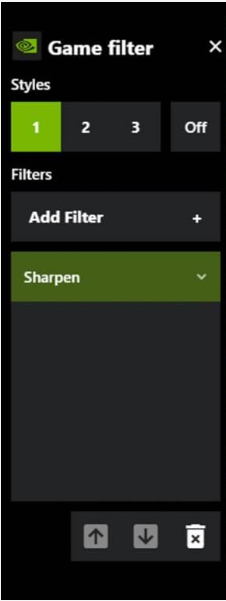
I also used Nvidia Freestyle to add sharpness like OP said, but I found another filter for it. This new filter sits as a standalone option, separate from the "detail" filter, is is simply called “Sharpen”.
-
Haven't even played this game yet after the update but now I don't want to. This AA problem was pissing me off before, and now, when it cannot be disabled... Bruh
-
As a killer, you can at least farm with survivors, for example, if you can't grab them properly, but as for survivors... I hate challenges like "do something and then escape". Especially, when this "something" is a stupid or too hard thing to do. I am not a pro survivor, and when you get a bad or inexperienced team due to matchmaking, it is soooo difficult to complete such challenges. And the Dwight one is really dumb.
-
I don't know which servers I am connected to, but two days ago I started to notice that my ping was higher than usual, yesterday it was around 135. And today it was almost 300! Despite the fact that usually at this time of the day it is always green. Even when it is a little more than 100, I experience so much lags and teleports, like I can't even reach a gen 'cause it teleports me back multiple times. It seems that today I am being connected to Korean servers for some reason, when it should be German ones.