
Rizzo
Rizzo
About
- Username
- Rizzo
- Joined
- Visits
- 5,164
- Last Active
Comments
-
A DDoS attack would take down your entire connection, not just the game, what you are describing is simply being booted out of the match.
In any case, if you believe you are experiencing a DDoS attack, please contact Support here: https://support.deadbydaylight.com/hc/en-us/categories/6713776396180-Dead-by-Daylight -
We do not discuss bans publicly.
If you want more information please contact Support here: https://support.deadbydaylight.com/hc/en-us/categories/6713776396180-Dead-by-Daylight -
For account issues, please contact Support: https://support.deadbydaylight.com/hc/en-us/categories/6713776396180-Dead-by-Daylight
-
If you have issues uploading a clip, please upload it to YouTube as unlisted and post the link.
Thank you! -
We do not discuss bans publicly.
If you want more information, please contact Support here: https://support.deadbydaylight.com/hc/en-us/categories/6713776396180-Dead-by-Daylight -
We do not discuss bans publicly.
If you want more information, please contact Support here: https://support.deadbydaylight.com/hc/en-us/categories/6713776396180-Dead-by-DaylightJust to clarify, the bot is only on the website and once the ticket is made, it is taken over by a member of the Support staff.
-
We do not discuss bans publicly.
If you want more information, please contact Support here: https://support.deadbydaylight.com/hc/en-us/categories/6713776396180-Dead-by-DaylightIf you contacted Support already, wait for a reply and do not open new tickets as it would send you back into the queue.
-
Hello, when you want to report a bug, please check the bug report section to see if it has been reported already and upvote it, otherwise you can open a new report following the given template.
Thank you.
-
Let's please keep the discussion civil and constructive, thank you.
-
You can post in our Feedback and Suggestions section fi you have anything to suggest:
-
Hello, when you want to report a bug, please check the bug report section to see if it has been reported already and upvote it, otherwise you can open a new report following the given template.
Thank you.
-
Nothing we can do about it on the forums.
They might be experiencing a surge of tickets and a reply might take a bit longer than usual, but you have to wait for them, just be sure not to open new tickets, because that will send you back into the queue. -
We do not discuss bans publicly, if your friend wants more information, they can contact Support here: https://support.deadbydaylight.com/hc/en-us/categories/6713776396180-Dead-by-Daylight
-
@Mortyfication said:
I tried to upload a video but it says the size is too large. Any other way I can send it?
You can upload the video to YouTube and post the link.
-
@Mr_Digi said:
https://forums.bhvr.com/dead-by-daylight/discussion/comment/3829593#Comment_3829593
probably is, after some more digging, i noticed that they also have screenshot of the diatech hype shirt, that i also have. Only i have a DLC for the shirt, he does not have the DLC. so most likly cheated. I reported the user
Thank you!
-
Sounds like a cheater, as far as I am aware, there are currently no bugs regarding that.
-
As Katsuh and Hermit already explained, the in-game actions you mentioned are not reportable offenses and if you have doubts, please refer to the game rules:
Regarding the threats you received in your PSN messages, you have to report that to the platform itself, as BHVR has no control over it.
Now if you encounter something that breaks the rules, keep in mind in-game reports are mandatory for every offense, but they are not the only necessary step to take for things like cheating and griefing. You would also need a clip of the match and a ticket here: https://support.deadbydaylight.com/hc/en-us/categories/6713776396180-Dead-by-Daylight -
@IBITE said:
https://forums.bhvr.com/dead-by-daylight/discussion/comment/3825986#Comment_3825986
Hiii, I attatched my log ! lmk if you need anything else
Thank you!
-
Could you please attach the logs to the report?
To find them:- Press the Windows Key + R to open the "Run" command.
- In the text box paste the following: %USERPROFILE%\AppData\Local\DeadByDaylight\Saved\Logs
- Click "OK" - this will open your Dead by Daylight Logs folder.
- The file called "DeadByDaylight.log" is your log file
-
Let's keep the discussion civil, thank you.
-
@Grigerbest said:
https://forums.bhvr.com/dead-by-daylight/discussion/comment/3824279#Comment_3824279
Does this report following a template?
https://forums.bhvr.com/dead-by-daylight/discussion/430460/tome-not-working
And this is mine. —
https://forums.bhvr.com/dead-by-daylight/discussion/430117/constant-200-ping-on-the-new-event
Do I really need to make a screenshot of the red bar in the lobby in order to have my report approved on this one?
A screenshot is not necessary, but you are on PC, so you should attach the logs.
And again, simply follow the steps. -
When you open a report, there is a preset template:
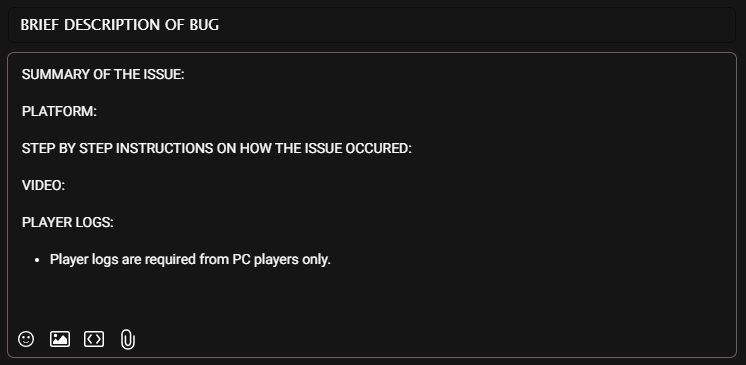
Just follow the steps given and attach videos and logs (if you are on PC).
For what I'm seeing from your reports, you did not follow the template and you did not attach videos and/or logs. -
Hello, when you want to report a bug, please check the bug report section to see if it has been reported already and upvote it, otherwise you can open a new report following the given template.
Thank you.
-
It's a known issue and it's being investigated:
@Goblin_BHVR said:
Breakable Walls are appearing in some maps where they are not intended to be
-
Hello, when you want to report a bug, please check the bug report section to see if it has been reported already and upvote it, otherwise you can open a new report following the given template.
Thank you.
-
Hello, when you want to report a bug, please check the bug report section to see if it has been reported already and upvote it, otherwise you can open a new report following the given template.
Thank you.
-
Hello, when you want to report a bug, please check the bug report section to see if it has been reported already and upvote it, otherwise you can open a new report following the given template.
Thank you.
-
@Archael said:
log added
Thank you!
-
To find them logs
- Press the Windows Key + R to open the "Run" command.
- In the text box paste the following: %USERPROFILE%\AppData\Local\DeadByDaylight\Saved\Logs
- Click "OK" - this will open your Dead by Daylight Logs folder.
- The file called "DeadByDaylight.log" is your log file
-
If you could attach the logs, that would be helpful.
To find them:- Press the Windows Key + R to open the "Run" command.
- In the text box paste the following: %USERPROFILE%\AppData\Local\DeadByDaylight\Saved\Logs
- Click "OK" - this will open your Dead by Daylight Logs folder.
- The file called "DeadByDaylight.log" is your log file
-
The developers who check the forums, do so in their free time.
Part of the Community Managers' job is collecting feedback and reporting it to the various teams, so that's why they participate more actively to the platforms (not just the forums as this is not the only place where feedback gets collected).
So the answer is maybe? I'm sure he, just like others, is curious to see the community's reactions to specific things. -
Hello, when you want to report a bug, please check the bug report section to see if it has been reported already and upvote it, otherwise you can open a new report following the given template.
Thank you.
-
Just to clarify, working with the other team is against the game rules, so if you encounter it, you should record your match, report in game and open a ticket here: https://support.deadbydaylight.com/hc/en-us/categories/6713776396180-Dead-by-Daylight
I do not think an automated system for this type of offenses is something feasible.
-
Just to echo Peanits' words, please participate to the original Reddit thread and share your ideas there:
@Peanits said:
Hey folks, we appreciate all of you who have shared your thoughts so far! I just wanted to hop in really quick as ask you to please share any feedback you have in the Reddit thread as well if you haven't already. Opinions often differ from one platform to another, so I'd really encourage you to make sure your voice is heard by contributing in the original thread, even if it's just by upvoting posts you agree with.
-
Hello, when you want to report a bug, please check the bug report section to see if it has been reported already and upvote it, otherwise you can open a new report following the given template.
Thank you.
-
Thank you!
-
To find your Dead by Daylight logs:
- Press the Windows Key + R to open the "Run" command.
- In the text box paste the following: %USERPROFILE%\AppData\Local\DeadByDaylight\Saved\Logs
- Click "OK" - this will open your Dead by Daylight Logs folder.
- The file called "DeadByDaylight.log" is your log file
-
Hello, when you want to report a bug, please check the bug report section to see if it has been reported already and upvote it, otherwise you can open a new report following the given template.
Thank you.
-
Hello, when you want to report a bug, please check the bug report section to see if it has been reported already and upvote it, otherwise you can open a new report following the given template.
Thank you.
-
Hello, when you want to report a bug, please check the bug report section to see if it has been reported already and upvote it, otherwise you can open a new report following the given template.
Thank you.
-
Hello, when you want to report a bug, please check the bug report section to see if it has been reported already and upvote it, otherwise you can open a new report following the given template.
Thank you. -
We do not discuss bans publicly, if you want more information please contact Support here: https://support.deadbydaylight.com/hc/en-us/categories/6713776396180-Dead-by-Daylight
-
Let's keep the discussion constructive and respectful, disagreeing is fine, let's just avoid personal attacks.
Thank you. -
Let's keep the discussion constructive and on topic, thank you.
-
For Account issues like this, please contact Support here: https://support.deadbydaylight.com/hc/en-us/categories/6713776396180-Dead-by-Daylight
-
If you want to add information to a bug report, please upvote it and comment on it, no need to open a thread here.
Thank you. -
There is not much we can do here, if you already had an answer from Support you can try to ask for more information.
-
Tunneling and camping are not bannable and will probably never be, as they are strategies and part of the gameplay, moreover in certain scenarios they are the correct play.
We can discuss how these strategies, that can indeed be rough and unfun to deal with, can be discouraged or how alternative playstyles can be encouraged, but please let's not suggest to ban people for playing the game.
-
Just chiming in to say that the team is aware of the issue and working on a fix.
-
Hello, when you want to report a bug, please check the bug report section to see if it has been reported already and upvote it, otherwise you can open a new report following the guidelines.
This specific issue has already been reported and it's currently under review.