
Balrog
Balrog
About
- Username
- Balrog
- Joined
- Visits
- 1,435
- Last Active
Comments
-
Can we have more information on this?
Hey, would it be possible to get more info on this? It seems to be working normally upon testing. Were you against a specific killer or a perk combo that might narrow down how the issue occured?
-
Thank you for all the additional information!
-
Yes, log files are encrypted. You just upload the file here so it can be decrypted by the team.
-
Per the required template, can you please get us a copy of your logs?
Be sure they are taken right after encountering the issue.
To find them:
- Press the Windows Key + R to open the "Run" command.
- In the text box paste the following: %USERPROFILE%\AppData\Local\DeadByDaylight\Saved\Logs
- Click "OK" - this will open your Dead by Daylight Logs folder.
- If it does not open the Dead by Daylight Logs folder, it may mean that when installing Dead by Daylight you chose to save your files somewhere else and will need to check there.
- The file called "DeadByDaylight.log" is your log file
Thank you.
-
Does restarting the game client resolve the issue?
-
From today's bugfix patch:
- Fixed an issue where The Nurse's Chain Blink could fail to charge.
-
Could you please attach the logs? Be sure they are taken right after encountering the issue.
To find them:
- Press the Windows Key + R to open the "Run" command.
- In the text box paste the following: %USERPROFILE%\AppData\Local\DeadByDaylight\Saved\Logs
- Click "OK" - this will open your Dead by Daylight Logs folder.
- If it does not open the Dead by Daylight Logs folder, it may mean that when installing Dead by Daylight you chose to save your files somewhere else and will need to check there.
- The file called "DeadByDaylight.log" is your log file
Thank you.
-
For the future, logs must be captured directly after the affected Trial. You quit the game and follow these steps:
Windows Key + R to open the "Run" command.
- In the text box paste the following: %USERPROFILE%\AppData\Local\DeadByDaylight\Saved\Logs
- Click "OK" - this will open your Dead by Daylight Logs folder.
- If it does not open the Dead by Daylight Logs folder, it may mean that when installing Dead by Daylight you chose to save your files somewhere else and will need to check there.
- The file called "DeadByDaylight.log" is your log file
Thank you.
-
Just to make sure I'm understanding correctly, you are reporting a bug with the Houndmaster's dog, that using Vee's perk will prevent the dog from grabbing a Survivor?
Please provide a video or/or logs. Thank you!
-
For any account related issues, please contact Support. https://support.deadbydaylight.com
-
The team is aware of the issue and it is under investigation.
-
@Wezqu said:
Perk missing levels are usually directed to contact customer support as they fix account related issues.
Correct! Please contact Support for any account related issues. https://support.deadbydaylight.com
-
Is this still occurring as of 9.2.1?
-
Is this still an issue in 9.2.1?
-
Please contact Support regarding this issue. https://support.deadbydaylight.com
-
Can we have more information on your loadouts? What are you bringing with Object?
-
Thank you for the logs!
-
FAQ for Nintendo Switch Release Time Changes – Dead by Daylight Here is the FAQ for information on the Switch Release Time Changes.
- Switch will get the Release Update approximately two days after other platforms.
- For Switch only, the content of Bugfix Patch 1 will be rolled into Bugfix Patch 2 and will follow approximately one week after its release on all other platforms.
-
The team is aware of the issue and it has a fix upcoming. Thank you!
-
Thank you for the logs!
-
This is under investigation if matches are versus the Animatronic.
-
If anyone experiencing this on PC can get logs when this occurs, it would be greatly appreciated!
To find them:
- Press the Windows Key + R to open the "Run" command.
- In the text box paste the following: %USERPROFILE%\AppData\Local\DeadByDaylight\Saved\Logs
- Click "OK" - this will open your Dead by Daylight Logs folder.
- If it does not open the Dead by Daylight Logs folder, it may mean that when installing Dead by Daylight you chose to save your files somewhere else and will need to check there.
- The file called "DeadByDaylight.log" is your log file
Thank you.
-
Is this still occurring in 9.2.1?
-
Love your streamtuber! We will get this under review, thanks for the video!
-
The video thumbnail was chefs kiss. Thanks for the report, and making me laugh!
-
did you just… 😂
-
@melissayeti said:
i don't think this is a bug but definitely an oversight from the Devs with this system.
We have still made sure to alert the team to the issue regardless of intention. We appreciate the report!
-
Thanks for all of the extra information, I appreciate it!
-
Are you using Windowed Mode, Full Screen, or Borderless Windowed? This information will help me properly report the issue!
-
Could you please attach the logs? Be sure they are taken right after encountering the issue.
To find them:
- Press the Windows Key + R to open the "Run" command.
- In the text box paste the following: %USERPROFILE%\AppData\Local\DeadByDaylight\Saved\Logs
- Click "OK" - this will open your Dead by Daylight Logs folder.
- If it does not open the Dead by Daylight Logs folder, it may mean that when installing Dead by Daylight you chose to save your files somewhere else and will need to check there.
- The file called "DeadByDaylight.log" is your log file
Thank you.
-
We can disagree and keep the comments civil and respectful. Please keep that in mind during these discussions. Thank you!
-
Hello! Please check to ensure you do not have any filters selected. Please let us know if this does not resolve the issue; please provide a screenshot of the filters tab.
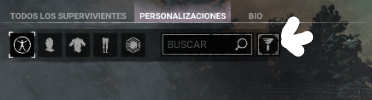
-
For this issue, please contact Support. https://support.deadbydaylight.com
-
Hi Sugar! We reviewed the video and just wanted to clarify that this is how Last Stand functions. The stun does not occur until the end of the animation. Thank you for taking the time to report this issue.
In the future, you can also upload the videos to YouTube unlisted and post those links here since the X account linked is not appropriate for our Forums.
-
Going to send you a quick DM!
-
I. Can't. Wait.
-
I want to squish it.
-
Is your crossplay enabled? Can you share a screenshot of what the queue looks like for you right now?
-
Let's please keep the conversation civil and constructive. Thank you!