
Coordi
Coordi
About
- Username
- Coordi
- Joined
- Visits
- 4,649
- Last Active
Comments
-
Congratulations!
-
Going to close this. If there is feedback that is relevant and new, please feel free to create a new thread.
-
Hey everyone, please ensure comments and debates remain constructive. Personal attacks are never needed or wanted in these conversations. Thank you!
-
When did you perform the invocation? What perks did the Killer have?
-
The video is no longer available.
-
@gerolau said:
https://forums.bhvr.com/dead-by-daylight/discussion/comment/3980150#Comment_3980150
glad to see youre okay
🖤
-
@Shroompy said:
https://forums.bhvr.com/dead-by-daylight/discussion/comment/3979698#Comment_3979698
Does that mean we have to go on an easter egg hunt for your profile picture
Now that's an idea!
-
@Amanova said:
https://forums.bhvr.com/dead-by-daylight/discussion/comment/3979534#Comment_3979534
Hun, where is your old avatar? I liked it so much! You look like a regular member now...
It's around here, somewhere. ;)
-
@Coffeecrashing said:
https://forums.bhvr.com/dead-by-daylight/discussion/comment/3979522#Comment_3979522
This entire thread is invalid. It’s based around the false statement that fog vials are only “too strong” if people are using filters.
But fog vials have been proven to be bugged even with zero filters.
I'm not here to shut down conversation. This is a player's experience and we can be constructive when talking about it together.
-
This game has SO much amazing sound design, and the clip clop shoes are some of my FAVORITE.
-
Please keep the post civil and on topic! Whilst the difference between infinite and not infinite is noted since a Trial does end, let's move on from that aspect of it and continue the discussion without those specific semantics. <3
-
Hey - just wanted to confirm this bug has been reported and is under review with the team. Thanks for making sure we were aware!
-
The logs are overwritten every time you launch the game; so if you played since experiencing the issue, these logs won't have the custom match information.
-
For inconsistent issues, the logs captured after the affected game are the best way for QA to get to the bottom of it!
After the issue occurs on live, quit the game. Then follow these steps:
Press Win+R
- Type in appdata
- Press OK
- In opened window navigate to: \Local\DeadByDaylight\Saved\Logs
- Usually you would need to attach the DeadByDaylight.log file.
- Send me the file!
-
What platform please?
-
I just want to make sure we have the right ones: are these logs from directly after when you quit the game after experiencing the issue?
-
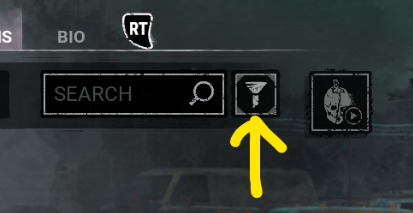
Can you check the filters for us please?
-
@hauntmares said:
https://forums.bhvr.com/dead-by-daylight/discussion/comment/3976916#Comment_3976916
Yes it was
https://x.com/DeadbyDaylight/status/1635743879109529600Thank you for the link!
-
@Adriana_ghoul said:
https://forums.bhvr.com/dead-by-daylight/discussion/comment/3976916#Comment_3976916
Thank you. Apologies if my previous comment came off as directed at you instead of the team responsible for what gets killswitched.
Sometimes the "you" is "the game" and not The Jocelyn. I get it. I also empathize with the frustration.
-
Merciless Storm wasn't kill switched to my knowledge, as it wasn't game breaking. Nemesis abuse of PWYF was critical enough that the team moved forward with the kill switch. The criteria isn't my call or expertise; I'm communicating with what information I have rather than ignoring the thread altogether. I can and have takem the feedback to the team, however, that more player facing information on the Kill Switch and criteria is wanted.
-
@gerolau said:
https://forums.bhvr.com/dead-by-daylight/discussion/comment/3976888#Comment_3976888
With all due disrespect, telling the player base to suck up and "git gud" against an exploit that they can do nothing about until they are in the match losing against it because its not as bad as [checks killswitch usage history] Nemesis' abusing PWYF (in theory beatable and not game breaking, huh, cherry picker much) then you dont deserve to be a community manager. What a horrible response to this bug. You all should be ashamed.
Please let's not put words into my mouth as neither "suck up" or "git gud" is fair to infer from what I said. This is leaving out a lot of nuance. Again, I am not here to tell people that it isn't annoying or frustrating, just that in this case there is no cause for a Kill Switch. Explaining that the feature will not be used in this case does not disable my ability in sharing feedback with the team. Sentiment, however, is not part of the Kill Switch criteria.
-
@Rapid99 said:
https://forums.bhvr.com/dead-by-daylight/discussion/comment/3976875#Comment_3976875
Acting like streetwise isn't a game breaking bug when survivors can give themselves INFINITE TOOLBOXES AND RUN THROUGH GENS is an absolute joke. There's no way you guys are being serious.
Like I said with the above reply… embarrassing.
Respectfully, considering how long it takes to even exploit the bug, it isn't affecting games enough to meet the criteria. I am not discounting the frustration or feedback about how it is being used. However, until it is gamebreaking, it will not receive a Kill Switch. It is a nuclear option.
-
Streetwise does not meet the criteria for a Kill Switch. It sucks to have to say that that plainlyt, as the last thing I want to do is minimize player concerns or frustrations. The team is aware, it's being monitored, but it is not breaking the game.
-
We have this one under review already and a fix is upcoming!
-
Amazing linework!
-
Hello, since this was on PC/Steam, can you please provide screenshots/video as well as your game logs?
After the issue occurs on live, quit the game. Then follow these steps:
Press Win+R
- Type in appdata
- Press OK
- In opened window navigate to: \Local\DeadByDaylight\Saved\Logs
- We need the DeadByDaylight.log file.
- Upload it to this thread.
-
The following cannot be appealed
- Temporary bans (of any kind including disconnection penalties)
- Forum bans
- Social Media bans/blocks (Twitch, Twitter, Facebook, Instagram)
- Unofficial Fan sites / Fan groups
-
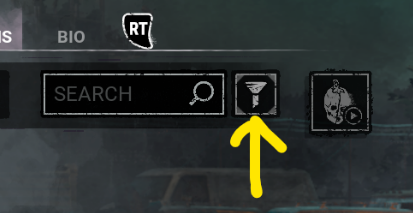
Hello, just checking with you about your filters!
-
You were never able to move again for the rest of the match? Just wanted to confirm!
-
You must exit the game to upload logs as the game is actively writing to the logs whilst the game is running.
-
Thank you for the log!
-
What prestige level is your Hillbilly? How many Bloodweb levels have you gone through? Thank you!
-
Please upload images of the missing debuff icon when working on the generator. If occurring on PC, please update with logs. Thank you!
-
Since the report is intermittent with no repro steps, if anyone on PC can get logs for this issue, it would be appreciated!
-
Can you show us a screenshot of your audio settings, please? Can you also get a capture with game audio recording only without you and others talking? Thank you!
-
-
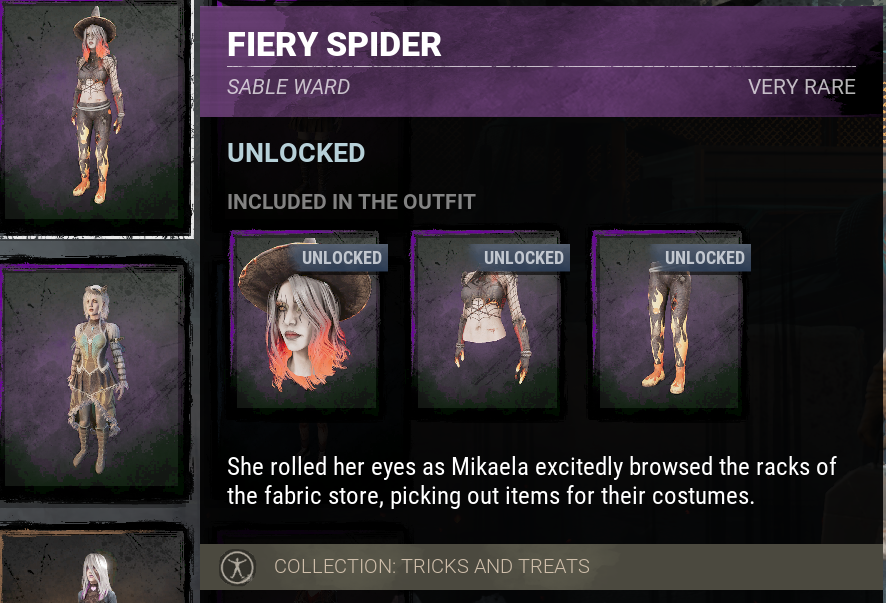
The Midnight Grove outfit for Sable Ward from 2024 was Fiery Spider. We are seeing it in her Customizations tab.
-
Please do not submit multiple bugs per report. Please submit a separate bug for each report, and check existing reports for already submitted issues.
-
Can we please have logs or a video uploaded so we can get this with QA ASAP?
After an affected match, please exit the game and follow these steps:
- Press the Windows Key + R to open the "Run" command.
- In the text box paste the following: %USERPROFILE%\AppData\Local\DeadByDaylight\Saved\Logs
- Click "OK" - this will open your Dead by Daylight Logs folder.
- If it does not open the Dead by Daylight Logs folder, it may mean that when installing Dead by Daylight you chose to save your files somewhere else and will need to check there.
- The file called "DeadByDaylight.log" is your log file
Does the penalty keep you from going to another Custom match?
-
We have this with the team and it is under review, and we appreciate the reports and feedback. <3
-
Hello, can you please provide logs and screenshots or video?
After an affected match, please exit the game and follow these steps:
- Press the Windows Key + R to open the "Run" command.
- In the text box paste the following: %USERPROFILE%\AppData\Local\DeadByDaylight\Saved\Logs
- Click "OK" - this will open your Dead by Daylight Logs folder.
- If it does not open the Dead by Daylight Logs folder, it may mean that when installing Dead by Daylight you chose to save your files somewhere else and will need to check there.
- The file called "DeadByDaylight.log" is your log file
-
Thank you!
-
Wanted to update quickly that this is under review!
-
We do not email you off of the forums, just for privacy reasons if nothing else! Please upload the clip to YouTube unlisted if necessary and post the link here.
-
Thank you for the additional information. Logs are always helpful for QA regardless of issue, however, so if you have a Trial where you experience the issue, uploading the logs here afterwards goes a long way.
-
Let's please not derail feedback threads with whatever Bingo game you're trying to play.
-
@MrDardon said:
https://forums.bhvr.com/dead-by-daylight/discussion/comment/3974152#Comment_3974152
Does it track custom games? I've used it twice in custom games but not a single time online.
Yes, custom games will generate in the logs as well!