
Rizzo
Rizzo
About
- Username
- Rizzo
- Joined
- Visits
- 5,164
- Last Active
Comments
-
We have a clearly stated rule against naming and shaming, so no, it's not allowed.
I suggest to read the forum rules before posting: https://forum.deadbydaylight.com/en/kb/articles/137-forum-rules
If you encounter people who verbally abuse others in the postgame chat, report them using the in-game report system and action will be taken, but if this kind of interactions happen via private DMs, you have to report them to the platform.
If you need more info regarding reporting, you can find them here: https://forum.deadbydaylight.com/en/kb/articles/139-game-rules
-
As Mandy already stated, we are sorry you encountered this kind of behaviors, so please report them if it happens again, which I hope it doesn't.
That said, since some people started getting political and others started throwing generalizations left and right, I decided to close this thread.
-
Please keep the discussion civil and respectful, this is a positive thread and I hope it stays that way, thank you.
-
Hello, when you want to report a bug, please check the bug report section (https://forum.deadbydaylight.com/en/categories/bugs) to see if it has been reported already and upvote it, otherwise open a new report following the guidelines.
-
Please keep it respectful and civil, if you have issues with their ideas, please explain why, without trashing them.
-
If you think you encountered a hacker, you have to record your match, report them in game and open a ticket on the Support website (https://support.deadbydaylight.com/hc/en-us/requests/new) giving all the information required.
-
Hello, when you want to report a bug, please check the bug report section (https://forum.deadbydaylight.com/en/categories/bugs) to see if it has been reported already and upvote it, otherwise open a new report following the guidelines.
-
We do not discuss bans publicly, if you need information about it, please contact Support here: https://support.deadbydaylight.com/hc/en-us/requests/new
-
The code should work, try typing it again or maybe check if you got the cosmetics without getting the notifications, perhaps you skipped them.
-
It's going to be re-enabled once the issues with the map are fixed.
-
Hello, when you want to report a bug, please check the bug report section (https://forum.deadbydaylight.com/en/categories/bugs) to see if it has been reported already and upvote it, otherwise open a new report following the guidelines.
-
Please keep the discussion civil, no need to attack others over a different opinion.
-
Reporting in-game for this kind of offenses is not enough, video evidence is required, since you need to prove they were actually hacking, evidence that can be sent to Support here: https://support.deadbydaylight.com/hc/en-us/requests/new
@Zozzy said:
Reporting literally does nothing and is thrown in the trash if you don't give them a video. So you basically need to have a dedicated youtube channel and stream or record 24/7 to report a cheater.
That's not how it works, you don't need any of that, as long as you have an NVIDIA card on PC you don't even need other programs to record your games, you just need to use the replay system built in the card and on console there's literally a share button to record the game.
For more information on the matter, please refer to this:
@Ryuti said:
Hello, people of the fog!
When reporting a player, many offences require video evidence to help us investigate your report. Below is a list of bannable offences which may require video evidence:
- Working with the opposite team to gain an advantage or grief teammates
- Targeting specific users repeatedly in order to ruin their game experience
- Holding the game hostage
- Botting
- Lag switching
- Exploit bugs, errors in design, or undocumented features to gain access to what otherwise would not be available or to obtain a competitive advantage
HOW TO RECORD YOUR MATCH:
XBOX:
- Press the XBOX button to open the guide.
- Press the VIEW button, and then select "Record from now" . Depending on your clip's resolution, you can record anywhere from 10 minutes with internal storage and up to 1 hour with external storage.
- To end the clip, open the guide and press the X button . You'll get a notification when it's been saved.
PS4:
- Press the "Share" Button on your controller to begin recording gameplay.
- When you've recorded your match, save your clip, and trim as needed.
- After that you can upload the video directly to your linked YouTube account.
- Length, quality and etc. can be changed depending on your console settings for Video sharing
PC:
- For players using an NVIDIA graphics card, you can enable Shadowplay which will automatically record any gameplay while running in the background.
- To use Shadowplay ensure you have the GeForce Experience program installed.
- Open the in-game overlay settings found in the top right corner. From there, you can turn on "Instant Replay" and adjust settings such as clip length, quality, and audio levels.
- Alternatively, you can use OBS to manually record the incidents.
INFORMATION THAT WILL AID US IN REVIEWING CASES:
Opening your escape menu and viewing the match details tab.
This will allow us to see all of the Survivor characters in the match and usernames of who is playing them.
Visiting the tally menu once a match has ended.
This will allow us to examine player loadouts including perks, items and offerings.
UPLOADING YOUR EVIDENCE
Due to the small file size limit on ZenDesk, we suggest uploading your evidence to YouTube and "Unlisting" it. This will prevent anyone without the link from seeing it, and will allow you to upload without needing to compress the quality to meet the size limit.
For XBOX players,
- Open the Youtube App, and sign in.
- Navigate to the Upload tab. You may need to turn on "Enable Sharing on Social Networks" for your clips to be visible.
- Select your recorded match
- Enter a title and then select upload.
For PC players
- If you wish to cut down your clip, you can do so in the editing software of your choice. Otherwise you can upload the raw footage straight to youtube by navigating to your shadowplay recording folder.
Please keep in mind that even with video evidence, an in-game report is still required.
Screenshots are not considered valid evidence.
If the video sent does not follow our criteria or the quality of the video is low, it is possible that nothing will be done against the player reported.
-
@Zokenay said:
Title.
Having this dumbasses telling the killer where survivors are and sabotaging them should get them a suspension on the spot.
Im annoyed at the name shaming rule, but dear god, i would gladly post both their names here so people know these idiots for what they are.
If you think two players are teaming, you can record your game, report them in game and then open a ticket on the Support website (https://support.deadbydaylight.com/hc/en-us/requests/new) selecting "Additional Player Report Information".
-
Hello, when you want to report a bug, please check the bug report section (https://forum.deadbydaylight.com/en/categories/bugs) to see if it has been reported already and upvote it, otherwise open a new report following the guidelines.
-
Hello, when you want to report a bug, please check the bug report section (https://forum.deadbydaylight.com/en/categories/bugs) to see if it has been reported already and upvote it, otherwise open a new report following the guidelines.
Also please contact Support here if the perks have been bought but not unlocked: https://support.deadbydaylight.com/hc/en-us/requests/new
-
Please keep the discussion civil and on topic, thank you.
-
For verbal abuse you are just required to report in-game, if you want to send additional evidence, you have to open a ticket on the Support website (https://support.deadbydaylight.com/hc/en-us/requests/new) selecting Additional Player Report Information.
-
When you encounter a hacker or if you think someone is hacking, record your match, report in game and open a ticket on the Support website (https://support.deadbydaylight.com/hc/en-us/requests/new) giving all the required information.
If you are not sure how to record your match, this thread may be useful:
@Ryuti said:
Hello, people of the fog!
When reporting a player, many offences require video evidence to help us investigate your report. Below is a list of bannable offences which may require video evidence:
- Working with the opposite team to gain an advantage or grief teammates
- Targeting specific users repeatedly in order to ruin their game experience
- Holding the game hostage
- Botting
- Lag switching
- Exploit bugs, errors in design, or undocumented features to gain access to what otherwise would not be available or to obtain a competitive advantage
HOW TO RECORD YOUR MATCH:
XBOX:
- Press the XBOX button to open the guide.
- Press the VIEW button, and then select "Record from now" . Depending on your clip's resolution, you can record anywhere from 10 minutes with internal storage and up to 1 hour with external storage.
- To end the clip, open the guide and press the X button . You'll get a notification when it's been saved.
PS4:
- Press the "Share" Button on your controller to begin recording gameplay.
- When you've recorded your match, save your clip, and trim as needed.
- After that you can upload the video directly to your linked YouTube account.
- Length, quality and etc. can be changed depending on your console settings for Video sharing
PC:
- For players using an NVIDIA graphics card, you can enable Shadowplay which will automatically record any gameplay while running in the background.
- To use Shadowplay ensure you have the GeForce Experience program installed.
- Open the in-game overlay settings found in the top right corner. From there, you can turn on "Instant Replay" and adjust settings such as clip length, quality, and audio levels.
- Alternatively, you can use OBS to manually record the incidents.
INFORMATION THAT WILL AID US IN REVIEWING CASES:
Opening your escape menu and viewing the match details tab.
This will allow us to see all of the Survivor characters in the match and usernames of who is playing them.
Visiting the tally menu once a match has ended.
This will allow us to examine player loadouts including perks, items and offerings.
UPLOADING YOUR EVIDENCE
Due to the small file size limit on ZenDesk, we suggest uploading your evidence to YouTube and "Unlisting" it. This will prevent anyone without the link from seeing it, and will allow you to upload without needing to compress the quality to meet the size limit.
For XBOX players,
- Open the Youtube App, and sign in.
- Navigate to the Upload tab. You may need to turn on "Enable Sharing on Social Networks" for your clips to be visible.
- Select your recorded match
- Enter a title and then select upload.
For PC players
- If you wish to cut down your clip, you can do so in the editing software of your choice. Otherwise you can upload the raw footage straight to youtube by navigating to your shadowplay recording folder.
Please keep in mind that even with video evidence, an in-game report is still required.
Screenshots are not considered valid evidence.
If the video sent does not follow our criteria or the quality of the video is low, it is possible that nothing will be done against the player reported.
And please keep the discussion civil, no need to attack one another.
-
We already explained you multiple times that Camping and Tunneling are not breaking any rule, there's nothing more we can add to this.
Please refer to the game rules, in all their parts, when you have doubts in regards of what is reportable or not: https://forum.deadbydaylight.com/en/kb/articles/139-game-rules
And as you can see from that post:
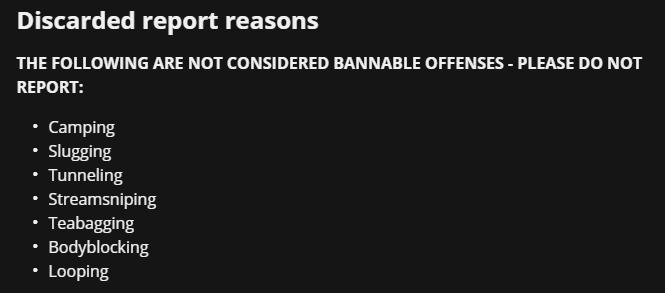
The rules are not going to change because you interpret them incorrectly.
-
Hello, when you want to report a bug, please check the bug report section (https://forum.deadbydaylight.com/en/categories/bugs) to see if it has been reported already and upvote it, otherwise open a new report following the guidelines.
-
@ObscurityDragon said:
https://forum.deadbydaylight.com/en/discussion/comment/2324531#Comment_2324531
https://forum.deadbydaylight.com/en/discussion/comment/2324531#Comment_2324531
Yeah but why do they write they fixed it for these two killers too :')
BHVR in a nutshell

No other Killer is mentioned.
As Mandy stated in a different thread, it's not intentional that DS and Trickster can't hit through those windows anymore (https://forum.deadbydaylight.com/en/discussion/comment/2322181#Comment_2322181)
-
I'm closing this thread, since OP decided to threaten people to report them and labeled everything that doesn't align with their view as "troll".
Just a reminder that when you post a thread, you open yourself to criticism, it's a discussion, not a monologue.
-
Thank you for your reports, the team has been informed and is aware of the issues, they are looking into it.
-
https://media.giphy.com/media/VbnUQpnihPSIgIXuZv/giphy.gif@Mandy said:
Was there an actual killer in that match as well?
I'm trying to figure out what happened here.
(do you have a cat?)
Is this what you are assuming there? 👀
-
Thank you for your reports, everyone, the team is looking into the issues, as stated here:
https://twitter.com/DeadByBHVR/status/1410264844557770754Hopefully they get solved promptly.
-
I'm gonna say this one more time: please keep the discussion civil, there won't be any more warnings.
-
@Razorbeam said:
6 hours later my threads approved
Sorry, I just started my work day, it's 9 am here, couldn't do it earlier than this.
-
Please keep politics out of the discussion and keep it civil, thank you.
And it saddens me that I have to state this once again, but people's identity is not a political matter, don't treat it as such, thank you.
-
Hello, when you want to report a bug, please check the bug report section (https://forum.deadbydaylight.com/en/categories/bugs) to see if it has been reported already and upvote it, otherwise open a new report following the guidelines.
-
The blocking option is to block communications with that user, it has nothing to do with encountering them in game.
-
Hello, when you want to report a bug, please check the bug report section (https://forum.deadbydaylight.com/en/categories/bugs) to see if it has been reported already and upvote it, otherwise open a new report following the guidelines.
-
Hello, when you want to report a bug, please check the bug report section (https://forum.deadbydaylight.com/en/categories/bugs) to see if it has been reported already and upvote it, otherwise open a new report following the guidelines.
-
I love when things like this happen, it reminds me of a friend of mine who used to play this game a lot, she would let you live if you offered her your toolbox, that she used to call lunchbox, she even had it on her Steam profile.
She was a scary af killer, so offering the toolbox could've been your only way out!
-
For issues like this, please contact Support here: https://support.deadbydaylight.com/hc/en-us/requests/new
-
Many of the bugs that have been fixed were found during the PTB, which means that work on these issues started a few weeks ago. That said, not all bugs are equal or even worked on by the same people! The team is still working hard on delivering a fix for these known issues as soon as possible.
-
@Mandy said:
Another vote for Noodle Legs - that's probably my all time favourite!
Same, I miss Noodle Legs :(
-
Hello, when you want to report a bug, please check the bug report section (https://forum.deadbydaylight.com/en/categories/bugs) to see if it has been reported already and upvote it, otherwise open a new report following the guidelines.
-
Hello, when you want to report a bug, please check the bug report section (https://forum.deadbydaylight.com/en/categories/bugs) to see if it has been reported already and upvote it, otherwise open a new report following the guidelines.
-
Hello, when you want to report a bug, please check the bug report section (https://forum.deadbydaylight.com/en/categories/bugs) to see if it has been reported already and upvote it, otherwise open a new report following the guidelines.
-
Hello, when you want to report a bug, please check the bug report section (https://forum.deadbydaylight.com/en/categories/bugs) to see if it has been reported already and upvote it, otherwise open a new report following the guidelines.
-
Hello, when you want to report a bug, please check the bug report section (https://forum.deadbydaylight.com/en/categories/bugs) to see if it has been reported already and upvote it, otherwise open a new report following the guidelines.
-
Please keep in mind we have a naming and shaming rules, so avoid posting to just throw shades at those mentioned in this thread, thank you.
-
Closed as requested by OP.
-
For issues like this, please contact support here: https://support.deadbydaylight.com/hc/en-us/requests/new
-
Hello, when you want to report a bug, please check the bug report section (https://forum.deadbydaylight.com/en/categories/bugs) to see if it has been reported already and upvote it, otherwise open a new report following the guidelines.
-
Hello, when you want to report a bug, please check the bug report section (https://forum.deadbydaylight.com/en/categories/bugs) to see if it has been reported already and upvote it, otherwise open a new report following the guidelines.
-
Hello, when you want to report a bug, please check the bug report section (https://forum.deadbydaylight.com/en/categories/bugs) to see if it has been reported already and upvote it, otherwise open a new report following the guidelines.
-
Hello, for issues like this, please contact Support here: https://support.deadbydaylight.com/hc/en-us/requests/new