How do you make your own font colored?

Well, those who are on the ultimate quest to be fabulous; Do not fret! (no one can be more fabulous than me, obviously ;p) To unleash the power of divinity you simply type (remove all spaces I put. The only space you keep is between font and color) < font color = # (number code) > or remove # and instead type the name of the color, no spaces between words, like BrightRed, it’s also not case sensitive.
Now You’ve done it! Congratulations! Colors are a great way to express and differentiate your identity! Colors that are already currently used are purple, pink, green, light blue/cyan, and red!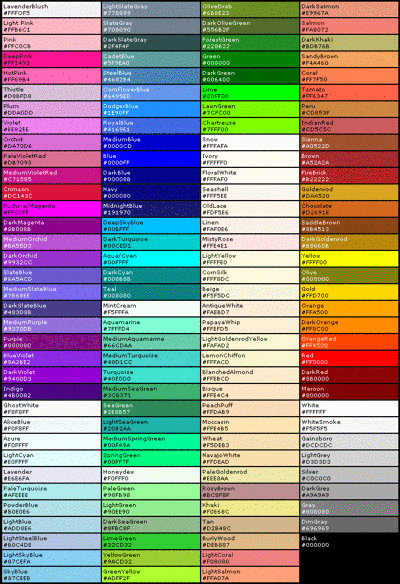
Comments
<font color=(orchid)
test
test
\
test
testing
I swear to god I'm going to castrate somebody
last attempt and then I give up with this bull
ok so if I'm doing this on a mobile I have to go on desktop mode or it's not going to work
Billy and Amanda are the sexiest Killers anyone who disagrees is objectively wrong
ok let's see if this actually works
<fontcolor=darkgreen> dang thas tuff
pp
Very informative
I shall now abuse this font color change.
This helps us learn how do do it, but I prefer vaporwave text font now
Test
Edit: Oh wow
Test
Testing
You forgot the "" at the BrightRed
Edit: Bright is not a usable thing
Thanks
Test4
Oof
Test5
Test VI
Test VII
<font color=“BrightRed">
Test VIII
Are you using a mobile? That might be the case. Go to desktop version.
Whoops
oh
Test IX
There you go. Have fun
My eyes!!
XD
This color seems nice
Nothing Beats Green For Me
I like how aggressive it is
Test?
Test
Edit : welp, I failed.
Haha Newbs >:D
Testing, testing, 1,2,3
Haha, muffugas! I'm fabulous!
Pathetic

> @PhantomMask20763 said:
Oi!

I apologize :frown:
Thank you , I owe you my life