How do you make your own font colored?

Well, those who are on the ultimate quest to be fabulous; Do not fret! (no one can be more fabulous than me, obviously ;p) To unleash the power of divinity you simply type (remove all spaces I put. The only space you keep is between font and color) < font color = # (number code) > or remove # and instead type the name of the color, no spaces between words, like BrightRed, it’s also not case sensitive.
Now You’ve done it! Congratulations! Colors are a great way to express and differentiate your identity! Colors that are already currently used are purple, pink, green, light blue/cyan, and red!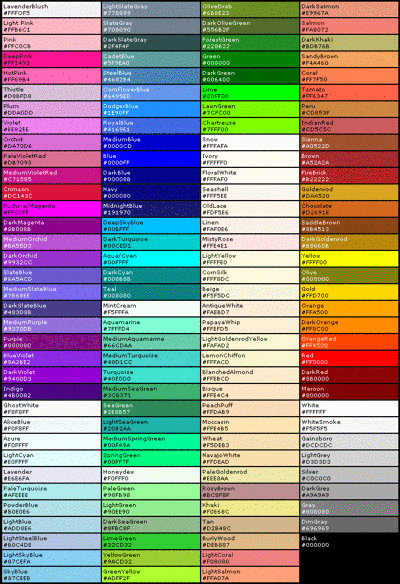
Comments
I think it was removed.
=ok then @A_Crow
Test
<font color=Green> Test
Test
Test
can ya plz tell me what I did wrong then?
Colored font is no longer possible. In fact, the whole reason that the mods changed the forum was because folks were changing their font color. In summary, don't try using a different colored font, it will make the mods angry.
oh, ok. didn't know, thanks.
Ooo Hexadecimal!
<fontcolor=#FF69B4> Test
Welp @Jack11803
<font color=White>- Test page omg. <font color=Orange> (ayy)
<font color=White>- I wonder if this works. <font color=Orange> (hello)
@TheBretzel Font Color was removed. This won't work anymore.
My poor Lime Font :'(
Yea just read the comments in disapointments q.q
@Shad03
<font color="Lime"> -Fingers crossed-
Edit: D A R N
<font color=#00d009> If this doesn’t work, then the forums have reached a truly tragic tragic time.