How do you make your own font colored?

Well, those who are on the ultimate quest to be fabulous; Do not fret! (no one can be more fabulous than me, obviously ;p) To unleash the power of divinity you simply type (remove all spaces I put. The only space you keep is between font and color) < font color = # (number code) > or remove # and instead type the name of the color, no spaces between words, like BrightRed, it’s also not case sensitive.
Now You’ve done it! Congratulations! Colors are a great way to express and differentiate your identity! Colors that are already currently used are purple, pink, green, light blue/cyan, and red!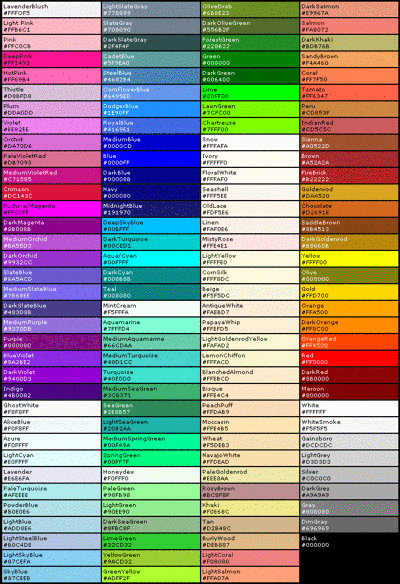
Comments
Dark orchid is reserved and if you touch it I'll tickle your pickle.
Although I didn't consider Dark Violet.
Indigo would be the color I'd put on my video game characters.
Yup, I'm switching to DARK VIOLET
Don’t worry, that’s what I meant by purple very indecisive honey-bun~
@Jack11803 said:
Nope, I'm swapping to Dark Violet.
Test?
Crap...I don’t know how to cross out font thingy whatever it’s called...
You mean this?
Use the word "strike"
POP.....NICE
I CAN'T READ THE CHART NUMBERS THEY ARE TOO SMALL SO HERE IS A RANDOM NUMBER DID IT WORK?
EDIT: COOL I GOT A WEIRD GRAY
EDIT 2: OH WAIT THIS IS THE NORMAL COLOR IT DIDN'T WORK
Which gray do you want? Some colors work by name, if not, I could read the number
cool I didn't know you could just say name of color
Edit: WHY YOU NO WORK I SAY "BLUE"
Edit 2: got it to work had to zoom in a lot, but EEEEW blue is ugly and cannot be read!
Edit 3: Ok Royal Blue is readable but holy ######### it is ugly. I will just stick to normal grey text from now on....
test
What is the format to strike stuff out?
Test
I think it’s same remove space rule as before < Strike > then to end it, < / Strike >
Test
I think I may have finally found the ugliest best color!
Edit: Fixed the strike. Also only thing wrong with this color is that it is hard to see the strike.
test
you mean, ugliest best color? Did you use the right /
@RagingCalm
Also, feel free to make as many Test comments, I only get a note in my backlog while on the site, not phone ding, so it won’t disturb me at all
Need to make a lengthy post to test this one.
Test
Remove parenthesis, I fixed it for you
Edited it and fixed it.
Edit: Also, how do you remember your font color lol? Just good memory? I have to remember 1e90ff >_<
I think the color is good. Strike is always hard to see on any color, not hard enough that people won’t notice though, so it’s fine
My code is easier, just 00d009. And I’ve done it so much it’s secind nature and muscle memory at this point,
@Jack11803 Not sure if you knew this, but I see you are making many test comments and posting them. It is possible to preview your comment/post before actually posting it, so you can test different stuff without having to comment fully. The button is to the left of Save Draft, which is to the left of Post Comment.
For example, I used Preview to make sure this font color works without having to make a seprate test post.
Edit: damn I just chose a random one for demonstration purposes, but I love it! DAA520 for the WIN!
Thanks,
Not sure if I should use this
or this
@Jack11803 Which color should I use daddy?
Edit: sorry for everyone who reads that. I just made my eyes hurt like hell by glancing at the contrast in those colors side by side.
Blue seems to look the most comfortable, and the most unused bubble of color. Plus, it justs feels like it goes with the way you act? I don’t know?
Test1
Test 2
<font color=darkviolet>
last try !
Quite interesting that it doesn't work for you.
I copy/pasted your markdown and it seems to work.
Let's see how it looks like
Nice!
Snip
(Don't ask)
testing one two Edit: Nice
@HIPSTERLION Almost had it. Just remove the parenthesis around the hexadecimal code and the font command at the end. This surprisingly doesn't work like python scripts
That isn't in my English level O_O
can you send a screenshot of the way you type it .
Do this
Also remember, some color names don’t work, and you must type the code, instead of =, type =# then the number
DO THIS, <font color=#9400D3>
It Doesn't fookin work >_<
Whats with the span style stuff? Why’d that appear?
Span style stuff ?
I know I'm so dumb
@HIPSTERLION. Try this.
<font color="#24FF5C">I AM AWESOME!!!</font>Should work.
Result is:
I AM AWESOME!!!
Thanks for help but it doesn't work
That is so odd...
Because if I copy/paste what you literally just wrote up there I get:
I AM DUMB ! ! !
(Which by the way, you are not)
Maybe you've changed some things in your settings since you registered? (I don't even know what options there are to change on this forum)
You're not doing anything wrong. It just doesn't want to work for you, lol.