
Coordi
Coordi
About
- Username
- Coordi
- Joined
- Visits
- 4,649
- Last Active
Comments
-
@Vegito said:
https://forums.bhvr.com/dead-by-daylight/discussion/comment/3792125#Comment_3792125
Hey my friend is having the same issue with none of these fixes working, can I DM you her Steam ID?
We don't need any more Steam IDs for the investigation but we appreciate everyone that has reached out! The team is currently working on the issue.
-
Hello, can you please attach a game log if on PC? Thank you.
-
Thank you.
-
Was this with 8.2.0 or after the bugfix patch today?
-
Please report bugs through Support https://support.bhvr.com/hc/en-us/articles/29613645876244-How-do-I-report-bugs
-
If you have completed the steps and have still not received the rewards, you need to contact Support: https://support.bhvr.com
-
Can you please attach a game log? Thank you!
-
Yes, please DM me!
@crystalkitti said:
https://forums.bhvr.com/dead-by-daylight/discussion/comment/3792224#Comment_3792224
Thank you! This seems like something that should be kept on the private side, though I'm not sure; is it ok if I message you with mine?
-
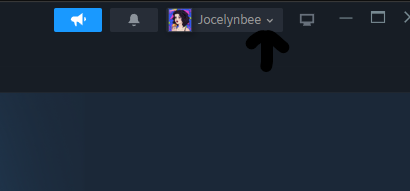
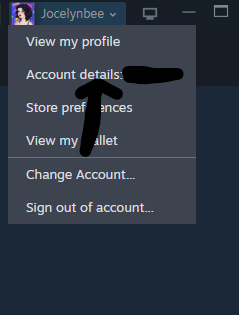
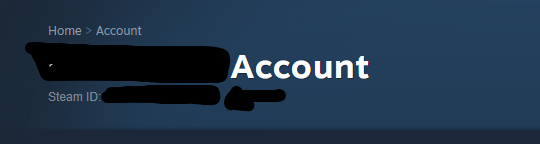
Sorry for my photoshops.
-
@Witchu said:
https://forums.bhvr.com/dead-by-daylight/discussion/comment/3792125#Comment_3792125
Many of us have mentioned we've tried everything possible. Here, on reddit, on the steam forums, we've tried every option.
Please DM me your Steam or EGS ID!
-
Please report bugs or suspected bugs in the appropriate area for proper tracking.
-
Hi, everyone! Can you please ensure that you are running your games as Admin? If running as Admin is not resolving the issue, can you please DM me your Steam IDs or your Epic Game Store ID? Thank you for your help!
-
For any bugs or technical issues, please contact Support. https://support.bhvr.com/hc/en-us/articles/29613645876244-How-do-I-report-bugs
-
For Casting of Frank Stone issues, please contact Support. https://support.bhvr.com/hc/en-us/articles/29613645876244-How-do-I-report-bugs
-
If you are having an account related issue and missing a cosmetic, please contact Support. https://support.deadbydaylight.com
-
The team is still investigating the issue affecting EGS players, and we'll provide updates as we go. Thank you for your patience.
-
Please uninstall, restart Steam, and initiate install again.
-
Hi, can you tell us if you pre-ordered?
-
Please keep the responses constructive and respectful. Thank you!
-
Thanks for the updates, I can get this communicated to the team.
-
@Princ3ssYami said:
I’m having the same exact issue with my game. Using windows Xbox on PC - nothing seems to be helping. I tried to download it on steam, worked fine yesterday but today it’s doing the same thing. Super annoying.
Players are sharing this workaround on Reddit for XBOX app on PC:
make sure your Xbox app is closed, you can go to task manager and end task
go to the folder EasyAntiCheat on the XboxGames within your game files
find EasyAntiCheat_EOS_Setup.exe
right click on it, make a shortcut
right click on the shortcut and go to properties
in the Target box, type "install prod-fn" (without quotes) after the last quotation mark
The end of the text should now look like: EasyAntiCheat_EOS_Setup.exe" install prod-fn
now press Apply then OK
now open up DBD and have fun :)
-
@NSKYW said:
https://forums.bhvr.com/dead-by-daylight/discussion/comment/3789821#Comment_3789821
Только что попробовал данный способ, сделал и БЕЗ перезагрузки компьютера и так же С.
К несчастью ничего не вышло, до сих пор зайти в игру могу, но поиграть нет, даже в свою игру с ботами не дает сыграть. Надеюсь разработчики починят все как можно скорее, мы все ждем!!!❤️What platform are you on?
-
@sk_f0cus said:
okay, i have checked epic games and steam both contains no sale on base game. when will be base game sale coming any idea because i want to buy it.
I see the Gold Edition 50% off on Steam! As stated, it varies by platform, and Steam and Epic Games Store do not have the base game on sale.
-
@Skillfulstone said:
https://forums.bhvr.com/dead-by-daylight/discussion/comment/3789788#Comment_3789788
And for people not playing on PC that can't provide logs, is there an alternative which will contribute to fixing something making some challenges nigh-impossible and making ranking up in Gold/Iri rank much harder? Are images including match-time enough?
Unfortunately, the logs help provide the appropriate context that is needed for investigation.
-
This is the only workaround we have seen posted that players are having success with:
- Go to your game's folder (Right click on the Dead by Daylight-> Manage->Browse local files:)
- Open the easy anti cheat folder
- Whilst holding the Shift key, right click "EasyAntiCheat_EOS_Setup.exe" and select "Copy as path"
- Press the Win key + R at the same time to open the Run prompt. Alternatively, open the Start Menu, search for "Run" and open the app from there
- Select the field next to open and press Ctrl-V to paste and At the end of the text, enter a space and the following: "install 2b2299be8ae84d679d4dc57c55af1510"
- Type "Ctrl+Shift+Enter" to run as admin and EAC will install for you. You should receive a User Account Control pop up asking to allow it to make changes to you device, if you are not running as admin. You will need to click "Yes"
-
We do not have an official Reddit so I'm not sure about the FAQ there. Cross-progression and account linking are different, but if you are experiencing account related issues, Support is the way to go: https://support.deadbydaylight.com Currently, we do not have access to check the duration on the waiting period.
https://support.deadbydaylight.com/hc/en-us/articles/28143341034644-Cross-Progression-Release-FAQ
-
Correct, this is not a bug! It is coming in a future patch.
-
We need more logs for these instances as we need to be able to see match times, and other conditions happening in the Trial. Thank you!
-
@ArchAbhor said:
https://forums.bhvr.com/dead-by-daylight/discussion/comment/3789220#Comment_3789220
Yes and I didnt know how. Now that I do if it happens again I'll get it for you.
Thank you! We will leave this report open so you can update it if you do get one.
-
This is a Known Issue. https://forums.bhvr.com/dead-by-daylight/discussion/424336/core-memory-terrifying-anamnesis-only-works-on-escape
-
Were you on PC? Can you provide a log?
HOW TO GET YOUR LOGS (THIS PART ONLY APPLY TO PC PLAYERS):When you get the issue, close your game and do not reopen it until you get your logs.
- Press Win+R
- Type in appdata
- Press OK
- In opened window navigate to: \Local\DeadByDaylight\Saved\Logs
- Usually you would need to attach the DeadByDaylight.log file.
- Add the file to your bug report
-
We deployed a fix to solve an issue preventing players from unhooking, healing or picking up Survivors. Players will need to reboot to see the change reflected in-game. Thank you for your patience!
-
Post is right here to the forums, that's perfect.
-
We deployed a fix to solve an issue preventing players from unhooking, healing or picking up Survivors. Players will need to reboot to see the change reflected in-game. Thank you for your patience!
-
@HPhoenix said:
https://forums.bhvr.com/dead-by-daylight/discussion/comment/3789057#Comment_3789057
I don't have crash logs. The game just freezes. I can give you guys DbDLogs if anything.
Yes please, thank you!
-
Hello, can you please provide a crash log?
-
@metaleiro said:
https://forums.bhvr.com/dead-by-daylight/discussion/comment/3788184#Comment_3788184
it’s not fixed here 🥺
What platform, please? Have you checked to see if it is showing as claimed on your BHVR account? Did you reboot your game?
-
Please reboot and check your inventories! This issue has been fixed.
-
Thank you for the additional screenshots!
-
Are you able to provide a log?
HOW TO GET YOUR LOGS (THIS PART ONLY APPLY TO PC PLAYERS):
When you get the issue, close your game and do not reopen it until you get your logs.
- Press Win+R
- Type in appdata
- Press OK
- In opened window navigate to: \Local\DeadByDaylight\Saved\Logs
- Usually you would need to attach the DeadByDaylight.log file.
- Add the file to your bug report
-
Can you tell us more? Is this Windows Store, Epic Games, Steam? Can you provide any logs? Our pinned post has information on how to get it. Thank you.
-
Please keep the post on topic and constructive. Thank you.
-
I will check the queue. Thank you!
-
@Rugalraim said:
My friend is scared to death from this. Please, someone confirm to me that he won't get banned for using NVIDIA filters!
We cannot confirm the safety of any third party programs.
-
@sausage11 said:
https://forums.bhvr.com/dead-by-daylight/discussion/comment/3787342#Comment_3787342
I just had a match where I couldn't pick up the last survivor, and I was worried that they would report me for holding the game hostage so I disconnected and didn't let her bleed out. Is this something you are aware of? Another situation that would be quiet risky imo, is the unhook-bug. For the survivor on the hook it could look like the other survivor is griefing by intentionally not unhooking them.
Another log from my match as killer, where I couldn't pick up the survivor:
https://us.v-cdn.net/6030815/uploads/0FY2BS0PFG7R/deadbydaylight.log
Can you create a new bug report for this one, with the information about map/killer and build? Thank you!
-
Thank you so much for providing a log!
-
Can you please provide more information, such as a video or screenshot?
-
We do not support any third-party software and we have always advised players that they are "use at your own risk".
-
Thank you for the updates and videos!