It's soooo tiny!!!!
(That's what she said!!! ...hey....wait)
So I finally got my Xbox Series X today. YAY!!!!
However...
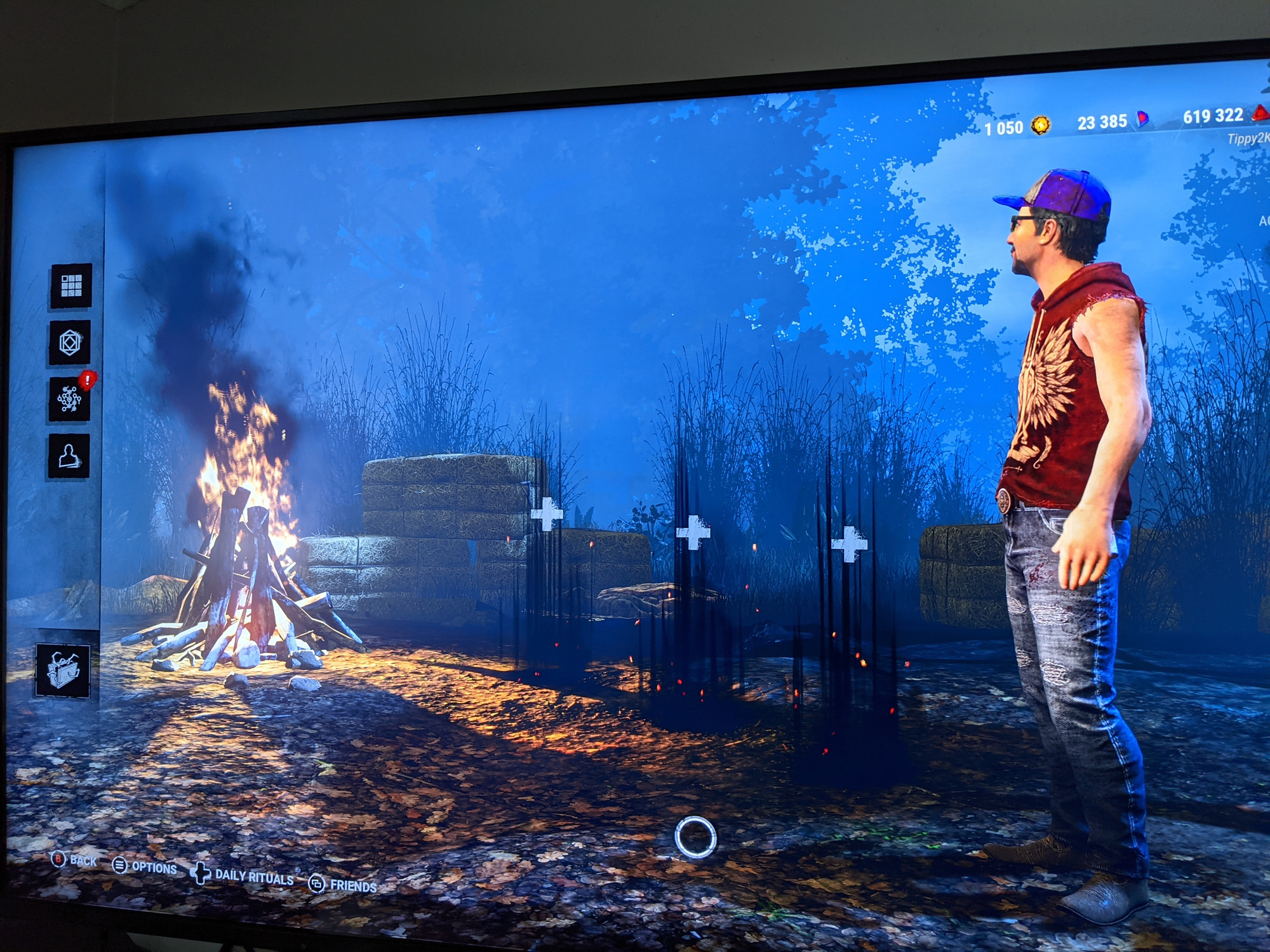
As you can see with my screenshot, everything but the character model looks weirdly tiny (except for Ace, he still gets to be normal sized). This isn't a game breaking problem or whatnot but when in game getting skill checks, the skill checker thingy is also pretty tiny. I can play like this but it's not optimal.
I have no idea if this is something I can do something about as I'm being told by Discord Buddies that this is a 4K thing and basically not everything is coded to blow up to 4K like they should be. So it sounds like I either have to wait for BHVR to fix this or I switch down to 1080 mode and be sad that I don't get to 4K for the time being.
However, I figured it wouldn't hurt to ask. Anyone familiar with this issue? If so, is there a way that I am able to fix it (besides dumbing down my connection to 1080) or am I stuck with tiny vision until BHVR fixes it?
Thanks!
Comments
That sounded like it would be the case but I figured it wouldn't hurt to ask in case I missed something...
Thanks!
This is normal in every game.
Most interface elements are made of sprites and not geometry, so when you play at higher resolution they shrink.
Is normal in PC world. In console you didn't have to worry about this because 4K wasn't a thing in the past.
The odds of BHVR "fixing" this are so low I would call it the "0-9 System" (meaning the chance is .0000000001%)
Believe it or not your tv could also be affecting this.
The new generation systems to run at optimal performance require a 120hz refresh rate on your tv or you can't run it at optimal settings, also certain tvs right now have problems keeping up with the ps4 pro or xbox one even though they're older systems, I had a tv I would have to put in game mode just to have the sound sync up with the game before and I've personally saw people with certain Bolva model tvs unable to play ps4 on it but could run xbox , long story short I would check the output settings on xbox and then check and see if your tv has a game mode or has the ability to handle the system , try a different tv if you have one and see if it makes a difference if all else fails
Well isn't UI scaling going to be a thing with next patch (or is it just the in-game HUD?) so you can adjust it
That's my hope. The game is certainly playable in this state but having the skill check things be small like that too makes it just a little bit harder to hit them...