4.3.0/1/2. Patch - Color issues/blinking screen and a possible glitch

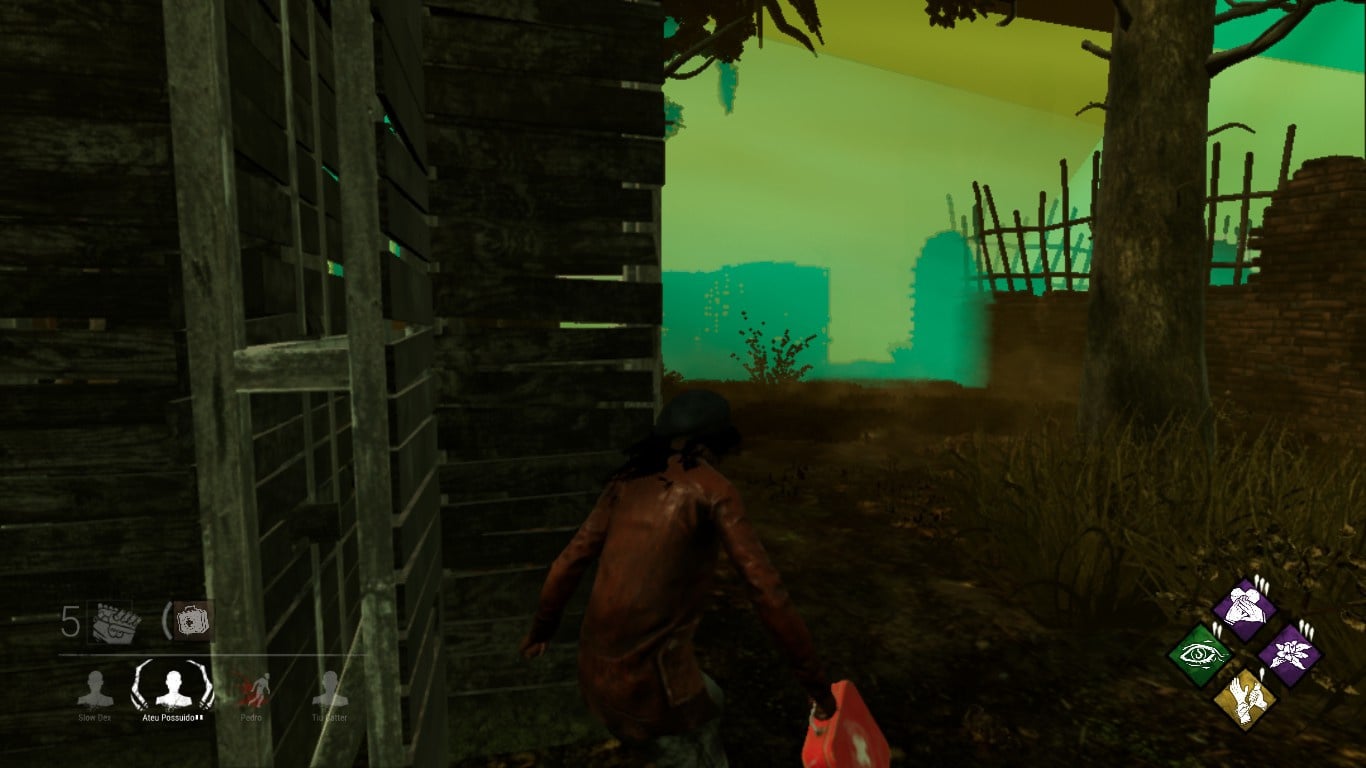
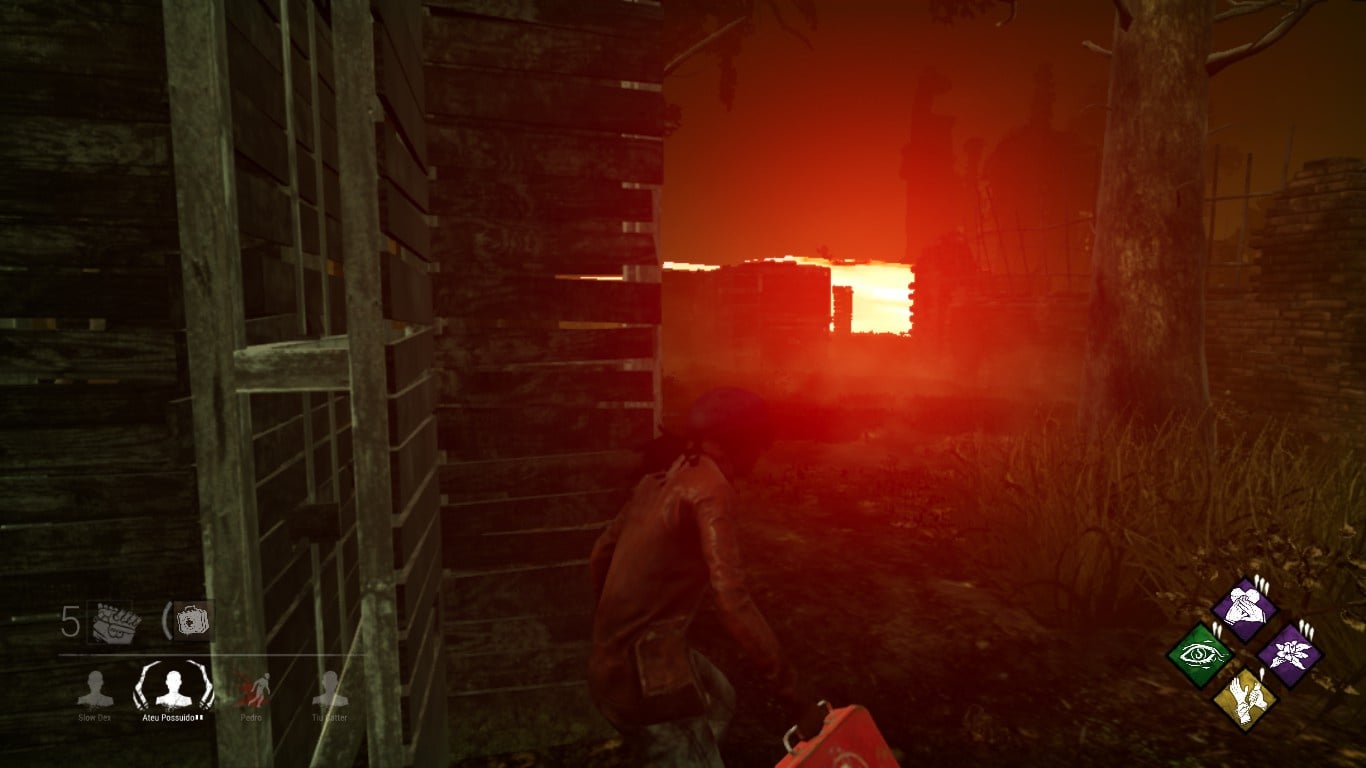
After the update I am experiencing certain uncommon (?) problems, It seems like I am playing the game in a rave’s DLC... It wouldn't be a problem at all, since I don't have epilepsy and it's pretty cool to see these colourful sky flashing which is an extra... but they also change the colour ( in white or distorted patterns) of things around me during some of these "blinking" moments or even fully consuming my fragile laptop screen, this happens every few seconds. I don't have the screenshots of these "blinking" moments (full screen’s blink), because I was actually playing the game, hiding, fixing or running away, but it's quite simple, just imagine half of the screen, or specific objects (like walls, boxes, etc.) or the full screen blinking for a short moment or persisting for more than 1 sec.
Obs: The survivor/killer's patterns aren't affected. I didn't play as killer to see how the map would look like in his perspective. And the game works "fine" (no lag, etc.).
The glitch part:
I played a match against a Doctor (before this one). He took me from the locker, then started to walk to the wall and when reached it (?) we got stuck INSIDE the locker. I made him let me go and I healed myself with the med kit. It seems that he couldn't attack me or use his skills and we were stuck at all. My/our camera was stuck “inside” locker which appeared to be "empty". He left the game.
Ok, my laptop (windows 10) isn't the best "gamer" option but the game worked pretty well before, with reasonable graphic config and I assume that's not the cause for these issues.
I tried to reduce everything to "low" and also to validate the game on Steam. Nothing changes.
UPDATE
It seems the "rave" issue just affects outdoor maps (realms, idk). I played one match in Saw's map and it worked fine.
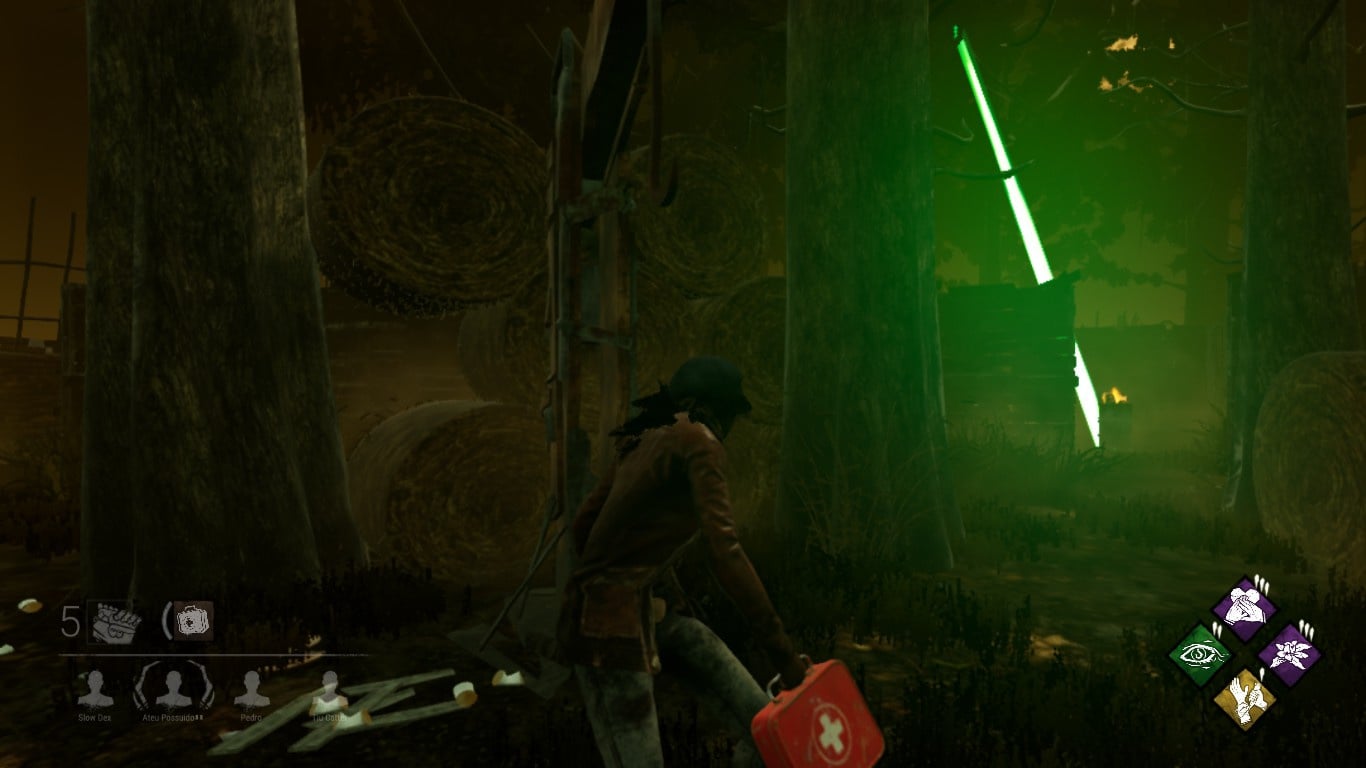
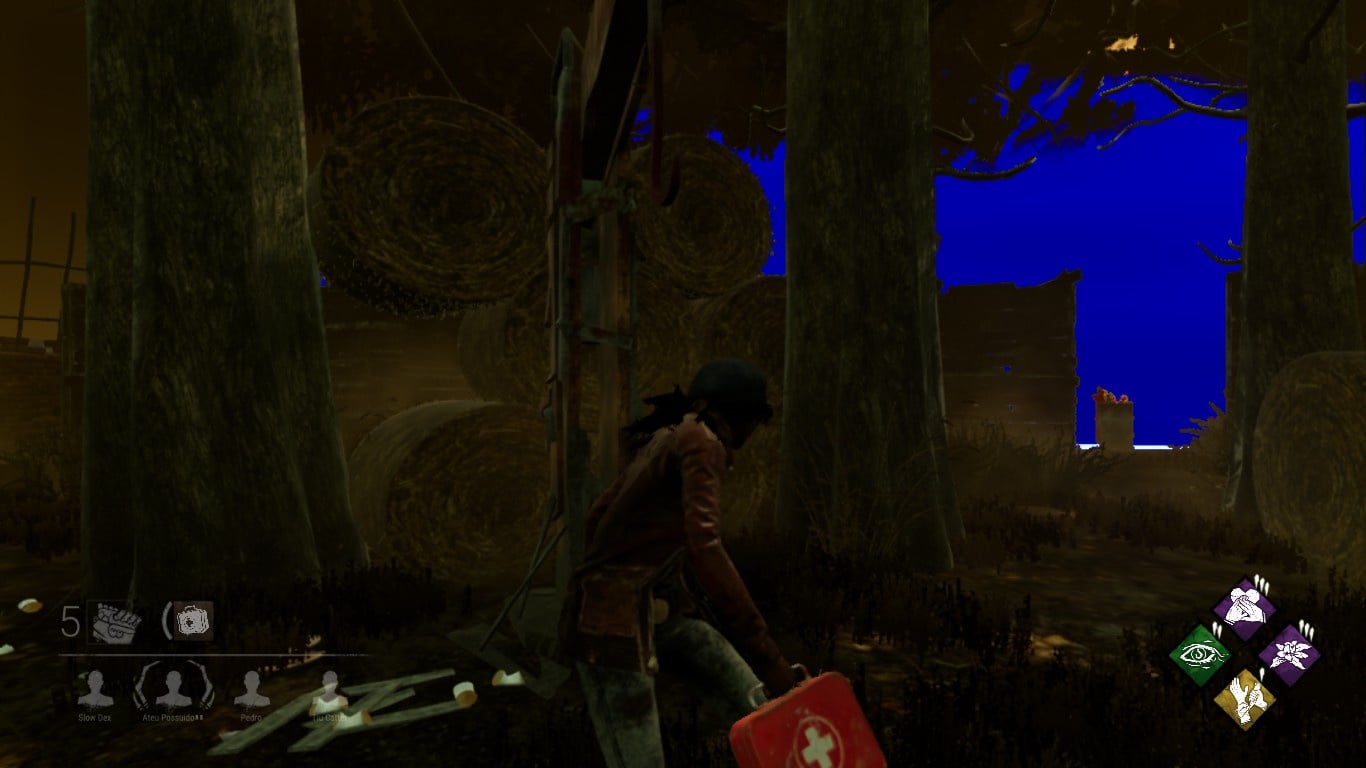
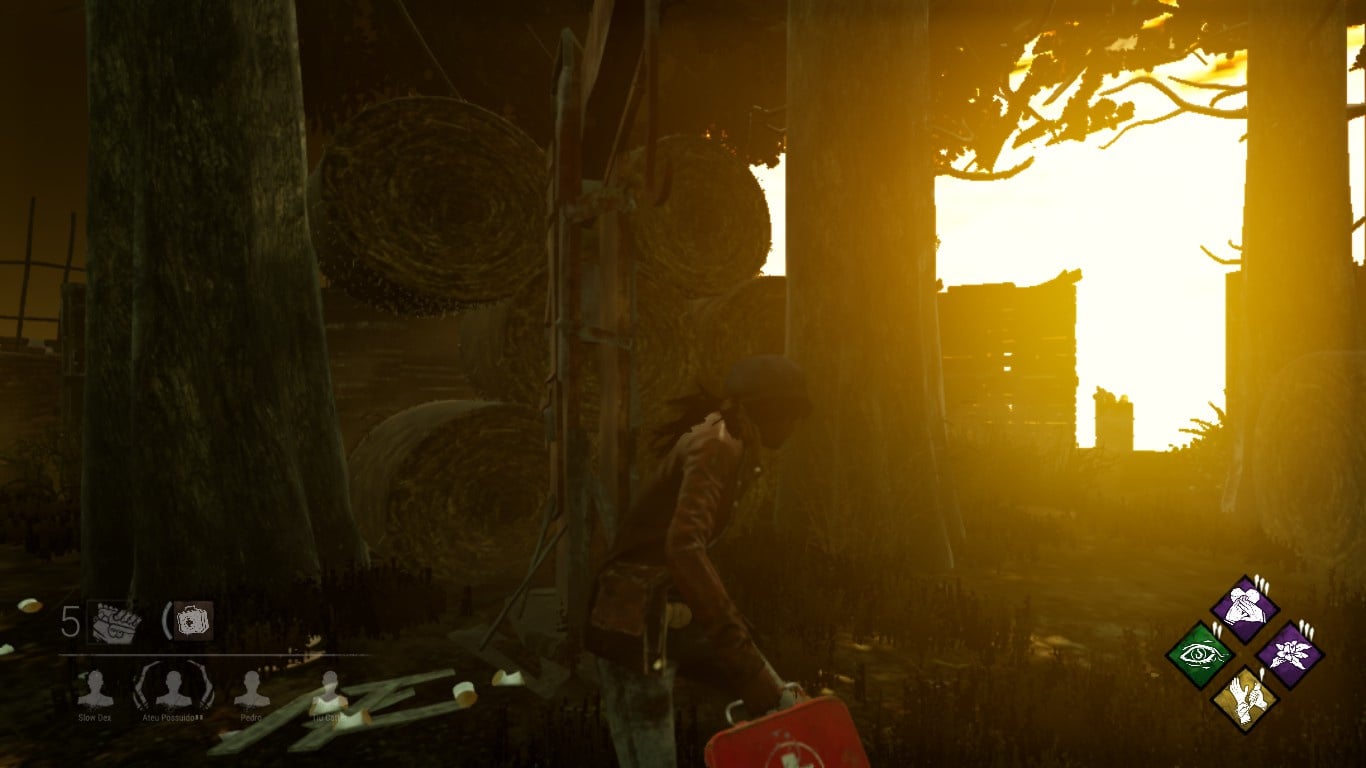
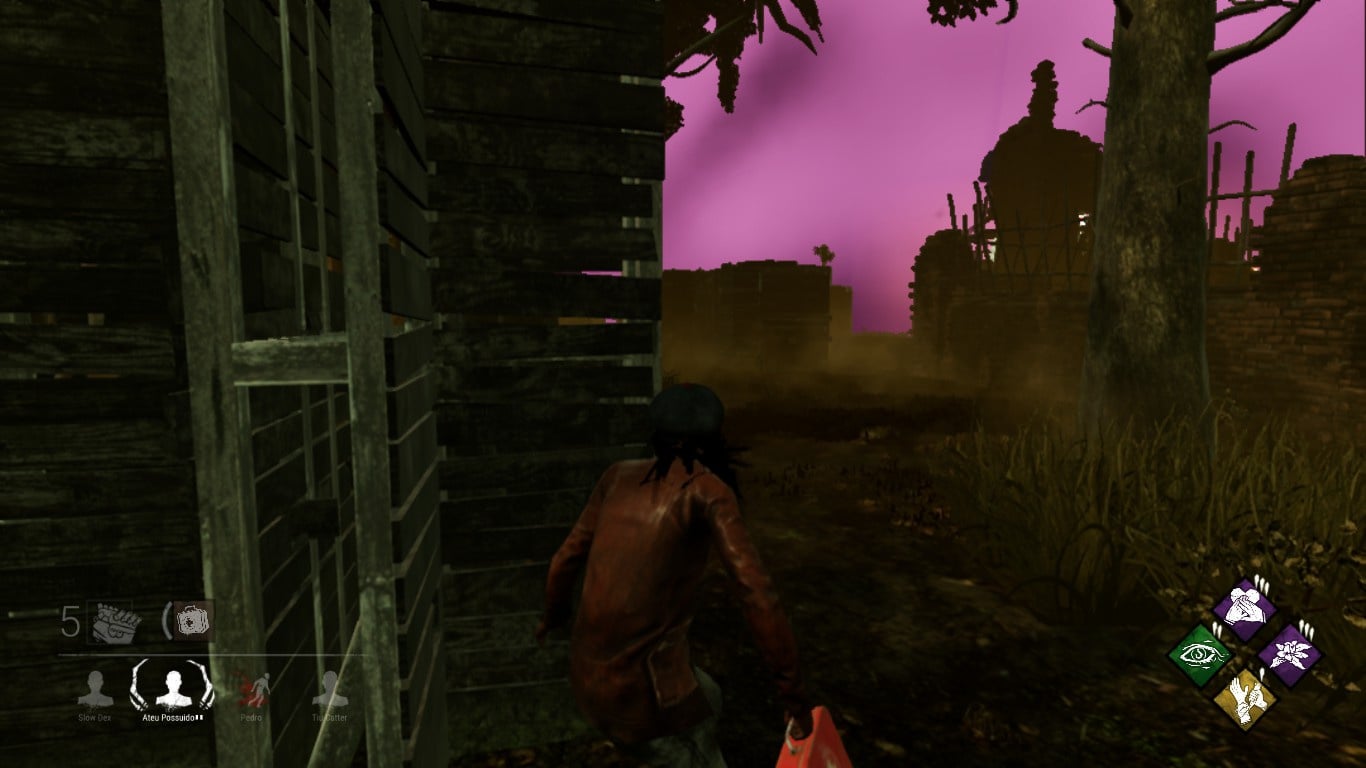
Comments
hello?
I'm having a similar thing but it blinds me while I'm playing and caused me to die once or twice because of it (I'll get a picture of it as soon as I can)
These are the pictures and it only started doing this after the update they just had.
strangely it only happens on certain/all outdoor maps all the indoor maps are fine. I am also running the game on a laptop. I do have integrated graphics, but the game was working just fine till this update happened. (Still having that problem even with the newest patch...)
I have same problem. Did you fix it?
Even with the latest patches this isn't fixed. I can still see it in killer view. Also when I crash it still locks me out of matchmaking even though that is suppose to be only for people who on purposely dc. I got a crash report and everything and still get locked out of matches. But this glitch is why I haven't been playing killer cuz this can actually cost you the game. (note I'm not good at killer to begin with but this def doesn't help)
I do have a question for you guys. Is it just because my computer sucks or what... this has literally happened twice now...
When my game stops responding like that, it doesn't respond ever after that... especially when given a crash report... so is it just cuz my computer sucks or what cuz I wouldn't be surprised if it was my computer, but I'd like to actually play the game... (Note: I also haven't been crashing like this or getting these crash reports before 4.3.0 patch happened... but I do have integrated graphics which I completely not help. Otherwise besides these color glitches and this I have been running the game very smoothly, barely any lag to speak of.) I don't rage quit from matches so the only time I've had the matchmaking locked is literally from crashing from the game. After those crash msgs have popped up and I've sent the crash report for both of them. I will honestly say I've thought about it with how many killers run moris and how many survivors run decisive but despite all the rage I go through the whole match anyway. At least if I'm going to be punished, I rather it be something I'm punished for something I could have chosen not to do like leaving the match before it's done... Is it because I used task manager? Because the game will literally not close after it stops responding... so at this point I see this as a lose/lose situation... (aka standing and waiting for a game that will never respond vs. task managing the game so I can actually play the game...)
Nothing changed.
I don’t think the problem is your or mine computer, they were working well before and this patch just changed few things... it’s a compatibility issue i guess. I don’t know about you, but my FPS is working fine, no drop or etc. and people who are playing on ps4 are complaining (a lot) about this... we are just experiencing shadow/brightness/color issues (gamma?). Whatsoever, seems to be something not extremely “complex” to fix. The point is: since indoor maps are working well, we can assume that the “sky” is causing the problem.
i just created an account to complain about this :( im using the very same computer that i was using before, and i was not having this problem
ive searched all over google whos having the same issue and the most relevant thing i found was this topic.
i had no idea people with ps4 was going thru the same thing. theres nothing we can do? because is really hard playing like this...
It's actually about the campfire. Lights come out of campfire smoke. Instead of smoke these lights come out.
Guys! I sent a ticket and they answered. Look:
"Hello there,
Thank you for letting us know about this very odd issue that you have encountered. I am truly sorry for any inconvenience this issue may have caused.
I've gone ahead and forwarded this information to our QA team, who can try to reproduce the issue on their side and help work towards a fix using the information you've kindly provided us with.
Rest assured that everything will be done to have this issue resolved at the earliest possible time.
Again, we apologize deeply for the inconvenience. We hope you extend your patience with us as the team works towards squashing this bug!
See you in the fog,
The Dead by Daylight Team"
Finally they noticed us. I hope we will be able to play as before soon.
That's awesome that you got an answer to what was going on with your situation. It seems like when a bug or glitch is brought to their attention that they actually try to address it.
Regarding what you dealt with, if it is the same patch I'm thinking of, I dealt with glitching too or I guess framerate drop but I'm on console and a more recent patch stated that issue was fixed. I wonder if it is something more common to PC.
!!!!!!
Oh, i forgot to mention that when the killer hits me, the blood splashes (bright) like this hahahaha
Has there been an update on this, because I have experienced the same issue and it almost blinds and distracts me..
I sent a ticket and still waiting. Is everyone using onboard graphics card?
I've been having this issue as well for a while. It lags my computer (which already only runs the game at ~15 FPS without this on lowest graphics and 0% res) so kinda hoping it gets fixed??? Anyone have issue with it going solid and just sitting on things like pallets or gens?
Can everyone send a ticket about this? Please.
Uhh... How do you do that?
You can send from here: https://support.deadbydaylight.com/hc/en-us
I sent a ticket. Time to wait and see if we get noticed again!
Thanks! (:
I also got a response. Hopefully with enough of these tickets they'll do something about it.
I think at this point it's just us pestering them XD
I said why the issue might be but they don't even respond anymore. They said they had communicated the issue to their team before.
Please keep sending tickets because i don't think they care. Although not resolved, they mark it as solved
Still waiting...
The next update hasn't come out yet. Just wait till after that.
Sending more tickets won't resolve anything. I can almost guarantee you that they care. They would not be so popular still if they didn't.
If they see that the more people have the problem, the sooner they solve. I don't think it will fix with the next update. I hope I'm wrong.
I have a question concerning this, what GPU's are you all using?
Intel(R) HD Graphics 4000
It only seemed to start doing this as of the 4.3.0 update
Intel HD Graphics
Actually mine is the exact same too, Intel(R) HD Graphics 4000
Like I said, only happens with onboard graphics cards. It was working fine before the 4.3.0 update.
Hello? Anyone fix the issue?
I will check further into this, but I must warn you that Intel Graphics are not officially supported by DbD - as per our information on the Steam Store.
There were no problems until 4.3.0 update arrived. Will you ignore gamers using Intel HD Graphics? Please dont ignore us.
I believe this is it
The issue is almost solved. But still light comes out in some campfires. Although not as much as before, it is still a little uncomfortable and the same problem happens when the killer hits. Playable but needs to be solved.
Does anyone fix the issue completely?
Did you fix?