Twitch claim bug, and how I bypassed it
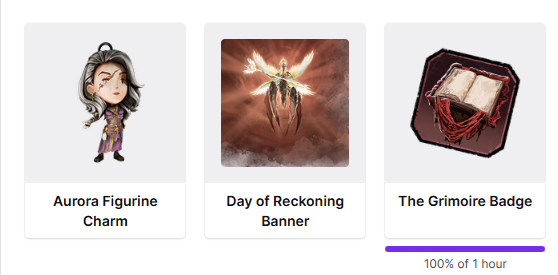
When I went to claim all 3 rewards after the full time was done, the claim button itself would not appear.
It said 100% for all 3 of them, but with no claim button, I managed to refresh the page, and see the claim button for barely half a second. The only way to click on the claim button was to refresh then spam click on the claim button area before it could vanish. Which worked for the first 2 and I left the third as an example of the button missing^
Comments
Always something with these, huh
Claiming via the twitch mobile app was the only way i could get them. No clue whats up with them on desktop
These claim automatically now. You don't have to click a button. They should appear in your in-game inventory as soon as you qualify for them.
I thought that was how it was going to work but then checked. They did not arrive in the game until i got past the claim glitch and clicked the claim button.
Really? that wasn't the case for me.
I had that bug as well and what worked for me was the pop ups in the streamer's chat (if it doesn't show, just close all tabs and open the stream again):
Then you click on this "+3/+4 more" (don't mind the German in my example, ja?) and you get a list of the unlockable Twitch rewards on the bottom.
And THERE was a purple claim button for me for the reward I couldn't claim otherwise although it was at 100%.