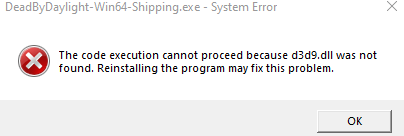
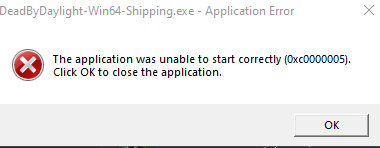
not sure what application you're running it on but you should try validating the game files
On steam right click the game in your library, click property's, on the left click local files, then select Verify Integrity of Game Files. if its another client i cant say im versed enough for that, googling how to verify should help. reset of the client and/or the pc may also help
not sure what application you're running it on but you should try validating the game files
On steam right click the game in your library, click property's, on the left click local files, then select Verify Integrity of Game Files. if its another client i cant say im versed enough for that, googling how to verify should help. reset of the client and/or the pc may also help
Did that multiple times already, some reason restarting my PC fixed it but not reinstalling the game nor validating files.
Tldr: This is an archived version of the DBD forum, it has all posts, comments and media. The archived data will be published at the end of October. This site is not in any way affiliated with or endorsed by Behaviour Interactive.

Comments
Some reason, restarting PC fixed it but uninstalling and reinstalling did not.......weird
not sure what application you're running it on but you should try validating the game files
On steam right click the game in your library, click property's, on the left click local files, then select Verify Integrity of Game Files. if its another client i cant say im versed enough for that, googling how to verify should help. reset of the client and/or the pc may also help
Did that multiple times already, some reason restarting my PC fixed it but not reinstalling the game nor validating files.